Invoice & quote templates
Eight billing documents you can copy and put to work. Each one answers the same three questions — who, how much, by when — with a different structure, because a VAT-compliant invoice, a builder’s quote and a metered subscription bill are not the same document wearing different colours.
Every template is a single JSON file rendered by pdf_render. They live in www/public/pdf-samples/, and the previews below are the real engine output at 150 DPI.
Choose by what you need
The templates differ in structure, not decoration. This is what each one actually gives you.
| Template | VAT breakdown | Payment QR | Signature box | Grouped subtotals | Tick boxes | Chart | Factur-X |
|---|---|---|---|---|---|---|---|
| Compliant invoice | ✓ | ✓ | — | — | — | — | ✓ |
| Minimal invoice | — | — | — | — | — | — | — |
| Subscription invoice | — | — | — | — | — | ✓ | — |
| Credit note | ✓ | — | — | — | — | — | ✓ |
| Sectioned quote | — | — | ✓ | ✓ | — | — | — |
| Quote with options | — | — | — | — | ✓ | — | — |
| Starter invoice | — | — | — | — | — | — | ✓ |
| Starter quote | — | — | — | — | — | — | — |
“Factur-X” marks the templates whose data carries everything the EN 16931 profile needs. Any template can be rendered as Factur-X — see Rendering as Factur-X.
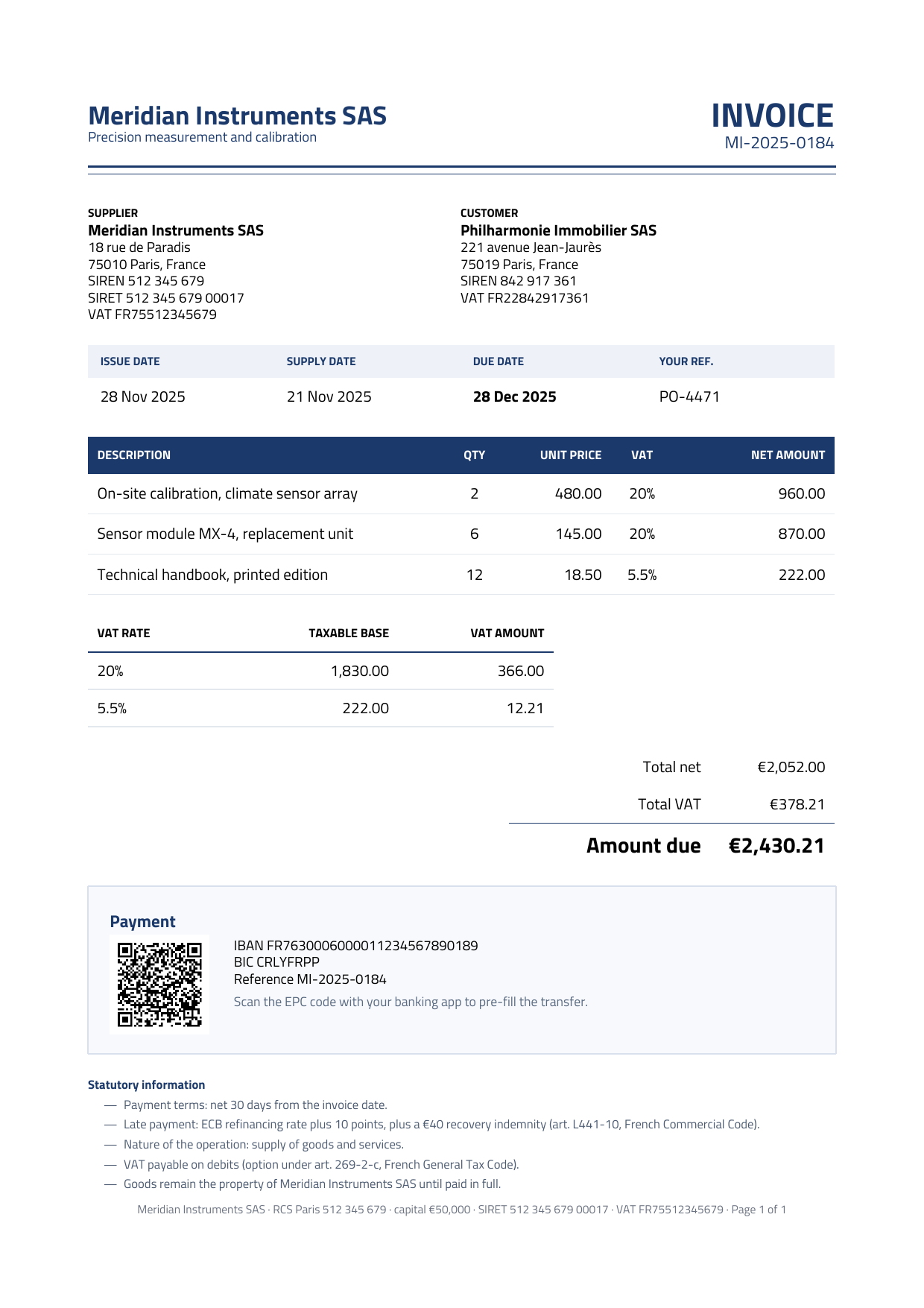
Compliant invoice
Compliance is the content.
Everything a VAT invoice must carry, laid out so an auditor finds it fast. Both parties’ SIREN and VAT numbers (plus the seller’s SIRET), supply date alongside issue date, a VAT breakdown by rate (the anchor of the page), the statutory late-payment terms, and an EPC QR that pre-fills the transfer in a banking app. No colour band — the ink-blue rules do the work, so it reads as a form rather than a brochure.
It is a French invoice, so it carries what the French e-invoicing mandate requires: both parties’ SIREN, the nature of the operation, the VAT-on-debits option, and the RCS/capital line in the footer. How those identifiers reach the CII XML.
- SIREN & SIRET
- VAT breakdown by rate
- EPC payment QR
- Statutory mentions
- Factur-X ready
The VAT breakdown is a second data-bound table over a vat_breakdown array — one row per rate, which is what the law asks for and what the CII XML mirrors:
{ "type": "table", "data": "vat_breakdown",
  "header_columns": [],
  "rows": [ [
    { "text": "${rate}",   "width": 90,  "alignment": "left"  },
    { "text": "${base}",   "width": 110, "alignment": "right" },
    { "text": "${amount}", "width": 100, "alignment": "right" },
    { "text": "",          "width": 181 }
  ] ] }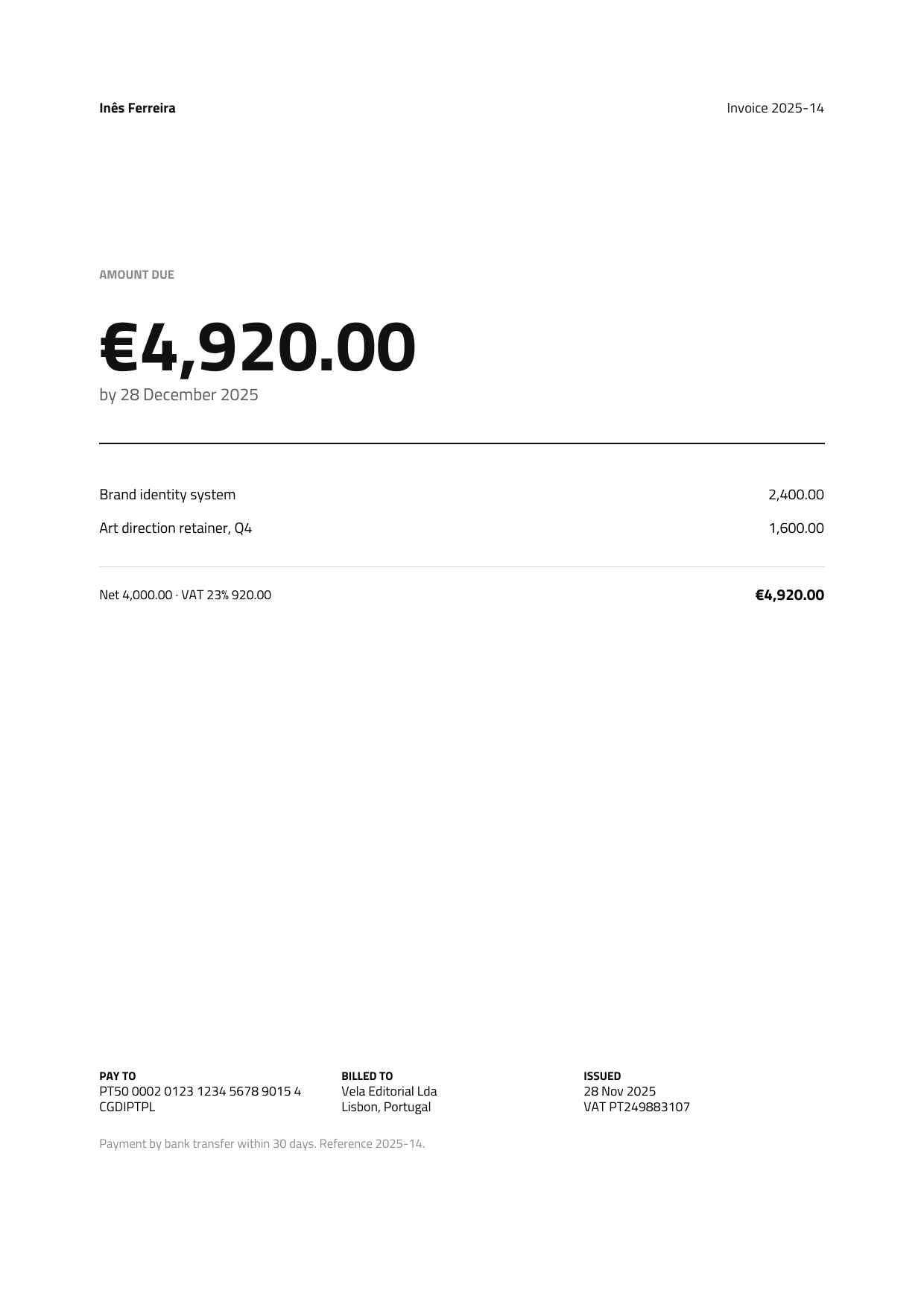
Minimal invoice
The amount due is the document.
One number at 46 pt, everything else at 8 pt, and two rules in the whole page. There is no accent colour at all — the hierarchy is carried entirely by the type scale, which is the point. For a freelancer or consultant whose invoice has three lines and needs to be paid, not admired.
- Monochrome
- Extreme type scale
- Wide margins (64 pt)
Note options.margins: widening it to 64 pt narrows the content width to 467 pt, and every column width in the file adds up to that instead of the default 481.
{ "options": { "margins": 64 } }

{ "type": "paragraph", "value": "AMOUNT DUE",
  "options": { "fontSize": 8, "fontWeight": "bold", "color": "8A8A8A" } },
{ "type": "move", "y": 6 },
{ "type": "paragraph", "value": "${totals.due}",
  "options": { "fontSize": 46, "fontWeight": "bold", "color": "111111" } }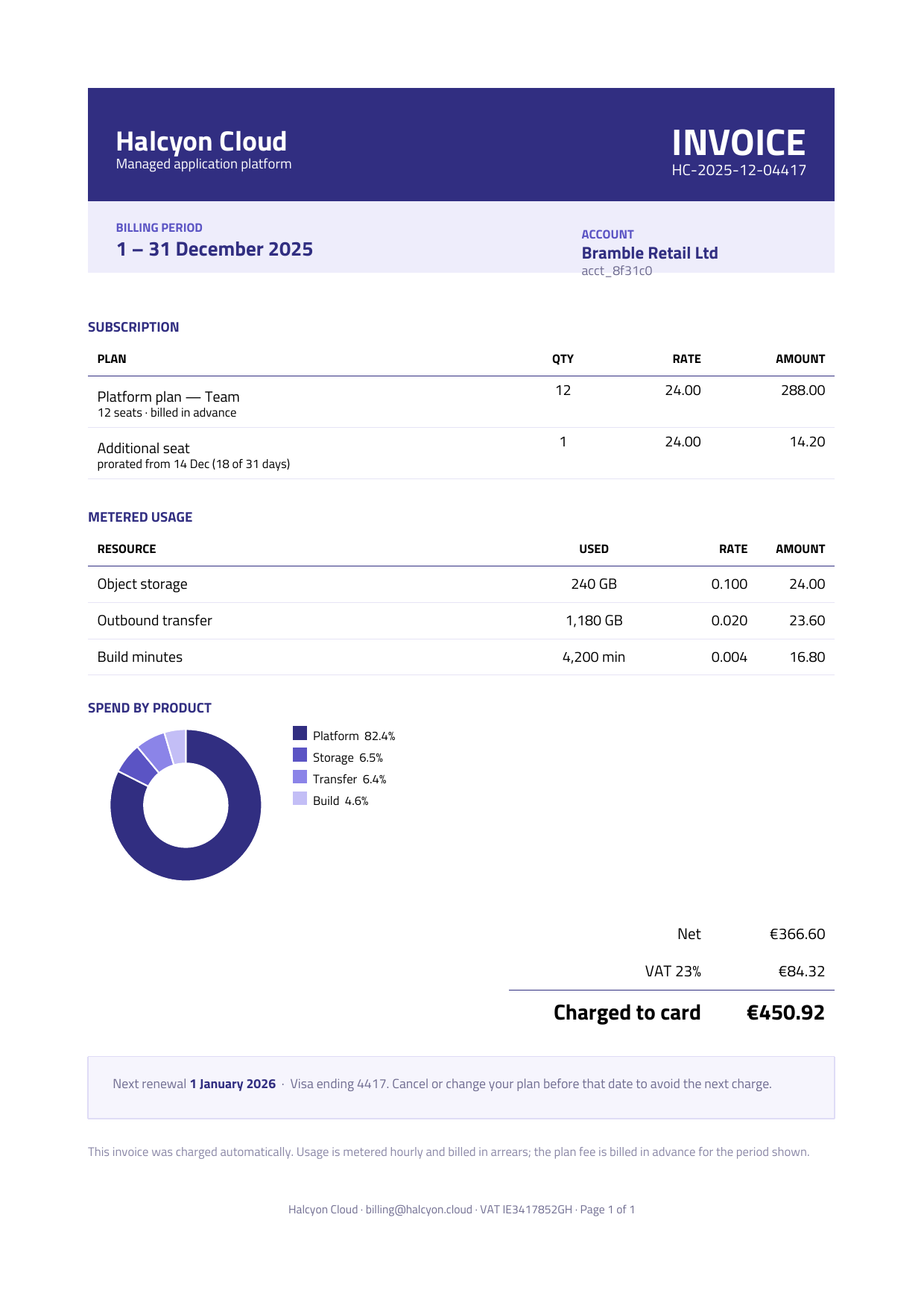
Subscription invoice
A billing period, not a list of deliverables.
The period band comes first because it is the thing customers query. Plan fees (billed in advance) are separated from metered usage (billed in arrears), the prorated seat carries its own explanatory sub-line, and a donut chart answers “where did the money go” before anyone opens a ticket. Closes with the next renewal date and the card on file.
- Period band
- Proration sub-lines
- Donut chart
- Renewal notice
The chart binds straight to an array of { name, amount }. Chart values must be real JSON numbers, not formatted strings:
{ "type": "chart", "kind": "donut",
  "data": "spend", "label": "name", "value": "amount",
  "width": 210, "height": 106, "legend": true,
  "colors": ["312E81", "5B54C4", "8B84E8", "C3BEF6"] }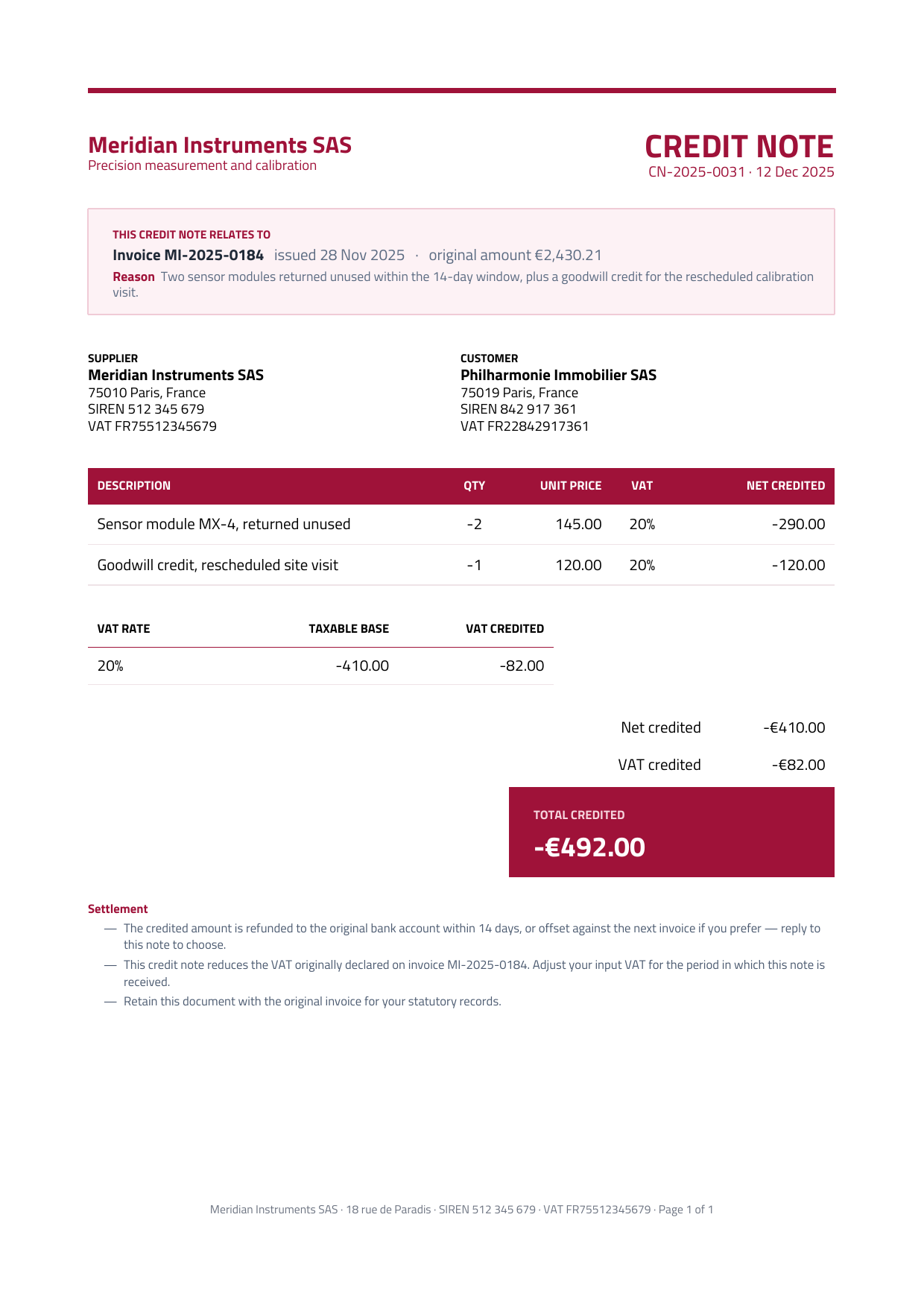
Credit note
A cancellation has to be traceable.
The band under the header names the invoice being corrected, its date, its original amount and the reason — the four things a reader needs before looking at a single figure. Amounts are negative throughout, and the oxblood is spent only on the wordmark, the top rule and the total panel. It credits the compliant invoice above, so the pair reads as one sequence.
- Reference-to-original band
- Negative amounts
- VAT breakdown
- Settlement terms
The solid total panel is a rect with spans text drawn over it: cell content arrays have no color field, so white-on-colour has to be done as an overlay, and rect not advancing the cursor is what makes that work. For a panel that should size itself to its contents, reach for box instead:
{ "type": "move", "x": 271, "y": 2 },
{ "type": "rect", "width": 210, "height": 42, "fill": "9F1239" },
{ "type": "move", "x": 14, "y": 9 },
{ "type": "paragraph", "spans": [
    { "text": "TOTAL CREDITED", "fontWeight": "bold", "color": "F6D3DC" } ],
  "options": { "fontSize": 8 } },
{ "type": "paragraph", "spans": [
    { "text": "${totals.credited}", "fontWeight": "bold", "color": "FFFFFF" } ],
  "options": { "fontSize": 18 } }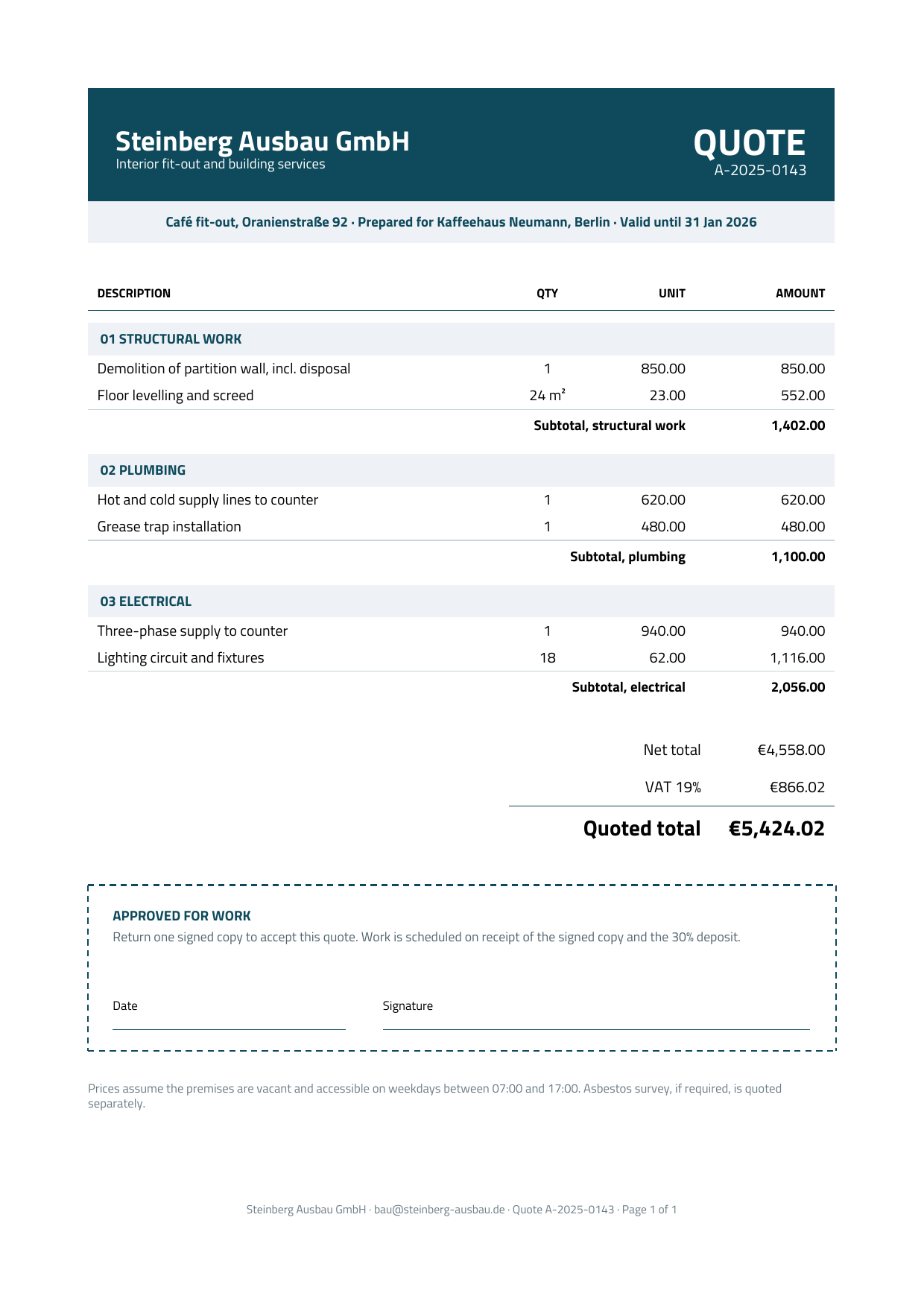
Sectioned quote
The work reads by section.
Line items grouped into numbered trade sections, each closing with its own subtotal, so a client can approve or challenge one trade without unpicking the whole figure. Ends in a dashed acceptance box — date and signature rules — because for most trades a returned signed quote is the contract.
- Grouped subtotals
- Acceptance box
- Nested
repeat - Deposit terms
Grouping recipe
A repeat nested inside another repeat binds to an array on the current item, so grouping is expressed directly: an outer repeat over sections, an inner one over that section's own lines. The data stays the shape your application already has — no flattening, no kind discriminator, no nested if chain. A data-bound table nested inside a repeat resolves the same way.
{ "type": "repeat", "data": "sections", "content": [
  { "type": "move", "y": 8 },
  { /* tinted band showing ${title} */ },
  { "type": "table", "data": "lines",            // ← binds to THIS section's lines
    "rows": [ [ { "text": "${name}" }, { "text": "${qty}" },
                { "text": "${unit}" }, { "text": "${amount}" } ] ] },
  { /* right-aligned rule + ${subtotal} */ }
] }
"sections": [
{ "title": "01 STRUCTURAL WORK",
"lines": [
{ "name": "Demolition of partition wall", "qty": "1", "unit": "850.00", "amount": "850.00" },
{ "name": "Floor levelling and screed", "qty": "24 m²", "unit": "23.00", "amount": "552.00" }
],
"subtotal_label": "Subtotal, structural work",
"subtotal": "1,402.00" }
]
Quote with options
The client chooses.
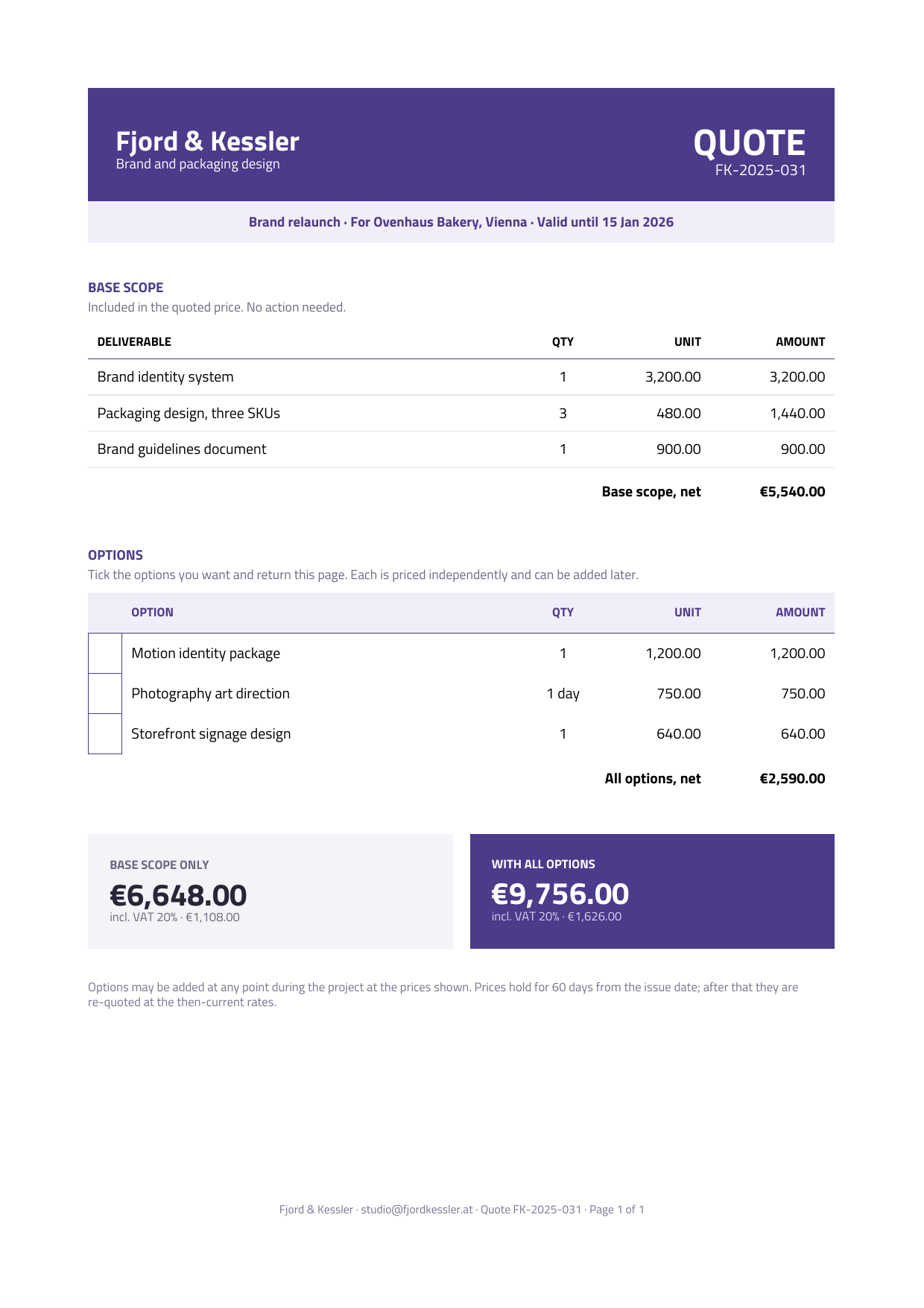
Base scope and optional work are separated, each priced independently, and the page closes on two totals side by side — base only, and with everything ticked. The client returns the page with boxes marked instead of writing an email describing what they want. Good for agencies, studios and anyone who quotes a core plus extras.
- Tick boxes
- Dual total
- Base / options split
The tick box is an empty cell with all four borders on — no glyph involved. That matters: none of the bundled fonts cover ☐ or □, so a box character would render as tofu.
{ "text": "", "width": 22, "valign": "middle",
  "borderSides": { "top": "true", "left": "true", "right": "true", "bottom": "true" },
  "borderColor": "4C3A8A" }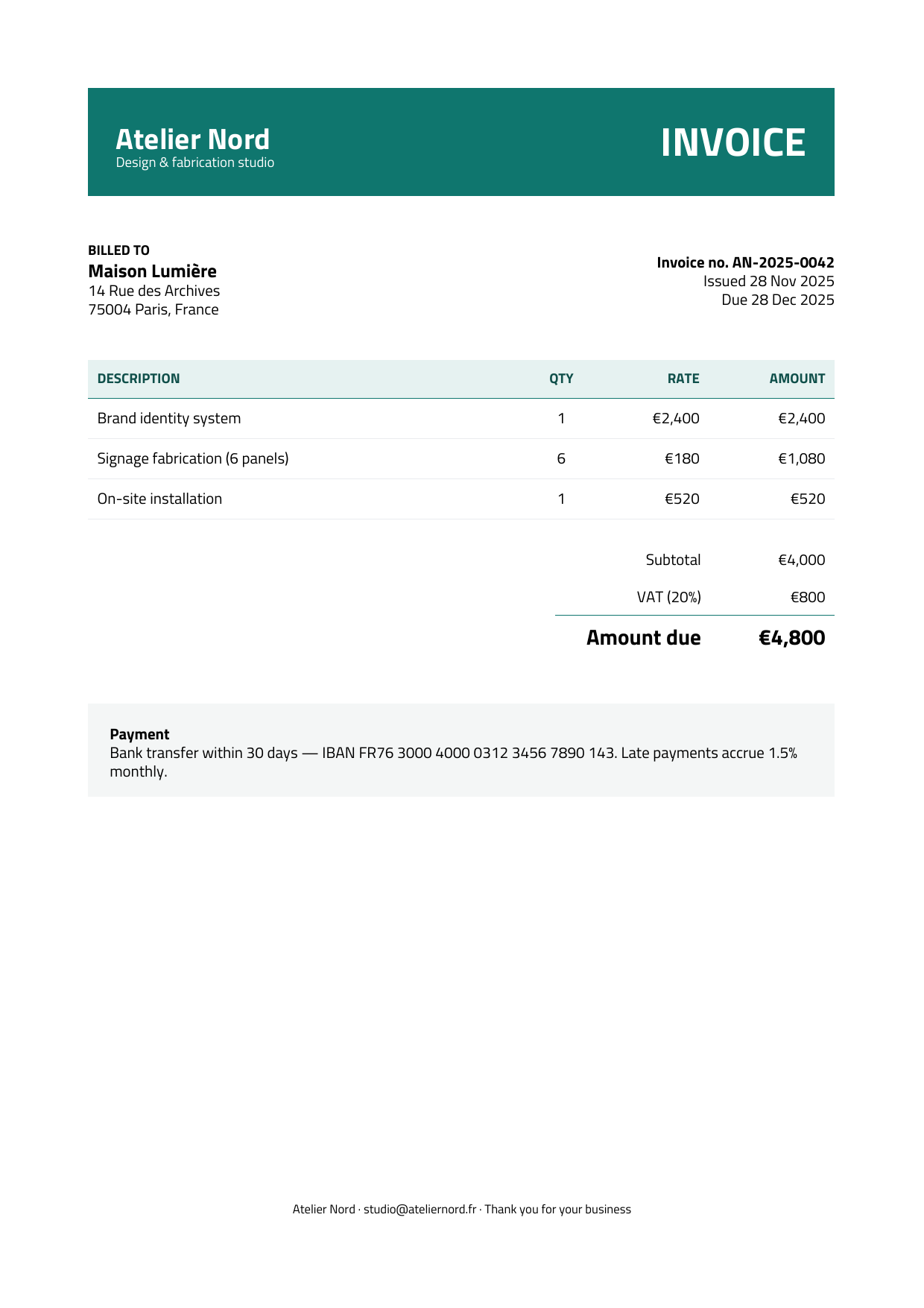
Starter invoice
The shortest path to a decent invoice.
A teal identity band, a billed-to block, a data-bound items table and a totals stack — about 130 lines with nothing clever in it. Start here if none of the structural models above match what you need, and add to it.
- Identity band
- Data-bound items
- Totals stack
Starter quote
The same skeleton, a different identity.
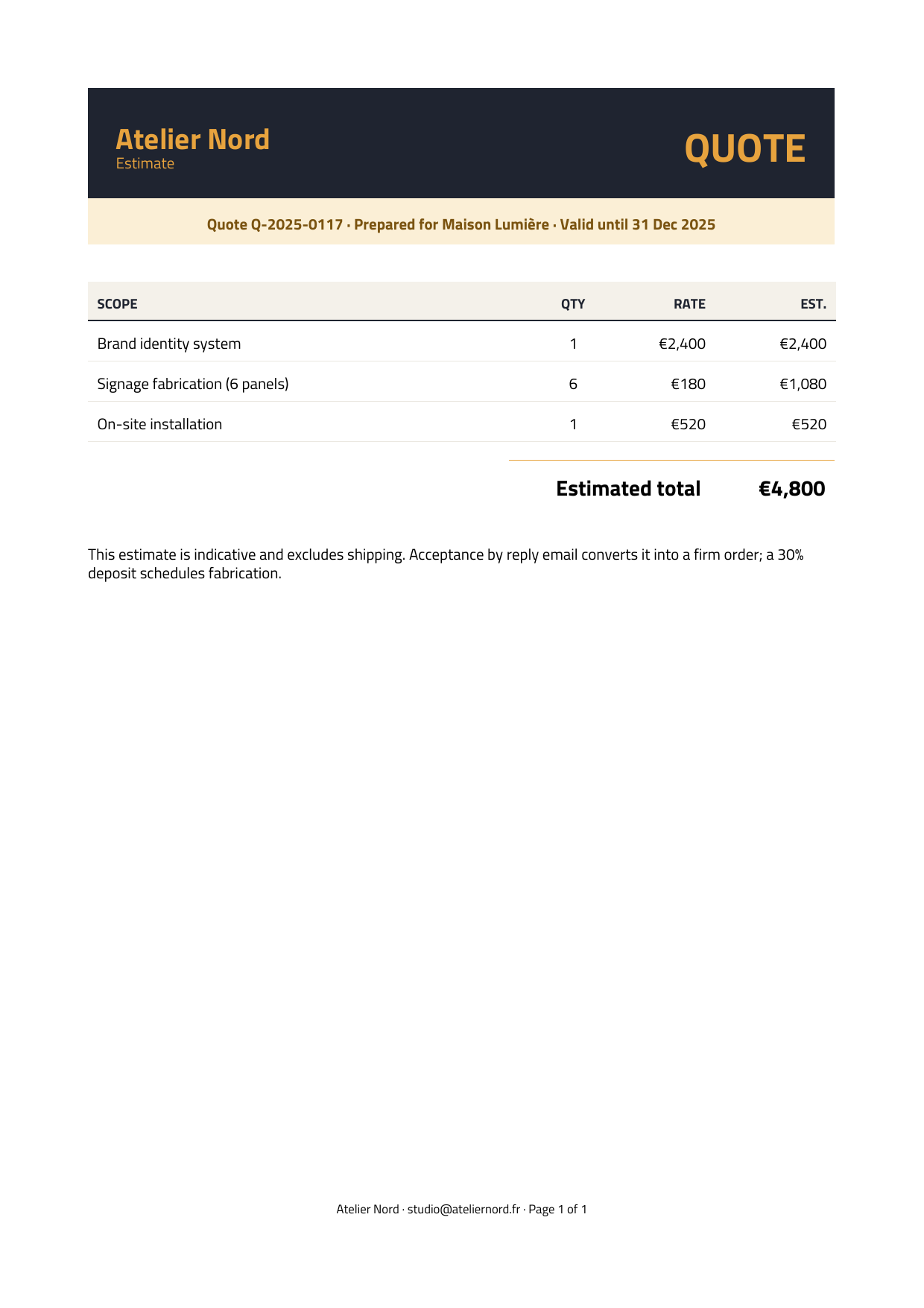
Charcoal and amber instead of teal, a “valid until” strip under the header, and an estimated total rather than an amount due. Useful as a side-by-side with the starter invoice: the structure is identical, only the data and two colours change.
- Validity strip
- Estimated total
- Page X of Y footer
Using a template
Copy the two files into your project, swap the data for your records, and render. pdf_response returns a ready controller response; pdf_render gives you the base64 bytes to store.
def show
  let invoice = Invoice.find(params["id"])

  # The template is static; only the data changes per invoice.
  let template = slurp("pdf/invoice_compliant.template.json")
  let data     = { "data": invoice.to_render_hash() }.to_json()

  return pdf_response(template, data, {
    "filename": "invoice-#{invoice.number}.pdf",
    "title": "Invoice #{invoice.number}"
  })
end
The data document may be wrapped in { "data": { … } } or passed as a bare object — both are accepted. Placeholders that find no value render empty and log a warning, so a missing field degrades rather than fails.
Rendering as Factur-X
Factur-X (EN 16931) embeds a machine-readable CII XML invoice inside a PDF/A-3b file: one document a human reads and a machine parses. There are two routes, and the difference matters.
You bring the XML
Your template, your data, your XML. You keep full control of the layout, which is what a compliance template needs.
let pdf = pdf_facturx(
  template, data, xml,
  { "profile": "en16931" }
)
The engine computes it
Give it a typed invoice and it derives the totals, the VAT breakdown and the XML. Less to get wrong — but read the caveat below.
let pdf = pdf_facturx_from_invoice(
  template, invoice,
  { "profile": "en16931" }
)
The typed-invoice route uses a different placeholder namespace
pdf_facturx_from_invoice ignores your data file and builds its own, so a template written for pdf_render will not interpolate against it. It supplies invoice.* (number, created_at, due_date, due_amount, payment_terms, type_label), company.* and customer.* (name, address, zipcode, city, country, phone, vat_number, registration — the SIREN/SIRET), items[], discounts[], charges[], total.*, infos.text and payment.*.
It does not expose a per-rate VAT breakdown array. If your template must print one — as the compliant invoice does — use pdf_facturx and supply the XML yourself. A ready CII XML and a typed invoice for that sample are both included so you can compare the two routes.
Both routes reject the password and pdfa options — the output is already PDF/A-3b. Full reference in PDF & Factur-X.
Regenerating the previews
The images on this page are committed artifacts rendered from the sample files. After editing a template, regenerate them:
scripts/gen_pdf_previews.sh                     # every sample
scripts/gen_pdf_previews.sh invoice_minimal     # just one
Needs nothing but soli — the engine rasterises its own pages through pdf_preview. Renders page 1 of each sample at 150 DPI into www/public/images/docs/pdf/.
Next: the full template reference for every element and option, or edit any of these live in the playground.