PDF & Factur-X Generation
Render a PDF from a JSON layout template + a JSON data document, entirely in-process — no headless browser, no wkhtmltopdf, no Node. Three builtins:
pdf_render for an ordinary PDF, pdf_facturx for a
PDF/A‑3b Factur‑X (EN 16931) electronic invoice with a Cross-Industry-Invoice XML you supply, and pdf_facturx_from_invoice which generates that XML (and the totals) from a typed invoice. The Factur-X output validates clean against veraPDF (146/146 rules).
And to show a document rather than download it, pdf_preview rasterises the same template to one PNG per page — thumbnails and preview panes without poppler or a PDF.js bundle.
Quickstart
Both builtins take the template and data as JSON strings and return the PDF as a base64 string (Soli has no bytes type). Save it with file_write_base64, or return it from a controller.
let template = slurp("pdf/invoice.json")
let data     = JSON.stringify({ "invoice": { "number": "AN-2025-0042" }, "items": [ ... ] })

let pdf = pdf_render(template, data)          # base64 string
file_write_base64("out/invoice.pdf", pdf)
let xml = slurp("pdf/factur-x.xml") # your EN 16931 CII XML
let pdf = pdf_facturx(template, data, xml, {
"profile": "en16931",
"title": "Invoice AN-2025-0042"
})
file_write_base64("out/invoice.pdf", pdf) # opens normally AND validates as Factur-Xlet invoice = slurp("pdf/invoice.json") # typed invoice, see below
let pdf = pdf_facturx_from_invoice(template, invoice, { "profile": "en16931" })
file_write_base64("out/invoice.pdf", pdf) # totals, VAT breakdown and CII XML are computedSamples
Every sample below is one template file rendered with the engine. The visual language is deliberate: solid colour bands (a filled table-header row) and hairline accent rules (cell borders) carry the identity; body text stays disciplined black. The full templates live in pdf/samples/.
Looking for a finished invoice or quote to start from? Invoice & Quote Templates collects eight ready-to-copy billing documents — compliant and minimal invoices, subscription billing, a credit note, and sectioned or optioned quotes — each with its data file, preview and a playground link.
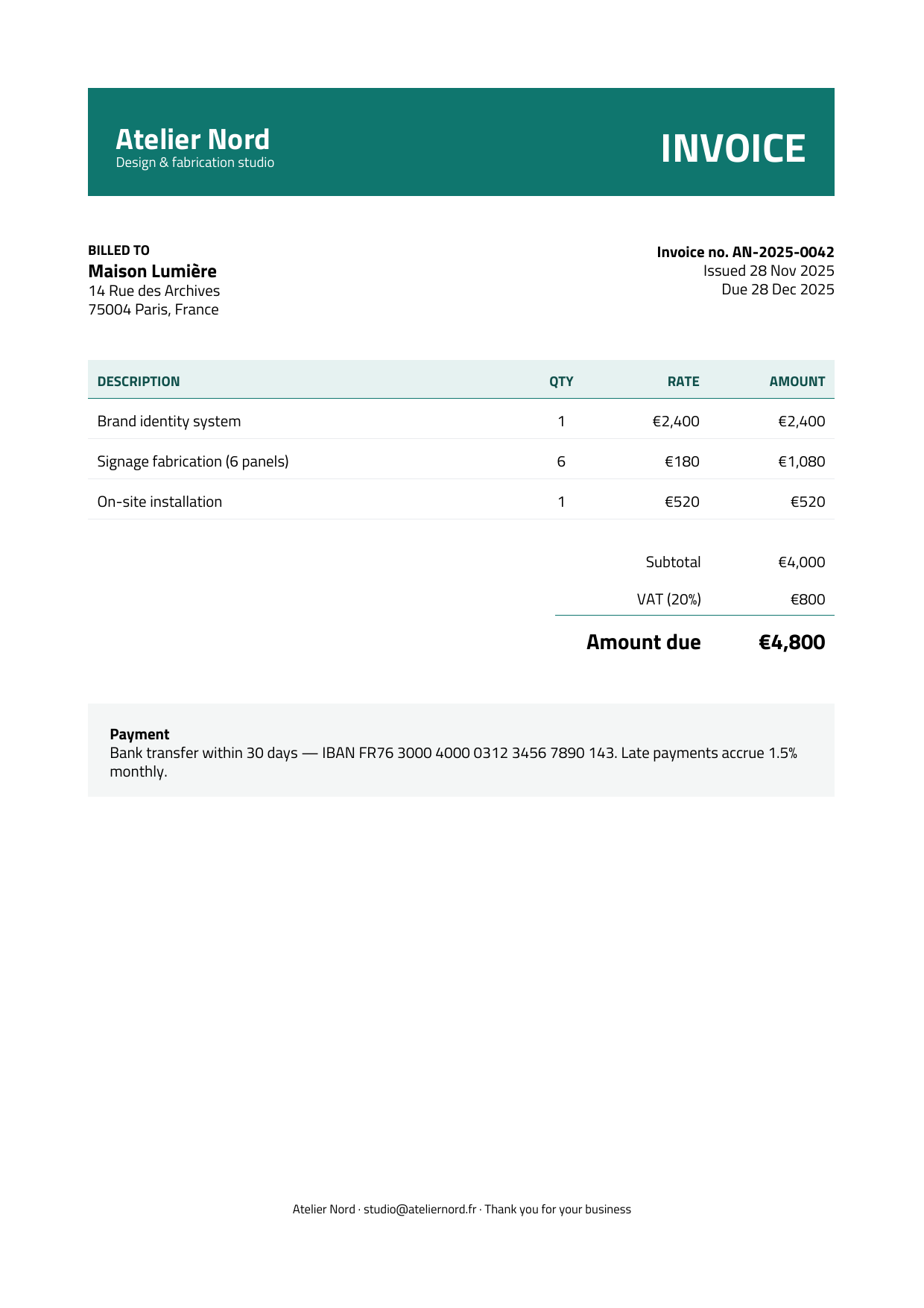
Modern invoice · Factur-X ready
A full-width teal identity band (fillColor + white textColor), a tinted line-items header, a data-bound rows table, and an accent rule above the total.
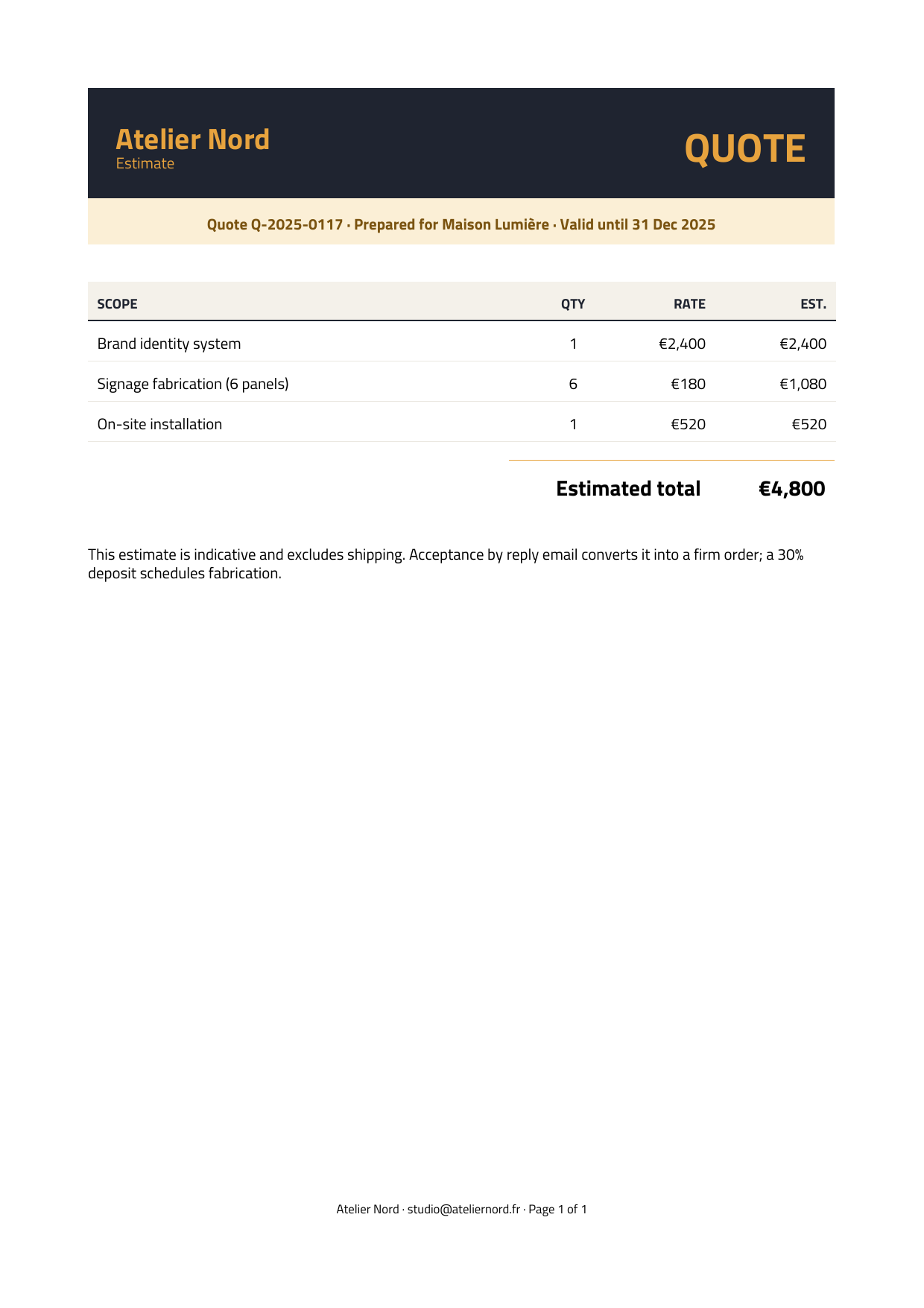
Quote · plain PDF
The same engine, a different identity: a charcoal band with an amber accent and a tinted “valid until” strip. Proof the design system flexes by data, not by code.

Letter · plain PDF
Paragraphs, move, and alignment — no tables. A right-aligned dateline, wrapped body, bold sign-off, and a P.S. line of inline rich text mixing italic, monospace, bold, and a link.
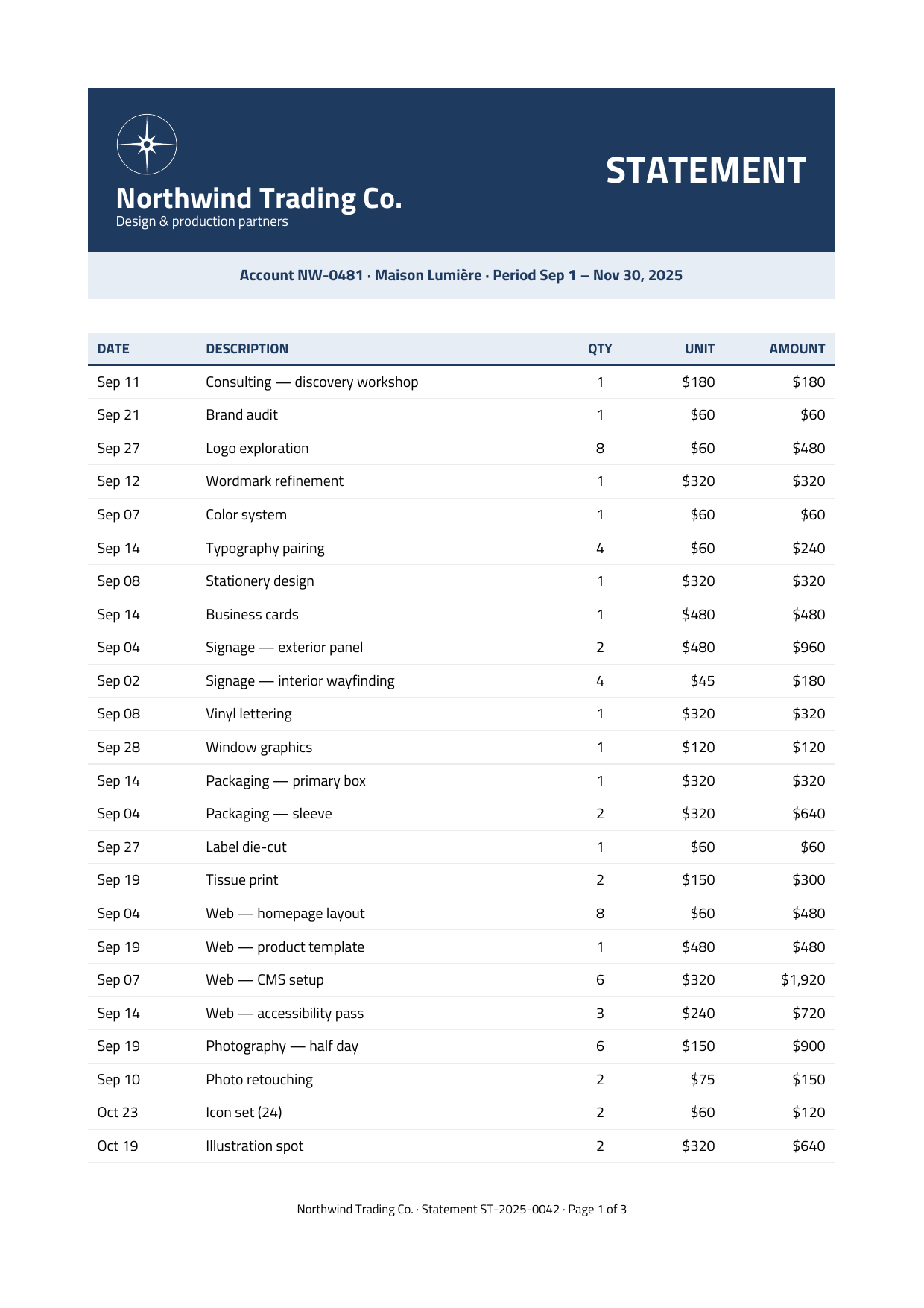
Statement · 3 pages
A 60-line statement of account that paginates automatically. The table's column header repeats at the top of every page and the footer counts “Page X of Y”.
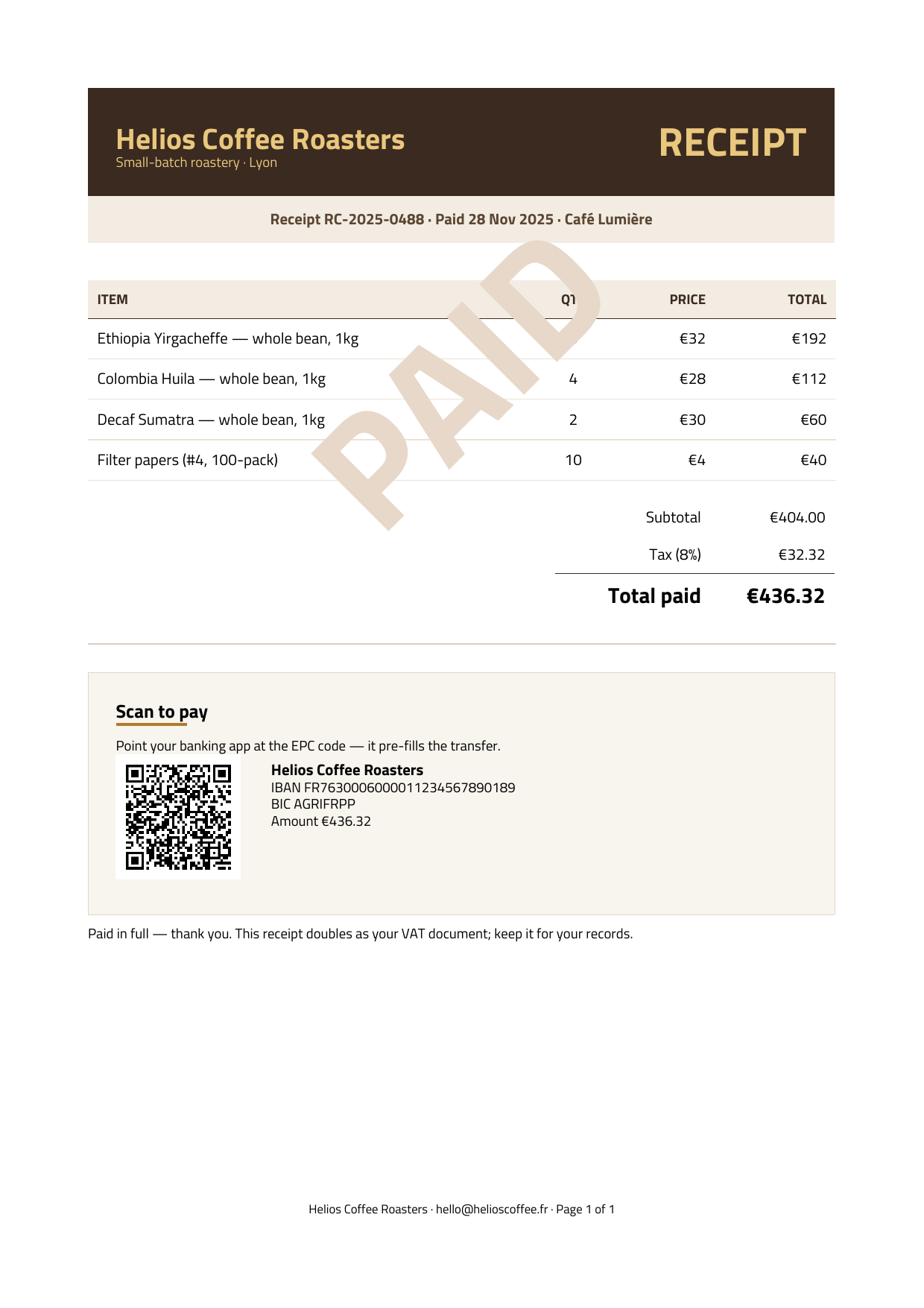
Receipt · QR · watermark
Shows the newer primitives: a diagonal PAID watermark, an EPC scan-to-pay QR, an hr rule, a tinted rect panel, and a line accent.
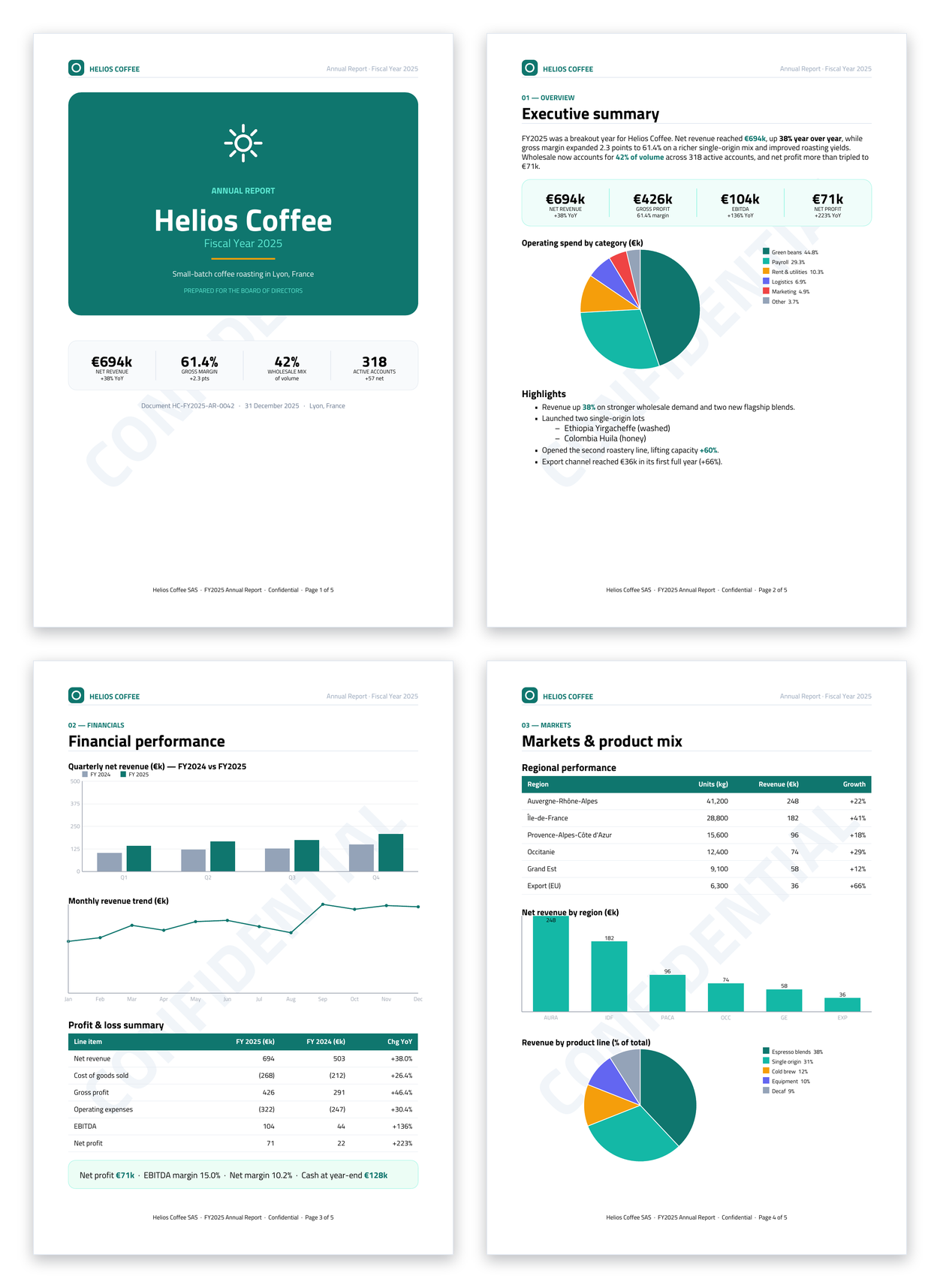
Annual report · 5 pages · charts · tables
The engine at full stretch: a five-page report from one template. A branded cover with an SVG sun mark and a strip of KPI cards; bar, line and pie charts (incl. a grouped multi-series comparison); data-bound P&L and regional tables with a filled header band; a nested list; a running header with a Page X of Y footer; a diagonal CONFIDENTIAL watermark; and a verification QR + barcode. Try it live in the playground.
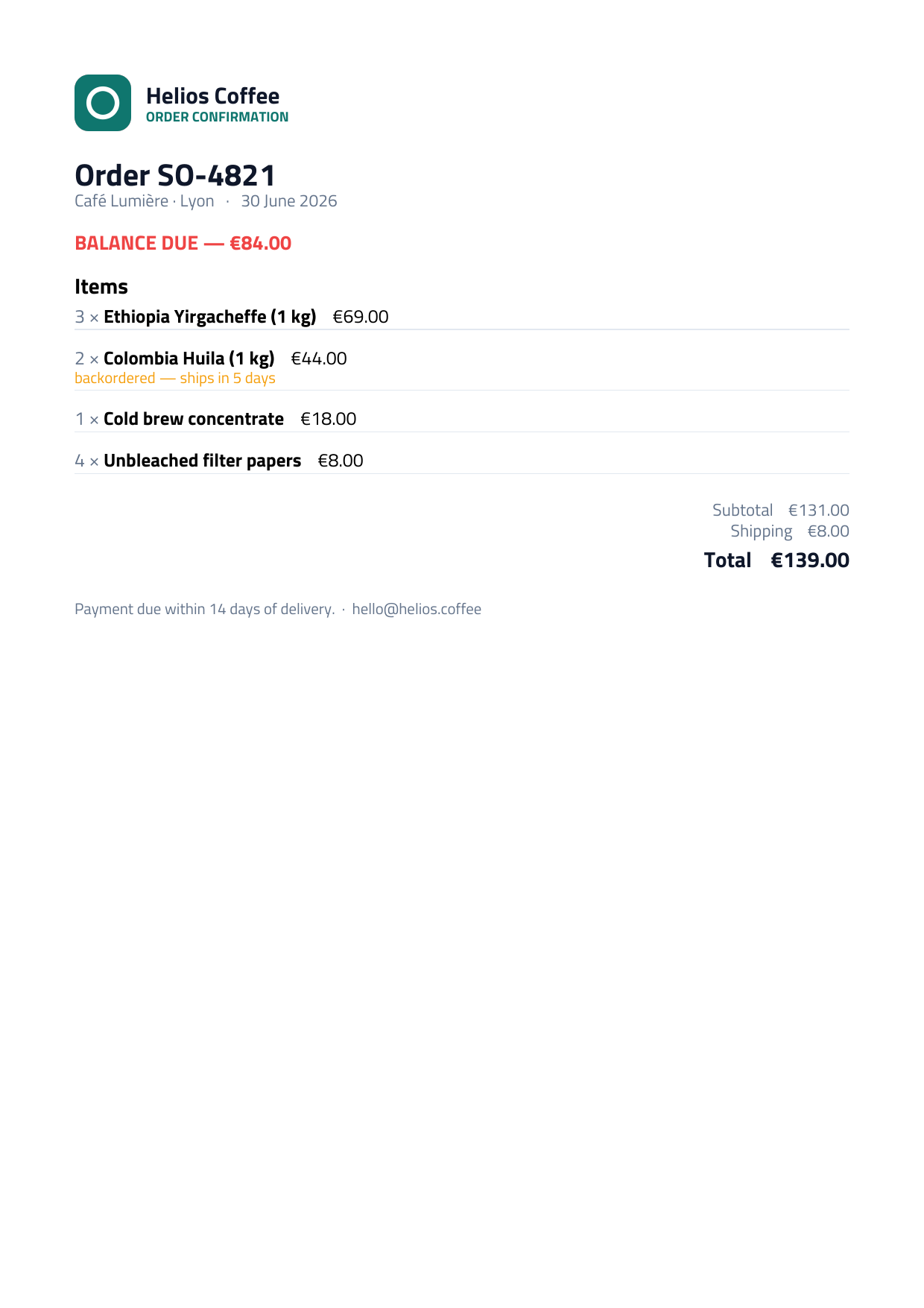
Dynamic · data-driven
One template, shaped entirely by data. repeat lays out the line items from an array; if/else swaps the PAID banner for BALANCE DUE; unless in_stock adds a backorder note only where needed. No per-row code — the document follows the data. Try it live in the playground.
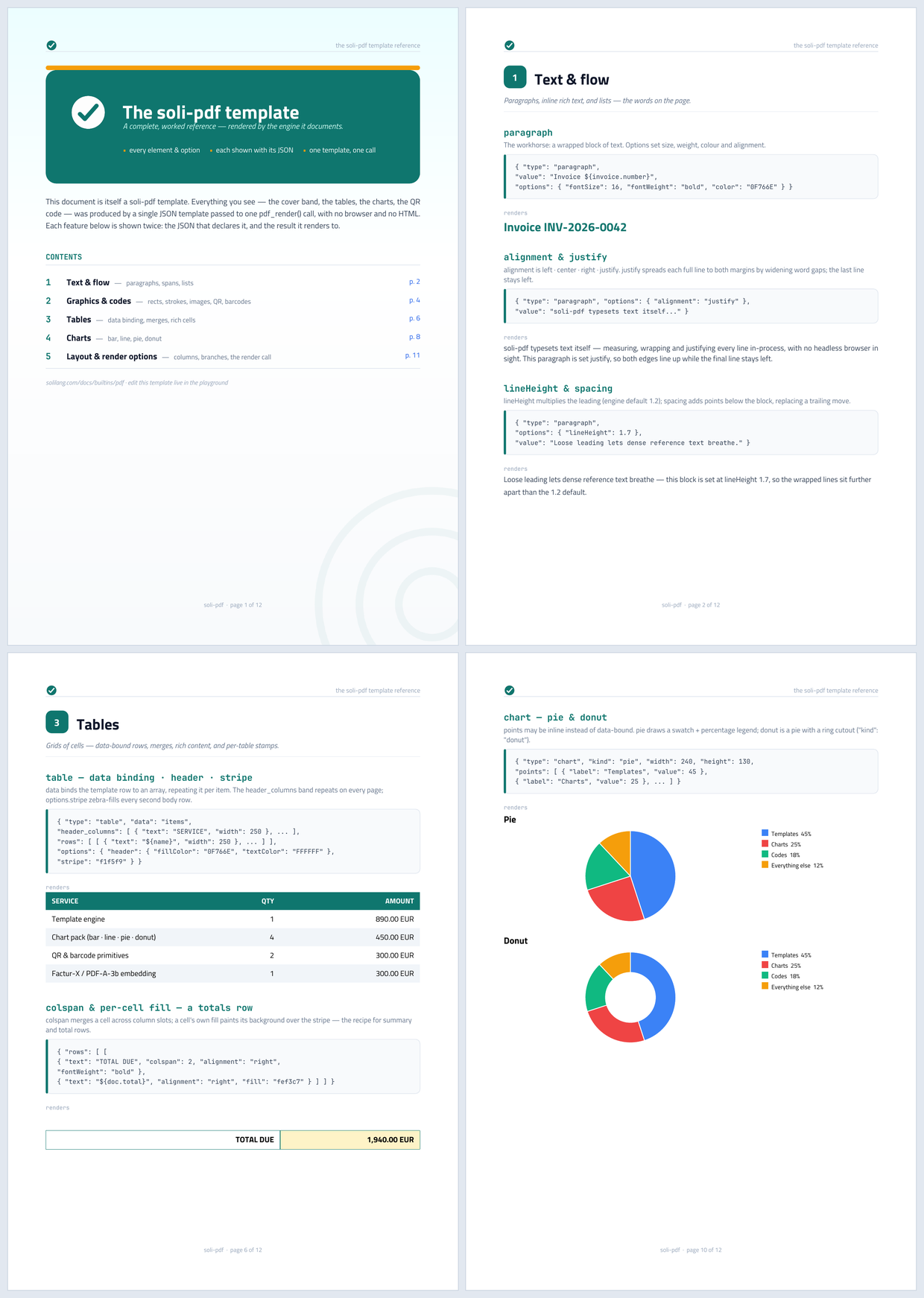
Template reference · 12 pages · self-documenting
A PDF that documents itself: a branded hero cover with a clickable table of contents (anchor/linkTo + #PAGE_OF# real page numbers), then five chapters. Every feature is a card — a heading, a one-line description, the JSON that declares it, and the result it renders to. Covers paragraph options (underline/strike/color/italic/mono/justify), spans, lists, dashed/rounded rects, both QR kinds + two barcode symbologies, a zebra-striped table with colspan/fill, rich cells + per-table watermark, repeat, if/unless, grouped/stacked/line/pie/donut charts, columns, and the ${...}/#PAGE# tokens (including the $${ literal escape). Try it live in the playground.
…from one call
def create
  let tpl  = slurp("pdf/invoice.json")
  let data = Invoice.find(params["id"]).to_json()
  let pdf  = pdf_render(tpl, data)
  file_write_base64(
    "storage/inv-" + params["id"] + ".pdf",
    pdf
  )
  render("invoices/show")
end
Functions
pdf_render(template, data, options?)
Render a PDF from a JSON layout template and a JSON data document. Returns the PDF as a base64 string.
Parameters
template : String — the layout template JSON (see the Template reference below).data : String — the data document JSON. May be { "data": {...} } or a bare object.Returns
String — base64-encoded PDF bytes.pdf_response(template, data, options?)
Render and wrap as a ready HTTP response — return it straight from a controller action, no file_write_base64 + redirect dance. The binary body travels via the body_base64 response key, decoded by the server (usable by any handler, not just PDFs).
def download
  let tpl  = slurp("pdf/invoice.json")
  let data = Invoice.find(params["id"]).to_json()
  return pdf_response(tpl, data, { "filename": "invoice-" + params["id"] + ".pdf" })
end
Parameters
pdf_render, plus filename : String? — adds Content-Disposition: attachment; omit to render inline in the browser.Returns
Hash — { "status": 200, "headers": { "Content-Type": "application/pdf", … }, "body_base64": … }.pdf_preview(template, data, options?)
Rasterise the same document to PNG page images — a thumbnail grid, a preview pane, a generated image asset. In-process like everything else here: no headless browser, no poppler.
# One base64 PNG per page.
let pages = pdf_preview(template, data, { "dpi": 150 })
file_write_base64("out/page-1.png", pages[0])

# Or a thumbnail width — `width` wins over `dpi`.
# WebP is ~3x smaller than PNG for a page of type: 7.7 KB vs 25 KB here.
let thumbs = pdf_preview(template, data,
  { "width": 320, "format": "webp", "quality": 90 })

# Or write them straight to disk, and get the paths back.
let paths = pdf_preview(template, data,
  { "width": 320, "out_dir": "public/previews", "prefix": "invoice-42" })
# => ["public/previews/invoice-42-1.png", "public/previews/invoice-42-2.png"]
Parameters
Returns
Array<String> — one base64 PNG per rendered page, in page order. With out_dir, the written paths instead.Previews rasterise the layout engine’s own draw model, not PDF bytes — so they cover what the renderer produces, and not a merged, filled, stamped or uploaded PDF. See Page previews.
pdf_preview_from_markdown(markdown, options?)
The Markdown counterpart of pdf_preview, mirroring pdf_from_markdown.
let pages = pdf_preview_from_markdown(slurp("README.md"), { "width": 600 })Returns
Array<String> — as pdf_preview.pdf_preview_response(template, data, options?)
One page as a ready image/png response — the preview mirror of pdf_response.
def thumbnail
  let tpl  = slurp("pdf/invoice.json")
  let data = Invoice.find(params["id"]).to_json()
  return pdf_preview_response(tpl, data, { "page": 1, "width": 480 })
end
Parameters
pdf_preview, plus page : Int (default 1) and filename. pages and out_dir are rejected — a response carries one image.Returns
Hash — { "status": 200, "headers": { "Content-Type": "image/png" }, "body_base64": … }.pdf_facturx(template, data, xml, options?)
Render the visual PDF, then embed the caller-provided Cross-Industry-Invoice xml and apply everything PDF/A‑3b + Factur-X require: the embedded factur-x.xml file, the /AF + name-tree wiring, an sRGB OutputIntent, and the strict XMP packet (PDF/A id + Factur-X extension schema). Returns base64 PDF/A‑3b bytes.
Parameters
template, data : String — as above.xml : String — your EN 16931 CII XML. The library embeds it; it does not generate it — so its contents (totals, VAT, party data) are yours to get right.options : Hash? — the render options below, plus profile / title / author / subject.Returns
String — base64-encoded PDF/A-3b bytes.pdf_facturx_from_invoice(template, invoice, options?)
Render the visual PDF and generate the EN 16931 CII XML from a single typed invoice document, then embed it. Line totals, the VAT breakdown and the grand/amount-due totals are computed from the line items — so the human-readable PDF and the machine-readable XML can never disagree. Returns base64 PDF/A‑3b bytes.
Parameters
template : String — the layout template JSON, using the invoice.* / company.* / customer.* / items[] / total.* / infos.text paths the invoice maps onto.options : Hash? — the render options below, plus profile / title / author / subject.Returns
String — base64-encoded PDF/A-3b bytes.pdf_from_markdown(markdown, options?)
Render a designed PDF straight from a Markdown string — write prose, get a PDF. Headings, paragraphs, bold/italic/code/links/strike, ordered & unordered (nested) lists, tables, fenced code blocks, blockquotes, rules and images map onto the layout engine's elements. No template to author. Composes with everything else — pdf_from_markdown(md, { sign: {…} }) gives a signed document from Markdown.
Parameters
markdown : String — the Markdown source (CommonMark + tables, strikethrough, task lists).options : Hash? — every render option below (font_dirs, sign, pdfa, password…) plus theme overrides: fonts, fontSize, lineHeight, headingColor, textColor, linkColor, codeColor.Returns
String — base64-encoded PDF bytes.pdf_fill(pdf, data, options?)
Fill an existing PDF's form fields (AcroForm) from data — the "take a government/enterprise form and fill it programmatically" workflow the render builtins can't do (they write PDFs; this reads one). Sets text fields, checkboxes/radios and choice fields; flatten bakes the values into static, read-only appearances.
Parameters
pdf : String — the source PDF: an app-root relative path, or base64 PDF bytes.data : Hash — { field_name => value }. Values are stringified; a bool drives a checkbox/radio on/off.options : Hash? — flatten (Bool, default false): bake the values in and lock the fields, or leave them editable with NeedAppearances on.Returns
String — base64-encoded filled PDF. Errors if the PDF has no AcroForm.pdf_merge(pdfs) · pdf_pages(pdf, selection) · pdf_stamp(pdf, text, options?)
Operate on existing PDFs — the toolkit half of the engine. Each takes a path or base64 and returns base64.
pdf_merge(pdfs) — concatenate an array of PDF sources (paths or base64) into one, in order. Inherited page attributes are inlined so pages keep their look.pdf_pages(pdf, selection) — keep a subset: a range string "1-3,7,9-11" or an array [1,3,7] (1-based), in original order.pdf_stamp(pdf, text, options?) — draw text onto pages. Options: pages (default all), x/y (default centered), size (48), color (hex), rotation (45), opacity (0.25). For DRAFT/PAID/CONFIDENTIAL watermarks.let doc = pdf_merge([ "cover.pdf", report, "terms.pdf" ])
let excerpt = pdf_pages(doc, "1-3")
let draft = pdf_stamp(doc, "DRAFT", { opacity: 0.2, color: "cc2222", rotation: 45 })pdf_extract_facturx(pdf) · pdf_attachments(pdf)
Read a received e-invoice — the inverse of pdf_facturx*. You can now process incoming Factur-X / ZUGFeRD / XRechnung invoices, not just emit them.
pdf_extract_facturx(pdf) — the embedded EN 16931 invoice XML as a String, or null if none. Matches the standard attachment names.pdf_attachments(pdf) — an array of { name, mime, size, base64 }, one per embedded file (reads the /EmbeddedFiles tree, falling back to /AF).let xml = pdf_extract_facturx("inbox/supplier-invoice.pdf")
if xml.present?
let invoice = Xml.parse(xml) # read totals, VAT, line items…
endpdf_sign(pdf, options) · pdf_verify(pdf)
Sign an existing PDF, and verify signatures on one you received. Both take a path or base64.
pdf_sign(pdf, options) — the standalone sibling of the sign render option; options is the sign config directly (cert, key, chain?, reason?, tsa?, appearance?). Composes with the toolkit: merge → sign, fill → sign.pdf_verify(pdf) — an array of { field, valid, covers_document, signer, reason?, signed_at? }. valid = the CMS verifies against its embedded cert AND the ByteRange digest matches (authentic + unmodified); it does not assert certificate trust.let signed = pdf_sign("contract.pdf", { cert: signer_pem, key: signer_key, reason: "Approved" })
for sig in pdf_verify(received_pdf)
print("#{sig["field"]}: valid=#{sig["valid"]} by #{sig["signer"]}")
endOptions hash
| Key | Type | Default | Meaning |
|---|---|---|---|
font_dirs | Array<String> | ["font"] | Directories to load fonts from. No fonts are bundled. |
fetch_images | Bool | true | Fetch http(s) images. Set false for offline/deterministic output. Fetches go through the same SSRF guard as HTTP.* (private/loopback/reserved refused, DNS-rebinding safe, every redirect hop re-validated); a body over 20 MiB is rejected. |
profile | String | en16931 | (Factur-X) Factur-X profile — see the profile table. |
title / author / subject | String | — | Document metadata (Info dict; XMP too on Factur-X). Works for pdf_render as well — the plain-render title defaults to "invoice" when unset. |
stationery | String | — | Path (app-root relative) to a letterhead PDF drawn beneath every page's content. Page 1 uses the letterhead's first page; later pages use its second page when present, else the first. Missing file = error; scaled to the page size; a template background fill paints over it. |
attachments | Array | — | Files embedded into the reader's attachments panel: [{ "path", "name"?, "mime"? }] (app-root relative; missing file = error; MIME guessed from the extension). Composes with Factur-X — factur-x.xml and your attachments coexist. |
password / owner_password | String | — | Password-protect the PDF (AES-128). password opens the document; owner_password lifts restrictions (defaults to password). Incompatible with pdf_facturx* (PDF/A forbids encryption). |
permissions | Array | all | With a password, the actions the user may take: any of ["print","copy","modify","annotate"]. Empty = allow all (open-password only). |
pdfa | Bool | false | (pdf_render / pdf_response) Emit PDF/A-3b (archival conformance: sRGB OutputIntent, XMP pdfaid, PDF 1.7) without a Factur-X payload — for legal-archiving mandates on non-invoice documents. Incompatible with password; pdf_facturx* reject it (already PDF/A). Composes with a tagged template — the output then declares PDF/A-3b and PDF/UA-1 (accessible + archival). Attachments compose. |
sign | Hash | — | Digitally sign the PDF (PAdES) — see Digital signatures. { "cert", "key", "chain"?, "reason"?, "location"?, "name"?, "contact"? }. Works on every builtin, including signed Factur-X e‑invoices. Incompatible with password (a signed PDF must not be encrypted). |
Preview options · pdf_preview* only
| Key | Type | Default | Meaning |
|---|---|---|---|
dpi | Number | 96 | Rasterisation density; scale is dpi / 72. A4 comes out 794×1123 at 96, 1240×1754 at 150. Capped at 600. |
width / height | Int (px) | — | Exact output size. Either one overrides dpi; given both, the page is scaled to fit inside the box with its aspect ratio preserved. Capped at 8192 per axis. |
pages | Array | String | all | Which pages to rasterise, 1‑based — [1, 3] or "1-3,7", the same selection pdf_pages takes. A page past the end is an error, not a short array. |
out_dir | String | — | Write PNG files here (app-root relative, jailed) and return their paths instead of base64. |
prefix | String | "page" | Base file name under out_dir. One page gives <prefix>.png; several give <prefix>-1.png, <prefix>-2.png, … Must be a plain file name — no path separators. |
page | Int | 1 | (pdf_preview_response) Which page the response carries. |
format | String | "png" | "png", "webp" or "jpeg". Reach for webp — see below. The written file extension and the response Content-Type follow it. |
quality | Int | 90 | 1–100, for webp and jpeg. Ignored by png, which is lossless. |
font_dirs and fetch_images work as they do for pdf_render. stationery, attachments, password, pdfa and sign are accepted but ignored, so one options hash can drive both the PDF and its preview. The two that change what you would see — stationery and sign — warn once per process; the rest cannot alter a pixel, so they pass quietly.
Page previews · pdf_preview · PNG
pdf_preview gives the layout engine a second backend: instead of emitting PDF operators it paints the same laid-out page into pixels. Three consequences are worth knowing.
It is the same layout
Not an approximation from a separate renderer — the identical draw model, measured with the identical font metrics. What you see is where the text will be.
It covers what the engine renders
pdf_merge, pdf_pages, pdf_fill, pdf_stamp and an uploaded PDF produce bytes; rasterising those would need a PDF interpreter. Preview the template, before those steps.
A few things cannot appear
None of them fails the render, so a preview always appears. Only the two that change what you would see say anything, once per process.
| Option | Why not | Warns |
|---|---|---|
stationery | The letterhead is composited onto emitted PDF bytes. The preview shows your content without it. | yes |
sign | The signature is applied to emitted bytes, so a visible signature appearance is missing. | yes |
attachments | Embedded files are not drawn on a page. | no |
password | A preview image is plaintext by nature. | no |
pdfa | Metadata and OutputIntent only — no visual effect. | no |
Two smaller divergences from a PDF viewer: colour/bitmap glyph fonts (CBDT/sbix/COLR) are not drawn, and hairlines below one device pixel are anti-aliased rather than snapped, so very thin table rules read a little differently at low dpi. Raise dpi if that matters.
WebP is three times smaller
A document page is mostly flat colour and crisp type — exactly what PNG is bad at and WebP is good at. Measured on the invoice sample:
| PNG | WebP q90 | WebP q80 | |
|---|---|---|---|
| A4 at 150 dpi | 165 KB | 51 KB | 41 KB |
| A4 at 96 dpi | 93 KB | 28 KB | — |
| 320 px thumbnail | 25 KB | 7.7 KB | — |
At quality: 90 the type stays crisp — no visible ringing on body text at 150 dpi. If a preview is going over the network, { "format": "webp", "quality": 90 } is very likely the right setting; png is the default only because lossless and universal is the safer thing to default to.
Encoding goes through libwebp, the same encoder Image.format("webp") uses — the image crate’s own WebP encoder is lossless-only and would give up most of that saving. jpeg is accepted for completeness; it has no alpha (the page is flattened onto the paper colour) and is worse than WebP at this kind of content.
Limits. Because dpi and width usually come from a request, each is capped: SOLI_PDF_PREVIEW_MAX_DPI (600), SOLI_PDF_PREVIEW_MAX_DIMENSION_PX (8192), SOLI_PDF_PREVIEW_MAX_PAGES (64), SOLI_PDF_PREVIEW_MAX_PIXELS (40 000 000 per page). An A4 at 600 dpi is already a 140 MB pixmap.
Writing files. out_dir resolves through the same jail as file_write_base64, and prefix must be a plain file name. Under soli run and soli test no jail is installed, so paths resolve against the working directory exactly as File.write does — which is what lets the gallery on this site regenerate itself.
Compose with the Image class for the rest: Image.from_buffer(pages[0]).thumbnail(240).format("webp").to_buffer().
Digital signatures · sign · PAdES
Pass a sign option to cryptographically sign the PDF with a detached CMS signature (PAdES baseline, ETSI.CAdES.detached). A reader — Acrobat, Okular, pdfsig — can then confirm who issued the document and that it hasn't been modified since. Signing is in‑process (no external service) and layers on top of everything else, including Factur-X: emit an invoice that is archival (PDF/A‑3b), machine‑readable (EN 16931) and signed in one call.
let pdf = pdf_render(template, data, {
  sign: {
    cert: slurp("config/certs/signer.pem"),   # signer certificate (PEM or path)
    key:  slurp("config/certs/signer.key"),   # private key (PEM or path)
    reason:   "Invoice issued",
    location: "Paris, FR",
    name:     "ACME SARL"
  }
})

# The flagship: archival + machine-readable + signed, in one call.
let pdf = pdf_facturx_from_invoice(template, invoice, {
  sign: { cert: signer_pem, key: signer_key }
})| Key | Required | Meaning |
|---|---|---|
cert | ✓ | The signer's X.509 certificate — an inline PEM string or an app-root relative path to a PEM/DER file. |
key | ✓ | The private key: RSA (PKCS#1 or PKCS#8) or EC P‑256 (PKCS#8), PEM/DER. Inline string or path. |
chain | — | Array of intermediate-certificate PEMs to embed so verifiers can build the trust path. |
tsa | — | URL of an RFC 3161 Time-Stamp Authority. When set, the signature is timestamped (PAdES-B-T). Requires network access at sign time. |
appearance | — | Draw a visible signature block (name, "Digitally signed", date, reason, location): { page?, x?, y?, width?, height? } in points from the bottom-left. Omit for an invisible-but-valid signature. |
reason / location / name / contact | — | Metadata shown in the reader's signature panel. |
Produces a PAdES-B-B signature: SHA-256 digest, RSA or ECDSA (P-256), with the standard signed attributes (content-type, message-digest, signing-time, and the ESS signing-certificate-v2 that binds the signature to this exact certificate). It covers the whole document except its own signature value, so any later edit invalidates it.
Trusted timestamp (PAdES-B-T). Add a tsa URL to have the signature timestamped by a Time-Stamp Authority: the signature value is hashed, sent to the TSA, and the returned RFC 3161 token is embedded as an unsigned attribute — independent proof the signature existed at a given time, resilient to the signer's certificate later expiring. tsa: "http://timestamp.digicert.com". The URL is SSRF-checked (a private or loopback TSA is refused, redirects re-validated) and the reply is capped at 1 MiB.
Key handling. Read the certificate and key from files or env — never from request data — and keep the private key out of source control. Soli reads the material you pass and never logs it.
- Incompatible with
password— a signed PDF must not be AES-encrypted; choose one. - The signer certificate must chain to a root the verifier trusts for a "trusted" badge; a self-signed cert still verifies as valid + unmodified, just untrusted.
- A single signature. Long-term-validation (LTV) data — embedded OCSP/CRL for offline verification years later — is a planned follow-up.
Saving & serving
file_write_base64(path, b64) decodes the base64 string and writes the bytes — the natural partner to either builtin.
let pdf = pdf_render(tpl, data)
file_write_base64("storage/invoice.pdf", pdf)
To stream it as a download, return base64 with a PDF content type and let your front-end / proxy decode, or persist then redirect to the file:
def download
  let pdf = pdf_render(slurp("pdf/invoice.json"), Invoice.find(params["id"]).to_json())
  let path = "storage/inv-" + params["id"] + ".pdf"
  file_write_base64(path, pdf)
  redirect("/" + path)
end
Storing a PDF on a model
The builtins return base64, so persisting a generated PDF is a question of where the bytes live — three options, lightest commitment last.
Uploader recommended
Declare an uploader and attach the generated bytes — Soli stores the blob in SoliDB, keeps only its id on the document, and serves it back. No HTTP upload is involved; attach_<field> just needs a file hash.
class Invoice < Model
  uploader("pdf", {
    "multiple":      false,
    "content_types": ["application/pdf"],
    "max_size":      10_000_000,
    "collection":    "invoice_pdfs"
  })

  # Render the Factur-X for this record and file it as the `pdf` attachment.
  def store_pdf(template, invoice_json)
    let pdf = pdf_facturx_from_invoice(template, invoice_json, { "profile": "en16931" })
    this.attach_pdf({
      "data":         pdf,                          # pass base64 as-is — stored as raw bytes (decoded automatically)
      "filename":     "invoice-#{this.number}.pdf",
      "content_type": "application/pdf",
      "size":         Base64.decode(pdf).length()   # raw byte count, for the max_size cap
    })
  end
end
Add uploads("invoices") to config/routes.sl and the file is served at /invoices/:id/pdf; this.pdf_url() returns the link. detach_pdf() removes it, and deleting the record cleans up the blob.
Direct blob storage
Skip the DSL and keep the blob id yourself:
let client  = Solidb(getenv("SOLIDB_HOST"), getenv("SOLIDB_DATABASE"))
let blob_id = solidb_store_blob(client, "invoice_pdfs", pdf,
                                "invoice.pdf", "application/pdf")
invoice.update({ "pdf_blob_id": blob_id })

# read it back (returns base64)
let stored = solidb_get_blob(client, "invoice_pdfs", invoice.pdf_blob_id)
Inline field
Simplest — store the base64 string straight on the document:
invoice.update({ "pdf": pdf })Fine for small, occasional PDFs. Avoid it when the PDFs are large or you query that collection often: every read of the record carries the full base64 (a 135 KB PDF ≈ 180 KB of text). Blob storage keeps the document lean and the bytes out of band.
Template reference
Document shape
A template has five top-level keys. content is the flow; header/footer repeat on every page.
{
  "fonts":   ["titillium"],          // family to use as the primary text face
  "options": {
    "header_height": 0,              // reserved top band height (pt)
    "margins": { "top": 90, "left": 70, "right": 70, "bottom": 80 }, // pt; or a single number for all sides
    "watermark": { "text": "PAID", "angle": 45, "color": "e8c4c4", "fontSize": 96 }
  },
  "header":  [ /* elements drawn at the top of every page */ ],
  "footer":  [ /* elements drawn at the bottom; may use #PAGE# / #PAGES# */ ],
  "content": [ /* the document flow */ ]
}| key | type | meaning |
|---|---|---|
fonts | string[] | Families to load. The first is the primary text face; the rest are fallbacks for characters it can't cover (e.g. a CJK font). Resolved from files in font_dirs — see Fonts below. |
options | object | Document options: header_height (pt), margins, watermark — detailed below. |
header | element[] | Elements drawn in the reserved top band on every page, from their own cursor at the top margin. Sized by options.header_height; they never paginate (overflow just spills). Elements interpolate ${...}, may use #PAGE# / #PAGES#, and data-bound elements (table, repeat, chart) see the document data. |
footer | element[] | Drawn in the bottom band on every page. Supports paragraph, hr, image (these advance the band cursor), move, and rect/line/ellipse (drawn at the cursor — position with move, which also grows the reserved band). May contain #PAGE# / #PAGES#, substituted after pagination. The band auto-sizes above the bottom margin. |
content | element[] | The page body, laid out top-to-bottom; paginates automatically when it overflows. |
All five keys are optional. Lengths are in points (A4 = 595×842 pt; 1 mm ≈ 2.835 pt).
options.page — a preset (a4, letter, legal, a5, a3) or a custom { "width": …, "height": … } in points; options.orientation: "landscape" swaps width/height. Defaults to A4 portrait.
options.background — a page background fill (hex, no #) painted behind every page, beneath any watermark and content. Omit for white paper.
options.backgroundImage — a full-page background image { "src", "pages"?, "opacity"? } (a cover photo / branded page). Drawn stretched to the page, above the background fill and below the watermark/content; pages filters like the watermark. opacity (0–1, default 1) fades it into a soft wash — e.g. 0.15 for a faint stationery tint behind the content.
options.margins — page margins in points: a single number for all four sides, or an object overriding individual sides (unset sides keep the 20 mm default). The top margin is the gap above the header, the bottom margin the gap below the footer; header_height reserves the header band below the top margin. 1 mm ≈ 2.835 pt.
options.watermark draws a diagonal stamp (e.g. PAID, DRAFT) — centered behind the content of every page by default, with layering, position and page-scope all configurable. Fields: text (required), angle (deg, default 45), color (hex, default light grey), fontSize (pt, default 96), fontWeight (default bold), front (draw on top so panels/images can't hide it; default false), x/y (explicit center, pt; default page center), anchor (vertical hint when y is unset: top/center/bottom), and pages ("all"/"first"/"last" or a list like [1, 3]).
"options": { "watermark": { "text": "PAID", "front": true, "anchor": "top", "pages": "first" } }Per-table watermark. A table element can carry its own watermark (same fields), stamped centered over that table's box and always on top — mark one table PAID/VOID without touching the rest of the page (front/pages are ignored; the stamp follows the table).
{ "type": "table", "data": "items", "rows": [ ... ],
  "watermark": { "text": "PAID", "fontSize": 104, "color": "e8c4c4" } }
Accessible / tagged output · tagged
Set options.tagged: true (with an optional options.lang) to emit a tagged PDF. The renderer wraps each piece of content in marked content with a semantic role and adds the structure assistive tech relies on — a StructTreeRoot, MarkInfo, a ParentTree, per-page StructParents, logical tab order (/Tabs /S), the document /Lang, and an XMP pdfuaid identifier.
"options": { "tagged": true, "lang": "fr-FR" }Roles come from the template: a bookmarked paragraph (bookmark/bookmarkLevel) becomes H1…H6 (level = bookmarkLevel); any other paragraph is P; an image/qr/barcode is a Figure carrying /Alt from its alt; rules, watermarks, background art and the running header/footer are Artifacts that screen readers skip. Give every meaningful image an alt — a tagged render warns for each one missing it.
Headings, paragraphs, figures, lists (L › LI › LBody) and tables (Table › TR › TD/TH, with a /Scope on header cells) are all mapped to real structure. A tagged document rendered with pdfa (or via pdf_facturx*) validates as both PDF/A-3b and PDF/UA-1 — checked in CI with the veraPDF reference validator.
Tagging composes with PDF/A and Factur-X. Set options.tagged together with the pdfa option (or use pdf_facturx*) and the output carries both the PDF/A-3b (pdfaid) and PDF/UA-1 (pdfuaid) identifiers over a single structure tree — one file that is accessible, archival and (for Factur-X) machine-readable at once.
Elements
Each element in an array has a type. The cursor flows top-down; lengths are in points (A4 is 595×842 pt, default margins 20 mm).
paragraph
Wrapped, aligned text. Advances the cursor down by the consumed height. options also takes alignment (left/right/center/justify — justify distributes word gaps, last line stays left), color (hex, no # — applies to the whole paragraph), italic, mono, underline/strike (drawn in the text colour), lineHeight (multiplier, engine default 1.2), spacing (pt gap below the block — replaces trailing move elements), minSpaceBelow (keep-together for headings — the paragraph moves to the next page unless that much room remains), and link/bookmark + bookmarkLevel (nested outline)/anchor. For mixed colours/weights within one line, use spans instead of value.
{ "type": "paragraph", "value": "Invoice ${invoice.number}",
  "options": { "alignment": "left|right|center", "fontSize": 24, "fontWeight": "normal|bold", "color": "0f766e" } }
move
Relative cursor move. Positive y goes down, negative y goes up; positive x is right. Use it for spacing between blocks, or to place an element absolutely (e.g. a logo at top-right).
{ "type": "move", "x": 0, "y": 24 }at · absolute placement
Places content at an absolute position and restores the flow cursor, so the surrounding document is untouched. x/y are measured from the page's top-left corner (not the margin) because a canvas addresses the whole sheet; width sets the wrap width. Everything else in the language is a top-to-bottom flow — right for documents that grow with their data, but unable to say “this sits here”. Because the cursor is restored, placed items are independent: moving one can never shift another, which is what makes a visual canvas possible. This is what the studio compiles to. Coordinates are clamped to the page, and mixing at with ordinary flow content is fine — a flowing body with an absolutely placed logo or stamp.
{ "type": "at", "x": 40, "y": 120, "width": 220, "content": [
  { "type": "box", "fill": "1B3A6B", "padding": 12, "content": [
    { "type": "paragraph", "spans": [ { "text": "Placed here", "color": "FFFFFF" } ] }
  ] }
] }
box · self-measuring container
Lays out content inside optional padding, then paints its fill/border at the size the content actually measured, and advances the cursor below itself. The block primitive for panels, callouts, totals blocks and signature areas: unlike rect it needs no hand-computed height and no compensating move, so the panel keeps fitting when the text changes. Boxes nest, and children wrap at the padded inner edge rather than the page margin. padding is a number or per-side {top,right,bottom,left}; width defaults to the remaining region width; gap leaves space below. A box whose content spans a page break omits its decoration and warns, rather than painting it on a page the content has left. Build one visually in the layout editor.
{ "type": "box", "fill": "F7F9FC", "border": "D7E0EC", "borderWidth": 0.8,
  "radius": 4, "padding": 14, "gap": 16, "content": [
  { "type": "paragraph", "value": "Payment", "options": { "fontWeight": "bold" } },
  { "type": "paragraph", "value": "IBAN ${payment.iban}", "options": { "fontSize": 9 } }
] }
columns · multi-column flow
A multi-column block. Children fill column 1 to the bottom, then column 2, and so on (sequential fill); full-width flow resumes below. count (1–6, default 2), gap (pt). A page_break inside is a column break; overflowing the last column starts a new page and restarts the set. Paragraphs, lists, images, tables and charts all flow inside — a table overflowing a column continues in the next with its header repeated; nested columns flattened.
{ "type": "columns", "count": 2, "gap": 22, "content": [
  { "type": "paragraph", "value": "flows down column 1, then into column 2\u2026" },
  { "type": "list", "items": ["lists flow too"] }
] }
page_break
Force a new page at this point in the flow — finishes the current page (footer included) and starts the next one with its header band. Replaces the old { "type": "move", "y": 3000 } overflow trick. A trailing page_break with nothing after it leaves a final blank page.
{ "type": "page_break" }image
Draw an image at the cursor. Sizing: width only → height derives from the aspect; height only → width derives; both → scaled to fit inside the box (“contain”, aspect preserved, never stretched). Source may be an http(s) URL, a file:// path, or a data: URI. Raster formats (PNG, JPEG, WebP, GIF) and SVG are accepted — SVG is auto-detected and embedded as a PDF Form XObject (real vectors, not a pixmap) so a logo stays sharp at any size (<text> uses the fonts from font_dirs). In an inline SVG data: URI, colours may be written as a literal # (fill='#0f766e') or URL-encoded %23 (fill='%230f766e') — both work, and SVG percentages like width='50%' are preserved. alt supplies the figure's alt text for tagged output. The cursor is not advanced — position with move.
{ "type": "image", "value": "https://acme.example/logo.png", "width": 100 }
{ "type": "image", "value": "file://brand/logo.svg", "width": 120, "alt": "Acme logo" }
table
A grid of cells. Optional data binds the single template row to an array, repeating it once per item (${field} resolves against each item). A non-empty header_columns row repeats on every page the table spans; a non-empty footer_columns row closes the table AND repeats just above every intra-table page break (the “carried forward” band — it interpolates against the root data). options.stripe (hex) zebra-stripes every second body row; a cell's own fill paints its background (over the stripe — totals, highlights); colspan merges a cell across column slots; rowspan merges it down across rows — the slots it claims are skipped in the rows beneath, so those rows supply fewer cells, and the cell is drawn once at its own row tall enough to cover them all (pair it with valign to centre it). It applies to literal rows; a data-bound table repeats a single template row, so there is nothing to span. Build merges visually in the studio's table grid. valign (top/middle/bottom) positions its content vertically.
{ "type": "table", "data": "items",
  "header_columns": [ { "text": "DESCRIPTION", "width": 280, "fontWeight": "bold",
                        "borderSides": { "bottom": "true" } }, ... ],
  "rows": [ [ { "text": "${name}", "width": 280 }, { "text": "${amount}", "alignment": "right" } ] ],
  "options": { "header": { "fillColor": "0F766E", "textColor": "FFFFFF", "borderColor": "0F766E" },
               "stripe": "f1f5f9", "padding_x": 6, "padding_y": 7 } }
{ "type": "table",
"header_columns": [ { "text": "A", "width": 200 }, { "text": "B", "width": 100 }, { "text": "C", "width": 100 } ],
"rows": [ [ { "text": "TOTAL DUE", "colspan": 2, "alignment": "right", "fontWeight": "bold" },
{ "text": "2,140.00 EUR", "alignment": "right", "fill": "fef3c7" } ] ] }hr
A horizontal rule across the content width (or width pt). Advances the cursor below it — a flow separator.
{ "type": "hr", "color": "cccccc", "thickness": 0.5 }rect
A filled and/or stroked rectangle at the cursor (top-left) — header bands, totals boxes, signature boxes. Does not advance the cursor; position with move.
{ "type": "rect", "width": 515, "height": 26, "fill": "f4f4f5", "border": "000000", "borderWidth": 0.5 }line
A stroked segment from the cursor to cursor + (dx, dy). Does not advance the cursor.
{ "type": "line", "dx": 200, "dy": 0, "color": "cccccc", "width": 0.5 }qr · scan-to-pay
A QR code (square, side = width pt) at the cursor. An EPC SEPA "GiroCode" or arbitrary text — see Payment QR. Does not advance the cursor.
{ "type": "qr", "kind": "epc",
  "name": "${payment.name}", "iban": "${payment.iban}",
  "amount": "${payment.amount}", "currency": "${payment.currency}",
  "remittance": "${invoice.number}", "width": 110 }
ellipse
A filled and/or stroked ellipse (a circle when rx == ry) whose bounding-box top-left is the cursor — status dots, badges. Does not advance the cursor.
{ "type": "ellipse", "rx": 6, "ry": 6, "fill": "16a34a" }barcode · 1D
A 1D barcode rasterised at the cursor, sized width × height pt. symbology is code128 (any printable ASCII), ean13 (12 digits, check digit computed), ean8 (7 digits), or code39. humanReadable prints the value as a caption below the bars. Bad data is skipped with a warning. Does not advance the cursor.
{ "type": "barcode", "symbology": "code128", "value": "ORDER-${order.id}",
  "width": 220, "height": 56, "humanReadable": true }
list
A bulleted or numbered list; flows like a paragraph and advances the cursor. ordered numbers items from start; otherwise each gets a marker bullet. Items are strings, or objects with a text/spans body and/or a nested list (indented deeper). indent, spacing, and options (paragraph text styling) tune it.
{ "type": "list", "ordered": true, "options": { "fontSize": 11 }, "items": [
  "Grind the beans",
  { "text": "Brew", "list": { "items": ["Bloom 30s", "Pour to 250 g"] } }
] }
chart · bar · line · pie · donut
A bar, line, pie, or donut chart in a width × height box (plus an optional title); advances the cursor. donut is a pie with a ring cutout (what's behind shows through the hole). Points come from a data binding (data names an array; label/value name the fields) or inline points. colors are cycled; pie/donut show a legend, bar/line draw an axis and (opt-in) gridlines with value-axis labels.
{ "type": "chart", "kind": "bar", "title": "Revenue by month",
  "data": "months", "label": "name", "value": "revenue", "width": 360, "height": 160 }
Multiple series — replace value with values: an array of { field, name?, color? }. Each series reads its own field from every item; bars render grouped (or stacked with mode: "stacked"), line draws one line per series, and both show a legend of the series names.
{ "type": "chart", "kind": "bar", "data": "quarters", "label": "q", "gridlines": true,
  "values": [ { "field": "fy24", "name": "FY 2024", "color": "94a3b8" },
              { "field": "fy25", "name": "FY 2025", "color": "0f766e" } ],
  "width": 460, "height": 160 }
repeat · control flow
Lay out content (an array of elements) once per item of the data array, with ${field} scoped to each item — the block-level analogue of a data-bound table row. A missing or empty array renders nothing. (A table/chart nested inside still binds its own data against the top-level document.)
{ "type": "repeat", "data": "invoices", "content": [
  { "type": "paragraph", "spans": [ { "text": "${number}", "fontWeight": "bold" }, { "text": " — ${customer}" } ] },
  { "type": "hr" } ] }
if / unless · control flow
Render content only when a condition holds (if) or fails (unless); an optional else array is the other branch. The test reads ${when}: with equals it's string equality, otherwise truthiness (a value is falsy when missing, empty, false, 0, or null).
{ "type": "if", "when": "paid", "equals": "true",
  "content": [ { "type": "paragraph", "value": "PAID IN FULL" } ],
"else": [ { "type": "paragraph", "value": "Balance due" } ] }hr, line, and rect/ellipse borders accept a dash array (pt on/off lengths, e.g. [3, 2]) for dashed strokes; rect accepts a radius (pt) for rounded corners.
Inline rich text
A paragraph may carry spans instead of value to mix weight, size, colour, and inline links within one wrapped flow. Each span inherits the paragraph options for fields it omits; the line height follows the largest span on each line.
{ "type": "paragraph", "options": { "fontSize": 12 }, "spans": [
  { "text": "Amount due: " },
  { "text": "EUR 600.00", "fontWeight": "bold", "color": "0F766E", "fontSize": 16 },
  { "text": "  —  " },
  { "text": "pay now", "link": "https://pay.example/42", "color": "2563eb" },
  { "text": " see ", "italic": true }, { "text": "README", "mono": true }
] }
Span fields: text (required), fontSize, fontWeight, italic (bool), mono (bool — monospace, e.g. for code), color (hex), link (external URL), underline / strike (bool — the stroke follows the span's colour, so a red strike span reads as a redlined price). italic/mono use the matching faces in the font dir (Titillium italics + JetBrains Mono ship by default); a missing face degrades to the nearest available one.
Author it as markdown. Markdown.to_spans(md) turns inline markdown — **bold**, *italic*, `code` (→ mono), [text](url) — into exactly this spans array.
let spans = Markdown.to_spans("Pay **now**, read the `README`, see [docs](https://x).")
let template = { "fonts": ["titillium"],
  "content": [ { "type": "paragraph", "spans": spans } ] }
let pdf = pdf_render(template.to_json(), "{}")
Cells: text & rich
A cell is either a simple text cell, or a rich cell whose content stacks multiple items — text lines and images — vertically in one cell.
{ "content": [
    { "type": "text",  "value": "${company.name}", "fontSize": 12, "fontWeight": "bold" },
    { "type": "text",  "value": "${company.city}", "fontSize": 10 },
    { "type": "image", "value": "file://logo.png", "width": 80 }
  ],
  "width": 200, "alignment": "left",
  "borderSides": { "right": "false", "left": "false", "top": "false", "bottom": "false" } }
Styling & colours
alignment — left / right / center / justify (case-insensitive; justify works on plain-value and spans paragraphs, last line stays left).fontSize — points. fontWeight — normal / bold.link — an external URL on a paragraph's options or a text cell's style; the text becomes a clickable, borderless link annotation. The Factur-X output stays PDF/A-3b conformant (the Print flag is set for you).bookmark / bookmarkLevel / anchor / linkTo (paragraph options) — navigation: bookmark adds a PDF outline entry (bookmarkLevel nests it — 1 = top, a level-2 nests under the last level-1, like headings), anchor names a jump target, and linkTo makes the text a clickable internal jump to an anchor (a clickable table of contents).width — column width (pt). Width-less columns split the remaining space; over-wide rows scale to fit.borderSides — { "top": "true", "bottom": "false", "left": "...", "right": "..." }. Values are strings or bools. When the key is present, omitted sides default to true; when the whole key is absent, the cell has no borders.borderColor — hex without #, 3 or 6 digits ("fff", "EEEEEE"). Default border is light grey.fill (cell) — background fill for one cell (hex). Painted over the zebra stripe and the header band, beneath borders and text.valign (cell) — vertical alignment within the row: top / middle (default, optically centered) / bottom.colspan (cell) — merge the cell across that many column slots; following cells shift right. Define widths with header_columns and span in body/summary rows.options.stripe (table) — zebra fill (hex) behind every second body row. Header rows are never striped.header.fillColor / textColor / borderColor — the header row's band fill, text colour, and border colour. Body text is always black; accents come from bands, stripes, and rules.Interpolation
${a.b.c} — dotted path into the data document. Missing paths render empty (with a warning).$${...} — a literal ${...} (double the $): printed verbatim instead of interpolated. Use it to show template syntax in the output itself (a code sample, documentation), or wherever a $ legitimately precedes a {. Works in both value and spans text.${field} resolves against the current row item first, then the root.#PAGE# / #PAGES# (alias #TOTAL_PAGE#) — page tokens, substituted after pagination (alignment is recomputed). They work in footer, header, and body paragraphs (value form; a spans paragraph renders them literally).#PAGE_OF:anchor# — the 1-based page number of the paragraph carrying that anchor. Combine with linkTo for a table of contents with real page numbers. Unknown anchors render empty with a warning.Fonts
No fonts are embedded in the binary — place font files in a font/ folder (the default font_dirs). The template's fonts field names the primary family; its Regular/Bold styles are resolved from the files, and any other loaded font becomes a fallback for characters the primary can't cover (e.g. a CJK font for こんにちは). Characters no loaded font covers are dropped with a warning, keeping the PDF valid.
font/
  TitilliumWeb-Regular.ttf
  TitilliumWeb-Bold.ttf
  NotoSansJP-Regular.ttf   # optional CJK fallback
Payment QR · scan-to-pay
How scan-to-pay works
An EPC QR encodes a SEPA bank transfer — not a card charge or a payment link. The customer opens their banking app, scans the code, and the transfer is pre-filled (payee, IBAN, BIC, amount, reference); they just confirm. It's a push payment the payer approves in their own bank, so nothing is charged automatically and there is no real-time callback — reconcile incoming transfers by the remittance reference (your invoice/receipt number).
EUR / SEPA only, recognized by SEPA-area banking apps (ubiquitous as the GiroCode in the DACH region); apps outside SEPA generally won't read it. The code is built and rasterized into the PDF locally — no network call.
Under the hood it's a fixed EPC069-12 text block (not a URL): a BCD service tag + version, SCT (SEPA Credit Transfer), then BIC, beneficiary name, IBAN, EUR<amount> (omit the amount to let the payer enter it), and your reference — ≤ 331 bytes, error-correction level M.
A qr element renders a QR code as a raster image (square, side = width pt). Two kinds:
"kind": "epc" (default) — an EPC069-12 "GiroCode" SEPA Credit Transfer. The buyer scans it in their banking app and the payee, IBAN, amount and reference are pre-filled. All string fields are ${…}-interpolated."kind": "text" — encodes value verbatim.| field | notes |
|---|---|
name | Beneficiary (seller) name. Required, ≤ 70 chars. |
iban | Beneficiary IBAN. Required, ≤ 34 chars. |
bic | Optional within the EEA. |
amount | Decimal, re-formatted to 2 dp. Must be EUR, within 0.01…999999999.99. |
currency | Must be EUR (EPC is EUR-only); defaults to EUR. |
remittance | Unstructured reference, e.g. the invoice number. ≤ 140 chars. |
purpose | Optional 4-char purpose code. |
Invalid input (non-EUR, missing IBAN, over-long fields) is skipped with a warning, never fatal. With pdf_facturx_from_invoice, a ready-made payment block is exposed in the render data — give the seller an iban (and optional bic) and bind the QR straight to it:
{ "type": "qr", "kind": "epc",
  "name": "${payment.name}", "iban": "${payment.iban}", "bic": "${payment.bic}",
  "amount": "${payment.amount}", "currency": "${payment.currency}",
  "remittance": "${payment.remittance}", "width": 110 }
payment.amount is the amount due with no currency symbol (e.g. 600.00), payment.currency the ISO code, and payment.remittance the invoice number.
Factur-X & PDF/A-3b
The profile sets the embedded file's /AFRelationship and the XMP fx:ConformanceLevel; it should match your XML's BT-24 guideline id. Default is EN 16931.
| profile | Contents | AFRelationship |
|---|---|---|
minimum | Parties + totals only | Data |
basicwl | Header + totals, no lines | Data |
basic | Line items, subset of EN 16931 | Alternative |
en16931 | Full EN 16931 model (default) | Alternative |
extended | EN 16931 + extra business terms | Alternative |
Validate the output with the two standard gates:
# PDF/A-3b structure, fonts, OutputIntent, XMP
verapdf -f 3b invoice.pdf            # → PASS, 146/146 rules

# Factur-X XML + profile (XSD + Schematron)
java -jar Mustang-CLI.jar --action validate --source invoice.pdf
Typed invoice document
pdf_facturx_from_invoice takes a typed invoice instead of separate data + XML. Totals and the VAT breakdown are computed from the lines and the document-level allowances/charges, then mapped onto the template (invoice.*, company.* = seller, customer.* = buyer, items[], discounts[], charges[], total.*, infos.text) and emitted as CII XML.
{
  "number": "#12345",
  "issue_date": "2025-11-28",
  "due_date": "2025-12-28",
  "currency": "EUR",
  "note": "Thank you for your business.",
  "seller": {
    "name": "PDFx", "address_line": "1 Rue des Champs-Élysées",
    "postcode": "75000", "city": "PARIS",
    "country": "FR", "country_name": "France",
    "phone": "+33 6 12 34 80 32", "vat_id": "FRXX999999999",
    "legal_id": "512 345 679 00017",
    "iban": "FR7630006000011234567890189"
  },
  "buyer": {
    "name": "John Doe", "address_line": "123 Main St",
    "postcode": "12345", "city": "NYC", "country": "US", "country_name": "USA"
  },
  "lines": [
    { "name": "Item 1", "quantity": 1, "unit_price": 100, "vat_rate": 20.0 },
    { "name": "Item 2", "quantity": 2, "unit_price": 200, "vat_rate": 20.0 }
  ],
  "allowances": [
    { "reason": "Volume discount", "percent": 10, "vat_rate": 20.0 }
  ],
  "charges": [
    { "reason": "Shipping", "amount": "20.00", "vat_rate": 20.0 }
  ],
  "payment_terms": "30 days net"
}| Field | Notes |
|---|---|
number, issue_date, currency | Required. issue_date is YYYY-MM-DD. |
due_date, note, type_code | Optional. type_code defaults to 380 (commercial invoice); accepted codes: 380, 381 (credit note), 384, 389, 261, 386. |
currency_symbol | Optional; otherwise derived from the code (EUR→€, USD→$, …). |
prepaid | Optional amount already paid; subtracted to give the amount due and emitted as TotalPrepaidAmount (BT-113). |
allowances[] | Optional document-level discounts (BG-20): reason + exactly one of amount / percent (of the line-net total), plus vat_rate/vat_category (default S). Reduce the tax basis of their VAT group. |
charges[] | Optional document-level charges — shipping, fees (BG-21). Same shape as allowances; they increase the tax basis. A rate no line uses gets its own VAT-breakdown row. |
payment_terms | Optional free-text payment terms (BT-20), e.g. "30 days net". Emitted with due_date in the CII SpecifiedTradePaymentTerms block. |
seller / buyer | name, address_line, postcode, city, country (ISO-2), country_name, phone, vat_id. The seller's vat_id is required by EN 16931 when VAT is charged. |
seller.legal_id / buyer.legal_id | Optional legal registration identifier — SIREN or SIRET in France (BT-30 / BT-47). See SIREN, SIRET and the French mandate. |
seller.iban / seller.bic | Optional. When present, exposed as the payment.* render-data block for an EPC scan-to-pay QR. |
lines[] | name, unit_price, quantity (default 1), vat_rate (percent), unit_code (default C62), vat_category (default S). |
Amounts accept a number (100, 100.5) or a numeric string ("100.50") and are kept exact to the cent.
Credit notes. Set "type_code": "381" (or 261 for self-billed): amounts stay positive — in CII the type code carries the semantics, there is no separate credit-note document. The render data exposes invoice.type_code and a ready-made invoice.type_label ("Invoice" / "Credit note") for the template's title line.
Render-data paths. Besides items[], the computed figures land on total.*: total.amount (line total), total.discount (BT-107), total.charges (BT-108), total.taxable (the tax basis, BT-109 — differs from total.amount once allowances/charges exist), total.vat, total.due_amount. Each allowance/charge is also exposed in discounts[] / charges[] as { reason, amount, percent } — bind them with a repeat or a data-bound table for the totals card.
SIREN, SIRET and the French mandate
legal_id fills the legal registration identifier — BT-30 for the seller, BT-47 for the buyer:
"seller": { "legal_id": "512 345 679 00017" },
"buyer":  { "legal_id": "842917361" }
which emits, in the CII party block:
<ram:SellerTradeParty>
  <ram:Name>Meridian Instruments SAS</ram:Name>
  <ram:SpecifiedLegalOrganization>
    <ram:ID schemeID="0009">51234567900017</ram:ID>
  </ram:SpecifiedLegalOrganization>
  ...
The scheme is inferred. A 9-digit value is a SIREN and gets schemeID="0002" (SIRENE); a 14-digit value is a SIRET and gets schemeID="0009". Spaces are stripped, so the readable "512 345 679 00017" travels as the 14 bare digits a routing directory expects. Set legal_id_scheme explicitly for any other ISO 6523 ICD code:
"seller": { "legal_id": "34567890", "legal_id_scheme": "0106" }A non-numeric value with no explicit scheme — a Dutch "KvK 34567890", say — is emitted as a bare <ram:ID> with no schemeID rather than being tagged with a wrong one. EN 16931 allows that.
Is it mandatory? Not in the standard: BR-CO-26 only requires one of BT-30, BT-31 (VAT id) or BT-32 on the seller, so a VAT number alone validates. It is mandatory in France — the SIREN is already a statutory invoice mention, the reform adds the buyer's SIREN for domestic B2B, and routing keys off the SIRET. Fill it for any invoice that has to travel in France.
Both identifiers also reach the template as company.registration / customer.registration (and company.vat_number / customer.vat_number), so the visual PDF can print the statutory mentions the XML carries. The invoice_compliant sample does exactly this — open it in the playground.
Performance
Generation is in-process and CPU-bound — no browser to spawn. The numbers below load-test a controller action that renders a real invoice (the Quote sample) on every request, measured with oha on a release build (16 cores). /health is the bare-framework baseline, to show the overhead is the PDF, not the HTTP path.
def pdf_bench
  let pdf = pdf_render(slurp("pdf/template.json"), slurp("pdf/data.json"),
                       { "fetch_images": false })
  return { "status": 200, "headers": {"Content-Type": "text/plain"},
           "body": "generated " + len(pdf) + " base64 bytes" }
end
oha -n 6000 -c 50 http://127.0.0.1:8080/pdf-bench
# Requests/sec: 9423 · p50 5 ms · p99 9 ms · 100% success| Endpoint | Requests/sec | Avg | p50 | p99 |
|---|---|---|---|---|
/pdf-bench (renders a PDF) | ~9,400 | 5 ms | 5 ms | 9 ms |
/health (framework only) | ~57,000 | 0.8 ms | — | — |
Each embedded face is subset to the glyphs actually used before embedding, so a typical invoice weighs ~30 KB and a CJK invoice drops from multiple MB to a few hundred KB — which is also why throughput is high (there's little font data to compress per request). The CJK fallback is only loaded when a document needs it.