Taking Payments with Stripe in a Soli App
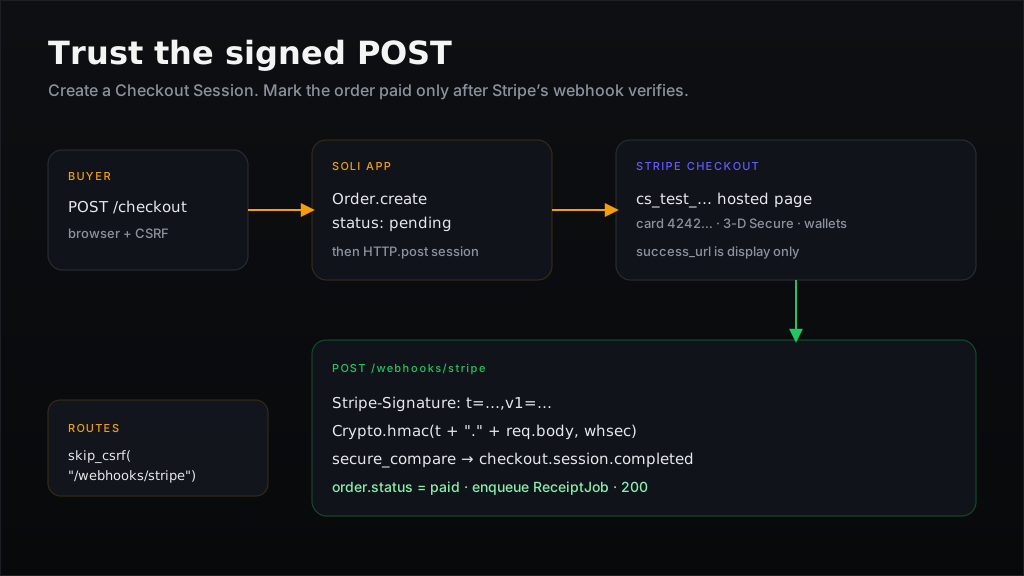
There is no soli generate stripe. Payments are a short, sharp path you should
be able to read end to end: create a Checkout Session, send the buyer to Stripe,
and mark the order paid only when Stripe POSTs a signed webhook. The success
URL is a thank-you page, not a source of truth.
This post builds that path with Checkout (hosted payment page), a webhook that
verifies Stripe-Signature, and an idempotent fulfill. No Stripe SDK, no extra
process — HTTP.post, Crypto.hmac, secure_compare, and skip_csrf.
The Shape
app/models/order.sl
app/services/stripe.sl                 # Checkout + signature check
app/controllers/checkouts_controller.sl
app/controllers/webhooks_controller.sl
app/views/checkouts/new.html.slv
app/views/checkouts/success.html.slv
config/routes.sl                       # skip_csrf on the webhook
The controller that starts Checkout never decides "this is paid". The webhook does, after it has verified the signature on the raw body.
sequenceDiagram
  participant Buyer
  participant Soli
  participant Stripe
  Buyer->>Soli: POST /checkout
  Soli->>Stripe: create Checkout Session
  Stripe-->>Soli: url + session id
  Soli-->>Buyer: 302 to Stripe
  Buyer->>Stripe: pay
  Stripe->>Soli: POST /webhooks/stripe (signed)
  Soli->>Soli: verify HMAC, fulfill once
  Buyer->>Soli: GET /checkout/success (display only)
Step 1: A Stripe account and two secrets
- Create a Stripe account and stay in test mode.
- Developers → API keys: copy the
Secret key (
sk_test_…). - Create a Product with a Price
(
price_…). You can also passprice_datainline; a Price id keeps the catalogue in the Dashboard. - Developers → Webhooks → Add
endpoint. For local work, skip the Dashboard and use the CLI (step 7).
Copy the Signing secret (
whsec_…).
# .env — never commit these
STRIPE_SECRET_KEY=sk_test_...
STRIPE_WEBHOOK_SECRET=whsec_...
STRIPE_PRICE_ID=price_...
APP_BASE_URL=http://localhost:3000
getenv inside the service, not at file load, so a .env edit + --dev
reload picks up a new key.
Step 2: Skip CSRF on the webhook only
Stripe POSTs from their servers with no browser Origin and no Soli CSRF
token. The scaffold already comments this case:
# config/routes.sl
skip_csrf("/webhooks/stripe")

post("/checkout", "checkouts#create")
get("/checkout/success", "checkouts#success")
get("/checkout/cancel", "checkouts#cancel")
post("/webhooks/stripe", "webhooks#stripe")
Do not SOLI_DISABLE_CSRF=true for this. Only this path is a machine
callback; the Checkout start is a browser form and must keep the token
form_with already embeds.
Step 3: Persist an order first
Create the row before talking to Stripe, then put its id on the session as
client_reference_id / metadata. The webhook will look the order up from
that, not from the query string of the success URL.
# app/models/order.sl
class Order < Model
  validates("email", { "presence": true })
  validates("status", { "presence": true })
end
Statuses you actually use: pending → paid (and later refunded if you
handle charge.refunded). Do not invent a paid row only after Checkout
returns.
Step 4: A thin Stripe wrapper
Stripe's REST API is form-urlencoded. HTTP.post + url_encode is enough.
# app/services/stripe.sl
class Stripe
  CHECKOUT_URL = "https://api.stripe.com/v1/checkout/sessions"
  TOLERANCE_SECS = 300

  static def secret
    key = getenv("STRIPE_SECRET_KEY")
    raise("STRIPE_SECRET_KEY is not set") if key.blank?
    key
  end

  static def webhook_secret
    key = getenv("STRIPE_WEBHOOK_SECRET")
    raise("STRIPE_WEBHOOK_SECRET is not set") if key.blank?
    key
  end

  static def create_checkout_session(order)
    base = getenv("APP_BASE_URL") || "http://localhost:3000"
    price = getenv("STRIPE_PRICE_ID")
    raise("STRIPE_PRICE_ID is not set") if price.blank?

    body = [
      "mode=payment",
      "line_items[0][price]=#{url_encode(price)}",
      "line_items[0][quantity]=1",
      "success_url=#{url_encode(base + "/checkout/success?session_id={CHECKOUT_SESSION_ID}")}",
      "cancel_url=#{url_encode(base + "/checkout/cancel")}",
      "client_reference_id=#{url_encode(str(order.id))}",
      "metadata[order_id]=#{url_encode(str(order.id))}",
      "customer_email=#{url_encode(order.email)}"
    ].join("&")

    HTTP.post(CHECKOUT_URL, body, {
      "headers": {
        "Authorization": "Bearer #{Stripe.secret()}",
        "Content-Type": "application/x-www-form-urlencoded"
      }
    })
  end

  # Stripe-Signature: t=<unix>,v1=<hex>[,v1=…,v0=…]
  # signed payload is "#{t}.#{raw_body}" — must be the bytes Stripe hashed,
  # not a re-serialized JSON object.
  static def verify_signature(raw_body, header)
    return false if raw_body.blank? || header.blank?

    parts = {}
    for piece in header.split(",")
      eq = piece.index_of("=")
      next if eq < 0
      parts[piece.substring(0, eq).trim()] = piece.substring(eq + 1).trim()
    end

    timestamp = parts["t"]
    given = parts["v1"]
    return false if timestamp.blank? || given.blank?

    age = DateTime.utc().to_unix() - timestamp.to_i()
    return false if age.abs() > TOLERANCE_SECS

    expected = Crypto.hmac("#{timestamp}.#{raw_body}", Stripe.webhook_secret())
    secure_compare(expected, given)
  end
end
A few details that are easy to get wrong:
{CHECKOUT_SESSION_ID}is Stripe's placeholder. They substitute it on redirect. Leave the braces in the success URL.Crypto.hmacreturns lowercase hex, which matches Stripe'sv1.secure_compare, never==, for the digest.- Reject stale
t. Five minutes is Stripe's default tolerance. Without it, a captured signed body stays valid forever. - Several
v1values can appear (rolling secrets). The snippet above takes the firstv1. If you rotate secrets, loop everyv1=and succeed if any matches.
Stripe's official libraries also try v0 (test helper). You can ignore v0
in production.
Step 5: Start Checkout from the app
# app/controllers/checkouts_controller.sl
class CheckoutsController < Controller
  def new
    render("checkouts/new")
  end

  def create
    email = params["email"].to_s.trim()
    order = Order.create({
      "email": email,
      "status": "pending",
      "amount_cents": 2000
    })
    unless order.valid?
      @order = order
      return render("checkouts/new")
    end

    response = Stripe.create_checkout_session(order)
    payload = json_parse(response["body"]) rescue {}

    if response["status"] != 200 || payload["url"].blank?
      order.update({ "status": "failed", "error": str(payload["error"]) })
      @error = "Could not start checkout"
      @order = order
      return render("checkouts/new")
    end

    order.update({ "stripe_session_id": payload["id"] })
    redirect(payload["url"])
  end

  def success
    # Display only. Payment is confirmed in the webhook.
    @session_id = params["session_id"]
    @order = Order.find_by("stripe_session_id", @session_id) if @session_id.present?
    render("checkouts/success")
  end

  def cancel
    render("checkouts/cancel")
  end
end
The new-checkout form is an ordinary form_with POST so CSRF applies:
<%# app/views/checkouts/new.html.slv %>
<h1>Checkout</h1>
<%- form_with({ "url": "/checkout" }) do |f| -%>
  <%- f.email_field("email", {"placeholder": "you@example.com", "required": true}) %>
  <%- f.submit("Pay with Stripe") %>
<%- end -%>
If your form_with helper needs a record, a hand-written form plus
csrf_field() is the same contract:
<form method="post" action="/checkout">
  <%- csrf_field() %>
  <input type="email" name="email" required>
  <button type="submit">Pay with Stripe</button>
</form>
The success page should say we're confirming your payment, and show
paid only if the order already is. A fast webhook often wins the race; a
slow one must not look like a failed charge.
Step 6: Fulfill on the webhook — once
# app/controllers/webhooks_controller.sl
class WebhooksController < Controller
  def stripe
    raw = req["body"].to_s
    header = req["headers"]["stripe-signature"].to_s
    unless Stripe.verify_signature(raw, header)
      return { "status": 400, "body": "invalid signature" }
    end

    event = json_parse(raw) rescue null
    return { "status": 400, "body": "invalid json" } if event.nil?

    type = event["type"].to_s
    data = event["data"]["object"] || {}

    if type == "checkout.session.completed"
      fulfill_checkout(event["id"], data)
    end

    { "status": 200, "body": "ok" }
  end

  def fulfill_checkout(event_id, session)
    order_id = session["client_reference_id"] || (session["metadata"] || {})["order_id"]
    return if order_id.blank?

    order = Order.find(order_id) rescue null
    return if order.nil?

    # Stripe retries webhooks. A second delivery must be a no-op.
    return if order.status == "paid"
    return if order.stripe_event_id == event_id

    unless session["payment_status"] == "paid"
      return
    end

    order.update({
      "status": "paid",
      "stripe_event_id": event_id,
      "stripe_session_id": session["id"],
      "paid_at": DateTime.utc()
    })

    ReceiptJob.perform_later({ "order_id": str(order.id) })
  end
end
Order.find raises if the id is unknown — rescue and return 200 so Stripe
does not retry a payload you will never apply. Return 400 only for a bad
signature or unreadable body; a 2xx tells Stripe to stop.
Fulfillment that sends mail or talks to another API belongs in a job (Jobs), not in the webhook action. The webhook's job is: verify, persist, enqueue, 200.
Step 7: Develop with the Stripe CLI
Dashboard endpoints cannot reach localhost. Forward events:
stripe listen --forward-to localhost:3000/webhooks/stripe
The CLI prints a whsec_… — put that in STRIPE_WEBHOOK_SECRET while
listening. Trigger a test payment:
stripe trigger checkout.session.completed
Or click through Checkout with test card 4242 4242 4242 4242, any future
expiry, any CVC.
What not to do
- Do not mark paid on
GET /checkout/success. Anyone can open that URL. - Do not HMAC
json_stringify(req["json"]). Key order and whitespace will not match Stripe's bytes. Signreq["body"]. - Do not skip the timestamp check.
- Do not log
sk_/whsec_values. Logevent["id"]andorder.id. - Do not generate a Stripe integration. The surface is small; the
mistakes (success-URL fulfillment, re-serialized HMAC, missing
skip_csrf) are cheaper to review in your app than to hide behind a scaffold you never read.
Going further
- Subscriptions:
mode=subscriptionand listen forcustomer.subscription.updated/invoice.paidthe same way. - Customer portal: create a
Billing Portal session
with the same
HTTP.postform pattern. - Idempotency keys on session create (
Idempotency-Keyheader) if a double-click on Pay could open two sessions for one order. - Connect / multiple prices: still one webhook; branch on
event["type"]and keep fulfillment idempotent.
The money path should stay boring: one signed POST you can read in a page of Soli, and a status column you only advance from that POST.