Watching an AI Agent Think: Live Progress with Server-Sent Events
An AI agent that does real work — plan a task, call a few tools, read some sources, synthesize an answer — is slow. Not slow like a slow query; slow like ten-to-sixty seconds of wall-clock while several model calls happen back to back. If all the user sees is a spinner, two things go wrong: they assume it's broken and refresh (kicking off the whole expensive run again), or they leave (and you keep burning tokens for nobody).
The fix isn't a fancier spinner. It's telling the user what's happening, as it happens: "planning…", "searching 2 of 4…", "writing the summary…", then the answer. That's a one-way stream of progress events from the server to the browser — which is exactly what Server-Sent Events are for, and Soli now streams them with a single sse(...) block.
This post builds a small research agent that streams its progress live. No WebSocket handshake, no client framework, no polling.
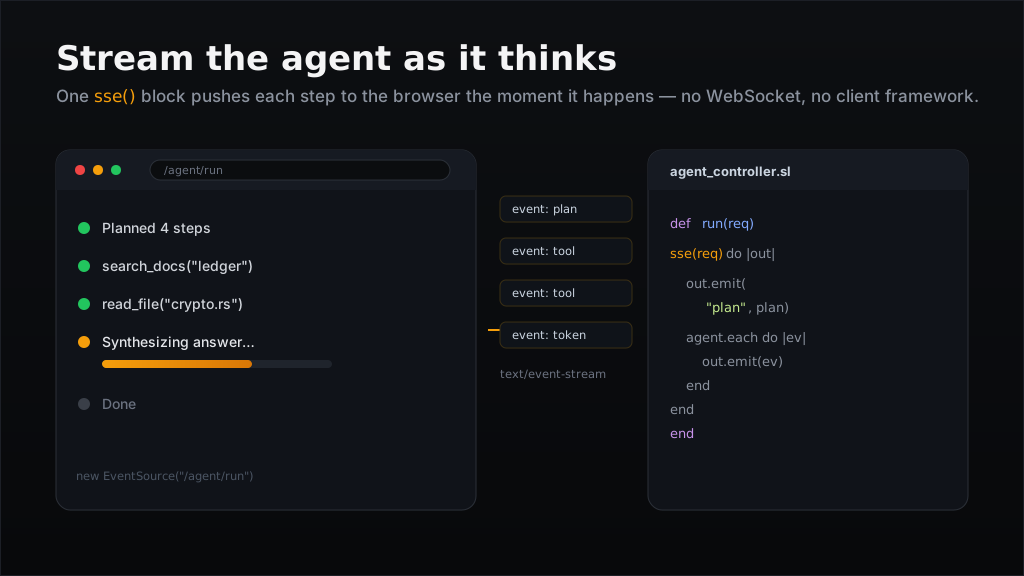
sse() block on the server pushes each step to the browser's EventSource the moment it happens — the user watches the agent work instead of staring at a spinner.Why SSE (and not WebSockets)
Progress reporting is one-directional: the server talks, the browser listens. SSE fits that shape perfectly and costs almost nothing:
- It's plain HTTP with
Content-Type: text/event-stream— works through proxies and needs no upgrade handshake. - The browser's built-in
EventSourceparses framed events and reconnects automatically if the connection drops. - You get named events (
event: status) and multi-line data for free.
Reach for WebSockets when you need the browser to talk back mid-stream; reach for Live View when you want server-rendered reactive UI. For "show me progress," SSE wins on simplicity.
The shape
A controller action returns sse(req) with a block. Soli holds the connection open and flushes each event as you emit it:
def run(req)
  sse(req) do |out|
    out.emit("hello", "status")   # event: status\n data: hello\n\n
    out.emit("world")             # a plain data: event
  end
end
out.emit(data, event?) sends one event; multi-line data is split into multiple data: lines per the SSE spec. Crucially, out.emit returns false when the client has disconnected — so an agent can bail out instead of running (and paying for) three more model calls no one will read.
The agent
Here's a research agent: it asks a model to break the question into steps, runs each step, then synthesizes a final answer — emitting an event at every stage. Because HTTP.* returns the complete response (it buffers, rather than streaming tokens), we stream progress per step, which is exactly the granularity a user cares about.
# app/controllers/agent_controller.sl

def run(req)
  question = params["q"] ?? "What changed in the last release?"

  sse(req) do |out|
    out.emit("Planning the work…", "status")
    steps = plan_steps(question)          # one quick model call -> a list
    out.emit(steps.to_json, "plan")

    findings = []
    total = len(steps)
    i = 0
    for step in steps
      i = i + 1
      # The user closed the tab? Stop now — don't pay for the rest.
      return unless out.emit("Step #{i}/#{total}: #{step}", "status")
      findings.push(run_step(step))
    end

    out.emit("Synthesizing the answer…", "status")
    answer = synthesize(question, findings)
    out.emit(answer, "result")
    out.emit("done", "end")
  end
end
The model calls themselves are ordinary HTTP. Because the Anthropic API needs custom headers (x-api-key, anthropic-version), use HTTP.request(method, url, headers, body) — the convenience HTTP.post(url, body, opts) ignores a headers option:
# Defaulting to the latest Claude models for AI work; Sonnet keeps a
# multi-step agent cheap, swap in claude-opus-4-8 for the hardest reasoning.
def ask_claude(prompt)
  res = HTTP.request("POST", "https://api.anthropic.com/v1/messages", {
    "x-api-key": getenv("ANTHROPIC_API_KEY"),
    "anthropic-version": "2023-06-01",
    "content-type": "application/json"
  }, {
    "model": "claude-sonnet-4-6",
    "max_tokens": 1024,
    "messages": [{ "role": "user", "content": prompt }]
  }.to_json)

  body = JSON.parse(res["body"])
  return body["content"][0]["text"]
end

def plan_steps(question)
  raw = ask_claude("Break this into 2-4 short research steps, one per line:\n" + question)
  return raw.split("\n").map(fn(s) s.trim()).filter(fn(s) !s.blank?)
end

def run_step(step)    return ask_claude("Research this and answer concisely:\n" + step) end
def synthesize(q, f)  return ask_claude("Question: #{q}\n\nNotes:\n" + f.join("\n\n") + "\n\nWrite the final answer.") end
Wire the route:
# config/routes.sl
get("/agent/run", "agent#run")
That's the whole server side. No queue, no background worker, no WebSocket session — the request is the stream.
The browser
EventSource does the heavy lifting. Subscribe to the named events and append to a log; close the connection when the end event arrives so it doesn't auto-reconnect and re-run the agent:
<form id="ask">
  <input name="q" placeholder="Ask the agent…" size="40">
  <button>Run</button>
</form>
<ul id="log"></ul>
<div id="answer"></div>

<script>
document.getElementById("ask").addEventListener("submit", (ev) => {
  ev.preventDefault();
  const q = ev.target.q.value;
  const log = document.getElementById("log");
  log.innerHTML = "";

  const es = new EventSource("/agent/run?q=" + encodeURIComponent(q));

  es.addEventListener("status", (e) => addLine("⏳ " + e.data));
  es.addEventListener("plan",   (e) => addLine("📋 " + JSON.parse(e.data).join(" · ")));
  es.addEventListener("result", (e) => { document.getElementById("answer").textContent = e.data; });
  es.addEventListener("end",    ()  => es.close());   // stop — don't reconnect
  es.onerror = () => es.close();

  function addLine(t) {
    const li = document.createElement("li");
    li.textContent = t;
    log.appendChild(li);
  }
});
</script>
Now the page narrates the run in real time: Planning the work… → Step 1/3: … → Step 2/3: … → Synthesizing… → the answer. The user knows it's alive, and if they close the tab the next out.emit returns false and the agent stops mid-flight.
Large outputs, same primitive
The sibling of sse is stream(req, content_type), for raw chunked bodies. If your agent produces a big artifact — a generated CSV, a long report — stream it out with out.write(chunk) instead of building the whole string in memory:
def export(req)
  stream(req, "text/csv") do |out|
    out.write("step,finding\n")
    for row in agent_findings()
      out.write(row.step + "," + csv_escape(row.finding) + "\n")
    end
  end
end
One thing to keep in mind
A stream holds one worker thread for its entire lifetime. Backpressure is automatic — a slow client pauses the block — but if you expect many concurrent long-lived streams, size your worker pool accordingly, and always honor the false return from out.emit so abandoned runs free their worker promptly. For a handful of agent runs at a time, it's a non-issue, and the UX payoff is enormous.
See the Streaming & SSE reference for the full API.