soli serve on Any Folder — and the One URL That Has Two Answers
Until this release, running soli serve outside a project got you this:
Error: Invalid MVC structure: /home/you/notes/app/controllers does not exist.
       Expected app/controllers/ directory. at 0:0
Exit 70. Which is a strange thing for a web framework's binary to say. You have an HTTP server, a template engine, a Markdown converter and a syntax highlighter all compiled into that executable, and it refuses to show you a folder of notes.
Now it does. Point soli serve at a directory with no app/controllers/ and no
config/routes.sl and it serves that directory as a website: files off disk,
.md rendered as pages, .slv/.erb templates executed, and a generated index for
every folder with a tree(1) sidebar. No config file, no scaffolding, no build step.
soli serve ./notes --dev
# Serving files from /home/you/notes
# Server listening on http://127.0.0.1:5011
Most of that is unremarkable plumbing. One part of it isn't, and it's the part worth writing about: the same URL has to return two completely different things depending on who asks for it.
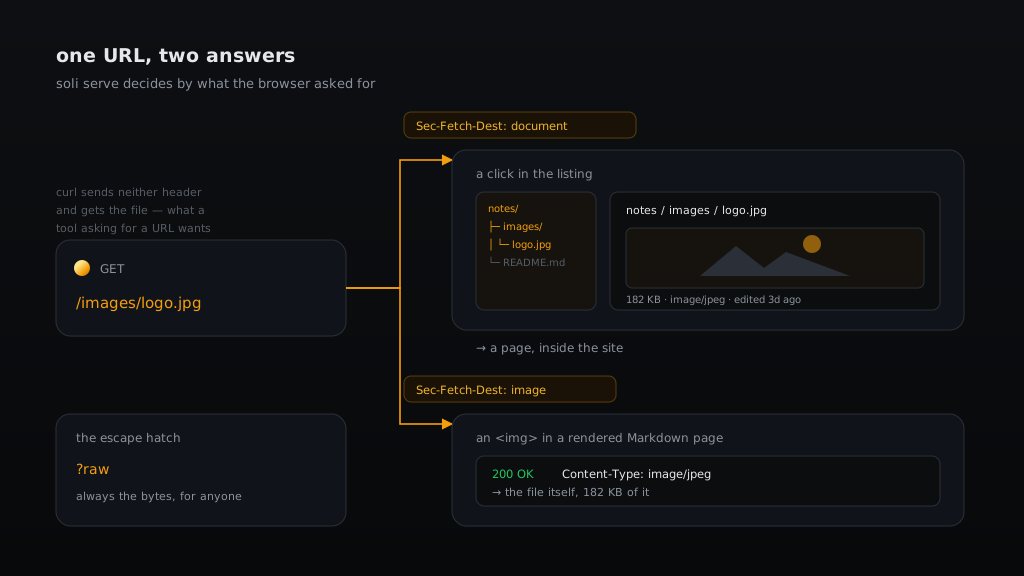
<img> differently — because they are asking different questions.The problem: a picture is not a page about a picture
Start with a reasonable feature request. You click a .jpg in a directory listing
and the browser navigates to the raw bytes: you leave the site, lose the tree,
and land on a picture centred on a blank background with the back button as your
only way home. Every file manager on the web has this problem.
So: render a viewer page instead. Show the image inside the shell, with its breadcrumb, its sidebar, its size and type. Easy.
Except a Markdown file in that same folder contains this:
<img src="/images/logo.jpg">
and that <img> needs the file, not a page about the file. Serve the viewer
there and every image on every rendered page turns into a nested HTML document.
The naive fix breaks the feature it was built to complement.
The two requests are for the identical URL. Same method, same path, same server. Nothing in the request line distinguishes them.
The signal is already in the request
Browsers have told servers what a request is for since around 2020, via the Fetch Metadata headers. A top-level navigation sends:
Sec-Fetch-Dest: document
and a subresource load from an <img> sends:
Sec-Fetch-Dest: image
That is exactly the distinction we need, stated by the browser, with no guessing. The whole decision is nine lines:
# Conceptually, in Soli terms — the real one is in src/serve/files/preview.rs
def wants_viewer(headers, query)
  return false if raw_requested(query)

  let dest = headers["sec-fetch-dest"]
  return dest == "document" if dest.present?

  # Older browsers: a navigation asks for HTML first, an <img> does not.
  return (headers["accept"] ?? "").includes?("text/html")
end
Three properties fall out of this, and each one matters:
curl gets the file. It sends neither Sec-Fetch-Dest nor an HTML Accept,
so it falls through to the bytes. curl -O http://localhost:5011/images/logo.jpg
produces a JPEG, not an HTML page named logo.jpg. A tool asking for a URL wants
the resource, and the default should never surprise a script.
Old browsers degrade sensibly. Accept: text/html,… is the fallback and it is
right far more often than not, because that is precisely what navigations send.
?raw overrides everything. The viewer's own <img> tag and its download link
point at ?raw, so the viewer can never recurse into itself no matter what a
browser decides to send. That is not paranoia — a viewer that renders itself inside
itself is exactly the kind of bug you find in production, not in tests.
The test that pins this down is the one I care about most in the whole module:
#[test]
fn clicking_an_image_opens_a_viewer_but_embedding_it_does_not() {
    // A click: the picture arrives wrapped in the shell.
    // An <img> inside a rendered Markdown page: the bytes.
    // This is the case that must never regress.
}
Offline is a design constraint, not a footnote
soli serve has to work on a plane. That rules out a CDN, which rules out
highlight.js, which is how most static servers colour code.
The interesting consequence is that the constraint produced a better answer than
the CDN would have. The binary already contains Soli's lexer — it's how
soli test --coverage renders its HTML report. So fenced ```soli blocks are
highlighted server-side by re-lexing them with the actual language implementation.
Not a regex approximation of Soli. Soli.
Every other language renders as plain monospace with the fence's info string shown as a label. That is a deliberate refusal: a heuristic highlighter is confidently wrong on exactly the code you were squinting at, and being visibly uncoloured is more honest than being subtly incorrect.
The same lexer highlights .sl and .slv files when you open them in the viewer.
index replaces, README describes
A folder gets its listing generated — folders first, then files, leader dots out to size and last-edit, no icons anywhere. Two conventions modify that:
| File | Effect |
|---|---|
README.md | rendered above the listing |
index.html, index.htm, index.md, index.slv, index.erb, … | replaces the listing entirely |
That split is GitHub's, and every static host's, and it is worth stating because it is easy to get subtly wrong. A README describes a directory; an index is the directory's page. Each index form is then served by its own rule — HTML as-is, Markdown rendered into the shell, templates executed.
One consequence to know: put both an index.md and a README.md in a folder and
the index wins outright. The README is still reachable at its own URL, but nothing
links to it any more.
Two things a file server should get right by default
It binds loopback. soli serve on a directory you happened to cd into should
not publish it to the coffee shop's wifi because you forgot a flag. File mode
defaults to 127.0.0.1; SOLI_HOST=0.0.0.0 opts in deliberately. MVC apps are
unchanged — they are things you meant to deploy.
Dotfiles are invisible. Any path segment starting with . returns 404 — not
403, which would confirm the file exists. The check runs on the canonicalized
path, so a symlink named notes pointing at .env is hidden too, and a symlink
escaping the served root is a flat 403. The mode never loads .env, never
configures a database, and never executes a .sl file.
Templates are the honest exception: a .slv file is code and it is executed.
The mode is for directories whose contents you control. The docs say so in a box
with a red border.
The sidebar taught me something about page weight
The sidebar renders the whole tree, so client-side filtering can search everything without a round trip. Point that at a JavaScript project and the first version produced 594 KB per page.
Three fixes, none of them clever:
- One prefix span per row instead of one per depth level. The rail lights per row, not per segment, so the extra elements bought nothing.
- Drop the
data-pattribute duplicating thehref; the filter derives its key from the link it already has. - Emit the animation-delay variable only on the rows that actually animate — the handful on the current path, not all of them.
That got it to 338 KB. Lowering the walk cap from 2000 entries to 1000 finished the job at 182 KB, and nobody scans a thousand-row sidebar anyway. When the cap truncates, the sidebar says so — silent truncation reads as "I listed everything" when it didn't. Folder index pages read their directory directly and are never capped.
What it's for
Reading a project's own docs/ folder without booting the project. Checking what
a build output directory actually contains. Sharing a handbook on the LAN for an
afternoon. Writing notes with --dev on, so saving a .md refreshes the tab.
soli serve ./docs --dev          # your docs, live-reloading
soli serve ./dist                # what did the build actually produce?
soli serve . --static            # force file mode inside a Soli app
soli serve . --app               # require an app; fail loudly if it isn't one
Detection is automatic. --static and --app pin it when you'd rather be explicit,
and --app keeps the old error verbatim — including the exit code — so nothing that
worked before behaves differently now.
Full reference: Static & Markdown Server.