How to Operate a Release Channel
Shipping a soli build --standalone or soli desktop build artifact used to mean
freezing a binary in amber. Users downloaded it once, and every fix after that
was a support email: "please re-download." Auto-update closes that loop — the
artifact checks a channel you control, verifies a signed manifest, and replaces
itself.
The hard part is not the code. The hard part is operating the channel: keys, versioning, canaries, rollbacks, and the day someone loses the private key. This post is that runbook. For the feature surface itself, see the auto-update docs.
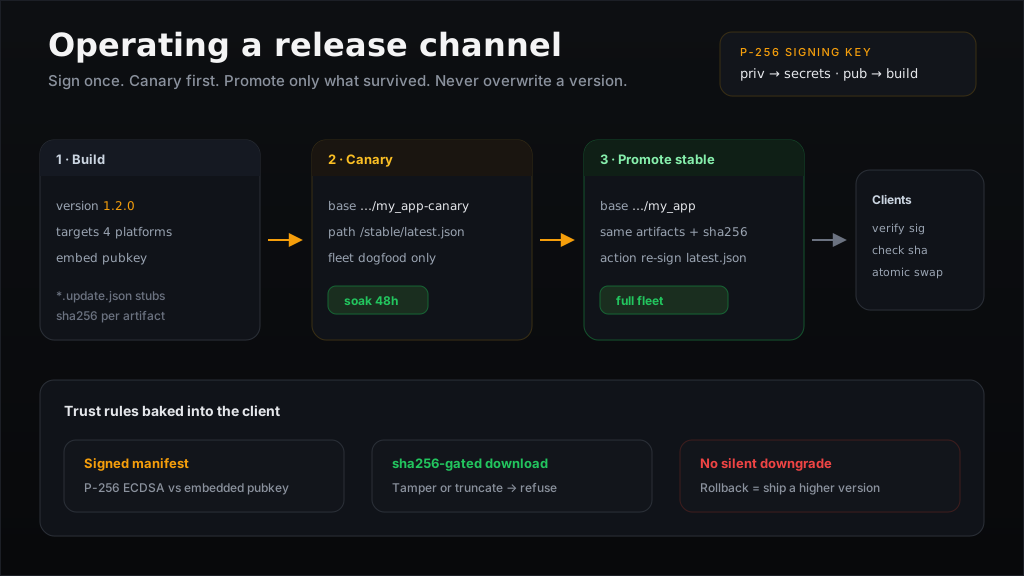
What a channel actually is
An updatable artifact embeds an update descriptor at build time:
| Field | Role |
|---|---|
app_version | From soli.toml [package] version — what the updater compares against |
update_url | Base URL you own |
channel | Path segment under the base (defaults to stable) |
pubkey | Base64 P-256 public key for manifest verification |
At runtime the app fetches:
{update_url}/{channel}/latest.json
verifies the signature against the embedded public key, picks the artifact for
its own platform (linux-amd64, darwin-arm64, …), checks the sha256, stages
the download, and only then atomically renames it over the installed binary.
So a channel is not a marketing name. It is a directory on your HTTPS host
whose latest.json is the single source of truth for every binary that was
built pointing at that base URL.
Step 0 — Treat the private key like production root
An auto-updater is a remote-code-execution channel with a nicer UI. Whoever holds the signing private key can push any binary to every installed client. Treat it accordingly.
# Once, on an offline or hardened machine
soli update-keygen
You get a PEM private key and a base64 public key. Then:
- Store the private key in a secrets manager (Vault, AWS KMS, 1Password vault with break-glass, HSM if you have one). Not the git repo. Not a Slack DM. Not the laptop of the person who "always does releases."
- Embed only the public key in every production build via
--update-key. - Restrict who can run
soli sign-update. Ideally one CI job with the secret injected, never a shared shell history. - Log every signature. Who signed what version, when, from which commit SHA. When something goes wrong, you will want that trail.
Unsigned manifests are accepted only when no key was embedded at build time, and then only with a loud warning. That path is for local testing. Shipping an unsigned production channel is volunteering for supply-chain compromise.
Layout on the CDN
Pick a base URL you control and keep it boring:
https://updates.example.com/my_app/
├── stable/
│   ├── latest.json
│   ├── myapp-1.2.0-linux-amd64
│   ├── myapp-1.2.0-darwin-arm64
│   └── myapp-1.2.0-windows-amd64
└── canary/                    # optional second base path / cohort
    ├── latest.json
    └── …
Builds currently embed channel: "stable" by default, so production clients
resolve {base}/stable/latest.json. A second cohort (internal dogfood, beta
testers) is easiest today as a second base URL:
# Production fleet
--update-url https://updates.example.com/my_app

# Dogfood fleet (same channel name, different base → different latest.json)
--update-url https://updates.example.com/my_app-canary
Both resolve …/stable/latest.json under their own base. Same signing key,
different manifests, independent promotion. When you want to promote canary to
production, you re-point the stable manifest at the same (already-signed)
artifact URLs, or re-sign an identical payload under the production path.
Keep artifacts immutable: once myapp-1.2.0-linux-amd64 is uploaded, never
overwrite it. New content always gets a new version number. Overwriting a URL
breaks the sha256 contract and makes incident forensics impossible.
The release checklist
This is the whole job, every time:
1. Bump the version first
# soli.toml
[package]
version = "1.2.0"
The updater refuses anything that is not strictly greater than the running version. Forgetting the bump means every client reports "already up to date" while you stare at a freshly uploaded binary.
2. Build every platform you ship
PUBKEY=$(cat update-pubkey.b64)
BASE=https://updates.example.com/my_app

for target in linux-amd64 linux-arm64 darwin-arm64 windows-amd64; do
  soli build ./my_app --standalone \
    --target "$target" \
    --output "dist/myapp-${target}" \
    --update-url "$BASE" \
    --update-key "$PUBKEY"
done
Each build drops a *.update.json stub next to the artifact — version, sha256,
size, and a guessed URL. Those stubs are the raw material for the manifest.
3. Assemble latest.json
{
  "version": "1.2.0",
  "notes": "Faster startup. Fix double-submit on checkout.",
  "artifacts": {
    "darwin-arm64": {
      "url": "https://updates.example.com/my_app/stable/myapp-1.2.0-darwin-arm64",
      "sha256": "…",
      "size": 60123904
    },
    "linux-amd64": {
      "url": "https://updates.example.com/my_app/stable/myapp-1.2.0-linux-amd64",
      "sha256": "…",
      "size": 57656963
    }
  }
}
Edit the stub URLs to match where you will actually host the files. Clients download exactly the URL you put here — no rewriting on their side.
Write release notes for humans. They surface in --check-update and in
Updater.check()["notes"], so "misc fixes" is a missed opportunity.
4. Sign, then upload
soli sign-update latest.json --key /secrets/update-private.pem
# uploads: latest.json + every artifact to the URLs in the manifest
Order matters operationally even though the client verifies before applying:
- Upload the binaries first (clients may race the promote).
- Upload
latest.jsonlast — that is the atomic flip for the channel.
HTTPS is required in production. The client also floors TLS at 1.2.
5. Smoke the channel before you walk away
# On a machine that already runs 1.1.0
./myapp --check-update
# → Update available: 1.1.0 → 1.2.0

./myapp --update
# → updated to v1.2.0

./myapp --check-update
# → already on latest
Also verify a negative path once per key ceremony: flip one byte of a downloaded binary and confirm the sha256 check refuses it; strip the signature and confirm the client refuses the manifest. Trust is only real if failure is loud.
Canary before stable
Do not point the entire fleet at a release the same minute CI finishes. A minimal canary pipeline:
flowchart LR
  Build[Build + sign] --> CanaryCDN["canary base /stable/latest.json"]
  CanaryCDN --> Dogfood[Dogfood fleet]
  Dogfood -->|soak 24–72h| Promote[Copy artifact URLs into production latest.json]
  Promote --> Sign[Re-sign production manifest]
  Sign --> StableCDN["production base /stable/latest.json"]
  StableCDN --> Fleet[All clients]
Practically:
- Build once. Artifacts are content-addressed by sha256; reusing them is fine.
- Publish that version under the canary base first.
- Ship dogfood installs with
--update-urlpointing at the canary base (internal team, 5% of devices, a single office, …). - Watch error rates, crash reports, and support tickets for a soak window.
- Promote by publishing the same version and same artifact URLs under the
production base (re-sign the production
latest.json). Clients already on canary see "already up to date"; production clients climb the version ladder.
If canary is bad, do not promote. Fix forward on canary with 1.2.1.
Production never saw 1.2.0.
Rollback is a forward release
This is the rule people fight until it bites them:
The updater never installs a version older than or equal to the running one. Downgrades are refused on purpose.
You cannot "roll back" by republishing 1.1.0 after 1.2.0 has gone out.
Clients on 1.2.0 will ignore it forever.
The correct rollback is:
1.2.0  →  bad release (out in the wild)
1.2.1  →  1.1.0 code + a version bump  (or a proper fix)
Bump the version, rebuild (or re-tag the known-good tree), sign a new manifest,
publish. The bad binary stays on the CDN as historical truth; it simply stops
being what latest.json points at.
If you need an emergency stop and cannot ship a fix yet: leave latest.json on
1.2.0 and stop building new installs from that tag. Existing clients stay on
the bad version until you ship 1.2.1 — which is why canaries exist.
Key rotation
Rotating the signing key is a fleet rebuild, not a CDN edit. The public key is baked into every already-shipped artifact. A new private key can sign forever; old clients will reject those signatures because they still hold the old public key.
Playbook:
- Generate a new keypair (
soli update-keygen). - From this commit onward, build with the new
--update-key. - Sign new manifests with the new private key.
- Old clients keep updating only if you also keep signing with the old key for as long as old clients matter — or you force a one-time manual reinstall that carries the new pubkey.
There is no dual-signature field today. Practical options:
- Scheduled rotation with a forced reinstall window (enterprise desktop: push a new package via MDM that embeds the new key, then retire the old channel).
- Never rotate unless compromised. Protect the key so hard that rotation is a crisis procedure, not a quarterly chore.
- Compromise response: revoke CDN access for the old host if needed, stand up a new base URL + new key, and require reinstall. Document that path before you need it.
If the private key leaks, assume every client will eventually run attacker code. Rotate, reinstall, and treat it like a production breach.
In-app updates vs CLI
Two consumption paths share the same channel:
./myapp --check-update   # report only
./myapp --update         # download + verify + swap
# Controllers / views inside the shipped app
info = Updater.check()
# { "configured": true, "available": true,
#   "current": "1.1.0", "latest": "1.2.0", "notes": "…" }

result = Updater.apply()
# { "status": "updated", "restart_required": true, "message": "updated to v1.2.0" }
Outside a built artifact (soli serve in development), Updater degrades to
configured: false — so the same controller can render an "update available"
banner in production and stay quiet in dev.
v1 does not silent-auto-apply. That is intentional: unattended binary
replacement is how auto-updaters become malware. Require an explicit
--update or a user click that calls Updater.apply(). After apply, restart
the process so the new binary is the one listening.
What to monitor
A channel is healthy when these stay boring:
| Signal | Why |
|---|---|
HTTP 200 rate on latest.json | CDN or DNS death looks like "no updates" |
| Signature verification failures in support | Wrong key, truncated upload, or active tampering |
| sha256 mismatches | Corrupted upload or partial object on the CDN |
| Version distribution across fleets | Stuck cohorts, canary not soaking, someone still on 1.0.0 |
Time from tag → first successful --update | Your real release latency |
Log Updater.check() results server-side if the app phones home (version,
available, errors). You cannot improve what you cannot see.
Minimal CI sketch
# .github/workflows/release-channel.yml (sketch)
# triggers on tag v*
set -euo pipefail
VERSION=${GITHUB_REF_NAME#v}
# 1. assert soli.toml version == $VERSION
# 2. build matrix of targets with --update-url / --update-key
# 3. merge stubs → latest.json, set notes from CHANGELOG
# 4. soli sign-update latest.json --key "$UPDATE_PRIVATE_KEY"
# 5. aws s3 cp artifacts…  (binaries first)
# 6. aws s3 cp latest.json s3://…/stable/latest.json
# 7. smoke: download latest.json, verify signature offline, curl each artifact URL
The signing step is the only place the private key should appear. Prefer OIDC →
cloud KMS over a long-lived PEM in CI secrets if your threat model warrants it;
the PEM path is what soli sign-update speaks today.
Anti-patterns
- Overwriting artifact URLs when a build is "almost the same." New sha256, new version, new object key.
- Shipping without
--update-key. Unsigned is for laptops, not customers. - Using the same base URL for canary and prod and flipping one
latest.jsonfor both. You lose the ability to soak. - Trying to roll back by republishing an older version. Bump and fix forward.
- Storing the private key in the app repo "just for convenience." Convenience is how private keys end up on GitHub.
- Silent background
Updater.apply()on a timer. Explicit user or operator consent is the product contract in v1.
The short version
- Generate a keypair once; lock the private half away.
- Every release: bump version → multi-platform build with
--update-urland--update-key→ assemblelatest.json→ sign → upload binaries → upload manifest last. - Canary on a separate base URL; promote by re-signing the same payload under production.
- Rollback = ship a higher version that undoes the damage.
- Key rotation = rebuild the fleet; plan it before you need it.
Operate the channel like a production database, not like a file drop. The clients will trust whatever you sign — that is the feature, and the entire responsibility.