A Live Field Desk
The last stretch of LiveView work is easier to feel than to list. Nested components share parent assigns. Files go over HTTP and hydrate into the handler. Tabs patch the URL without dropping the socket. A search box can wait until you pause. A hook owns a sparkline. A job can finish in the background and the board notices.
This post is the walkthrough. The widget under the figure is the same code, running on this page.
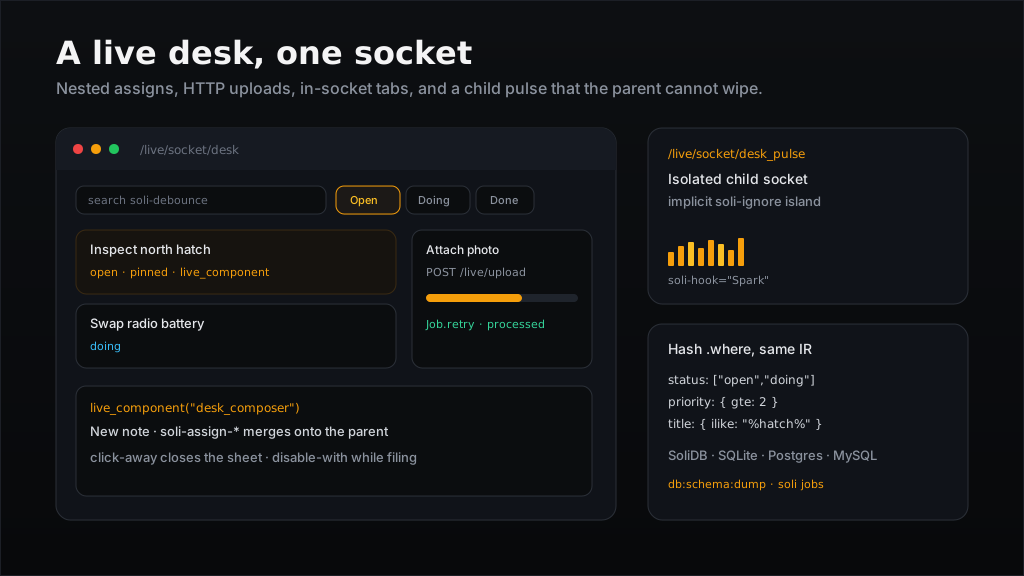
Try the obvious things: search (it waits 280ms), switch Open / Doing / Done (watch the address bar), file a note, open ··· and click away, attach a small image, click the focus boxes. Open a second tab of this post — both sit in data-live-room="field-desk", so a click in one patches the other. The pulse in the footer is a second socket — a parent patch does not wipe it.
What you are driving:
| In the widget | Mechanism |
|---|---|
| Search | soli-change + soli-debounce="280" |
| All / Open / Doing / Done | soli-click="tab" + soli-value-tab (handler may patch: the URL) |
| New note sheet | live_component("desk_composer", …) + soli-click-away |
| Focus boxes | live_component("desk_focus") + soli-assign-focus |
··· menu | soli-click-away="close_menu" |
| Attach a photo | soli-upload="attached" → POST /live/upload |
| “Filing…” / “Updating…” | soli-disable-with |
| Toast | handler js: [{ op: "add_class", … }] |
| Footer sparkline | isolated [data-liveview-url] + soli-hook="Spark" |
The notes on this page live in the handler's state so the docs site does not need a database. In an app you would query them — and that is what the snippets below show.
Three files, then the interesting parts
Register the component, write a template, return state. Same as the Live View guide:
# config/routes.sl
router_live("desk", "live#desk")
router_live("desk_pulse", "live#desk_pulse")
<!-- any page, including this blog post -->
<script src="/live/client.js"></script>
<div data-live-root data-live-room="field-desk" data-liveview-url="/live/socket/desk"></div>
# app/controllers/live_controller.sl
def desk(event_data) {
  event = event_data["event"]
  state = event_data["state"] || {}
  params = event_data["params"] || {}

  if event == "connect"
    { "state": load_desk(params) }
  elsif event == "search"
    load_desk({ "q": params["value"], "tab": state["tab"] })
  else
    state
  end
}
The layout should include csrf_meta_tag() if you use soli-upload — the POST to /live/upload sends X-CSRF-Token.
Filter with a hash, not a raw string
The hash .where used to be equality-only. A { "gt": 10 } silently became ==, and anything richer had to be raw SDBQL — which the SQL adapters refuse. It now compiles through a portable IR:
notes = Note.where({
  "status": ["open", "doing"],          # IN
  "priority": { "gte": 2 },             # comparison
  "title": { "ilike": "%#{q}%" },       # LIKE
  "or": [{ "pinned": true }, { "status": "doing" }]
}).includes("attachments", { "processed": true }).all()
That shape runs on SoliDB, SQL document tables, and column-aware models. Use Model.live_where(filter) inside the handler if a write from another request should wake this board — a job finishing an upload is the usual reason.
On this demo page the same rules run against the in-memory list so you can poke them without a database. The query you ship is the hash above.
Tabs are ordinary clicks. The handler writes the tab onto state and can also push the URL with patch: so the address bar stays in sync:
<button soli-click="tab" soli-value-tab="open">Open</button>
if event == "tab" {
  {
    "state": load_desk({ "tab": event_data["params"]["tab"], "q": state["q"] }),
    "patch": "/desk?tab=#{event_data["params"]["tab"]}"
  }
}
soli-patch="/desk?tab=open" is the other shape — the client updates the URL and sends event == "patch" with params["query"]. On a docs page, instant-nav owns history, so the desk uses the click. soli-href is a full leave, for a regular (non-LiveView) page.
Nested components share parent assigns
A [data-liveview-url] child is its own socket. That is what the pulse uses, so a parent patch cannot wipe the sparkline.
When the child should edit parent state, use live_component. The composer and the focus row are not sockets:
<%- live_component("desk_composer", {
  "draft_title": true,
  "draft_body": true,
  "composer_open": true
}) %>

<%- live_component("desk_focus", { "focus": true }) %>
true copies that key from the parent. A click inside the wrapper can send soli-assign-*; the runtime merges _assigns onto the parent (coercing types) before the handler runs, then the next render fans values back down.
<button soli-click="set_focus" soli-assign-focus="<%= n %>"></button>
<button soli-click="close_composer" soli-assign-composer_open="false">Cancel</button>
This is not Phoenix live_component — there is no update/2 / send_update. Parent state is the source of truth.
Click-away on the composer sheet is the same event machinery:
<form soli-submit="create" soli-click-away="close_composer">
Uploads go over HTTP, then the socket carries an id
WebSocket frames cap at 1 MiB, so bytes never go on the socket. soli-upload POSTs each file to /live/upload and then calls your handler with the same shape as find_uploaded_file:
<input type="file" accept="image/*"
       soli-upload="attached" soli-upload-max="2000000">
if event == "attached" {
  file = event_data["params"]["file"]
  # { "filename", "content_type", "size", "data" } — data is base64
  note.attach_photo(file)
  ProcessAttachmentJob.perform_later({ "note_id": note.id })
  { "state": load_desk(state), "flash": "Queued #{file["filename"]}" }
}
Progress is soli-upload-loading plus data-soli-progress. Put [soli-upload-bar] and img[soli-upload-preview] in the same label — the bar fills during the POST and images preview locally before the handler stores params["file"]["data"] as a data: URL. Not chunked, not resumable, 8 MiB default.
In an app the job is a class under app/jobs/:
class ProcessAttachmentJob {
  static def perform(args: Hash) {
    note = Note.find(args["note_id"])
    note.file_processed = true
    note.save()
  }
}
soli jobs (alias soli worker) runs that work with no HTTP listener — pair with SOLI_JOB_WORKERS=0 on soli serve when you want the queue in another process. Job.retry(id) puts a failed or dead row back on the queue and keeps attempts / last_error. /__soli/jobs is the same cancel/retry surface (--dev open; production
behind SOLI_JOBS_USER/SOLI_JOBS_PASSWORD or SOLI_JOBS_TOKEN).
On this page there is no queue: a short tick marks the attachment ready so you can see the chip flip without standing up SQLite. The job snippet is what you copy.
Hooks, loading states, and eval-free JS
The pulse registers a hook before connect. Auto-connect is skipped on this post (data-liveview-manual) because the docs layout never fires a second DOMContentLoaded after instant-nav; the page script calls live() itself and passes hooks:
SoliLiveView.hooks = {
  Spark: {
    mounted() { this.paint(); },
    updated() { this.paint(); },
    paint() {
      // this.el.dataset.series is JSON from the server
    }
  }
};
Pair hooks with soli-ignore when the widget owns its children. this.pushEvent("name", { … }) sends back over the socket.
While an event is in flight the control gets soli-loading / soli-click-loading. soli-disable-with="Filing…" swaps the label until the next patch.
A handler can also push commands — no eval:
{
  "state": next,
  "js": [{ "op": "add_class", "to": "#desk-toast", "class": "desk-toast-on" }]
}
add_class / remove_class / toggle_class, set_attr / remove_attr, focus, dispatch, navigate, patch. Unknown ops are skipped.
Schema dump, when the desk is a real app
Once the notes live in SQLite (or Postgres, or MySQL), freeze the schema so a fresh database does not replay every migration:
soli db:schema:dump     # writes db/schema.sql
soli db:schema:load     # rebuilds from that file
Dedicated adapter notes: SQLite, Postgres, MySQL.
What this widget is not
- Not Phoenix
live_component/allow_upload/live_patchby another name. The ideas rhyme; the APIs are smaller on purpose. - Uploads are one POST per file, not a chunked consume pipeline.
- Independent child sockets stay isolated. Shared assigns are
live_component+soli-assign-*. - Instances and
live_wheresubscriptions are per process.
The reference for every directive is Live View. Jobs and the standalone worker are in Jobs & Cron.