LiveView: Real-Time Server-Rendered UIs Without Writing JavaScript
For years the industry has oscillated between two painful extremes.
On one end: full-page reloads or HTMx-style partial updates feel simple but leave you with stale data the moment anything interesting happens in the background. On the other end: you reach for React, a WebSocket library, client-side state management, and three new packages just to show "three people are currently viewing this ticket."
Soli LiveView sits in the pragmatic middle. You keep your state on the server (where it already lives), you write ordinary Soli code, and the framework ships a compact patch for the changed region over a WebSocket. The client — ~7 KB gzipped, served by the soli binary itself at /live/client.js — morphs the DOM in place to match, so focus, caret position, and client-side widget state survive updates. There is no client-side framework, no build step, and no second mental model to maintain.
If you've used Phoenix LiveView, the mental model will feel familiar — though Soli's directive set is a smaller subset. If you haven't, the idea is surprisingly simple: a LiveView component is just a function that receives events and returns new state. The framework handles everything else.
The Mental Model
A LiveView component consists of three small pieces:
- A route registration —
router_live("component_name", "controller#action") - A template (
.html.slvfile) — regular ERB HTML where each state key is a plain variable, plus a handful ofsoli-*directives - A handler function — receives
{ "event", "params", "state" }and returns the next state (or{ "state": ..., "tick_interval": ms }to enable server-pushed updates)
When the browser connects, Soli renders the initial HTML and sends it down. Every subsequent user action (click, submit, input, etc.) is sent over the socket as a tiny JSON event. Your handler runs, produces new state, the template is re-rendered, and just the changed lines travel down the wire — the client then morphs the live region's DOM to match, mutating nodes in place instead of replacing them.
No virtual DOM to manage, no diffing library to configure. Just state transitions in Soli.
A Real, Useful Widget: Live Team Presence + Activity Feed
Theory is cheap. Let's build something you would actually ship.
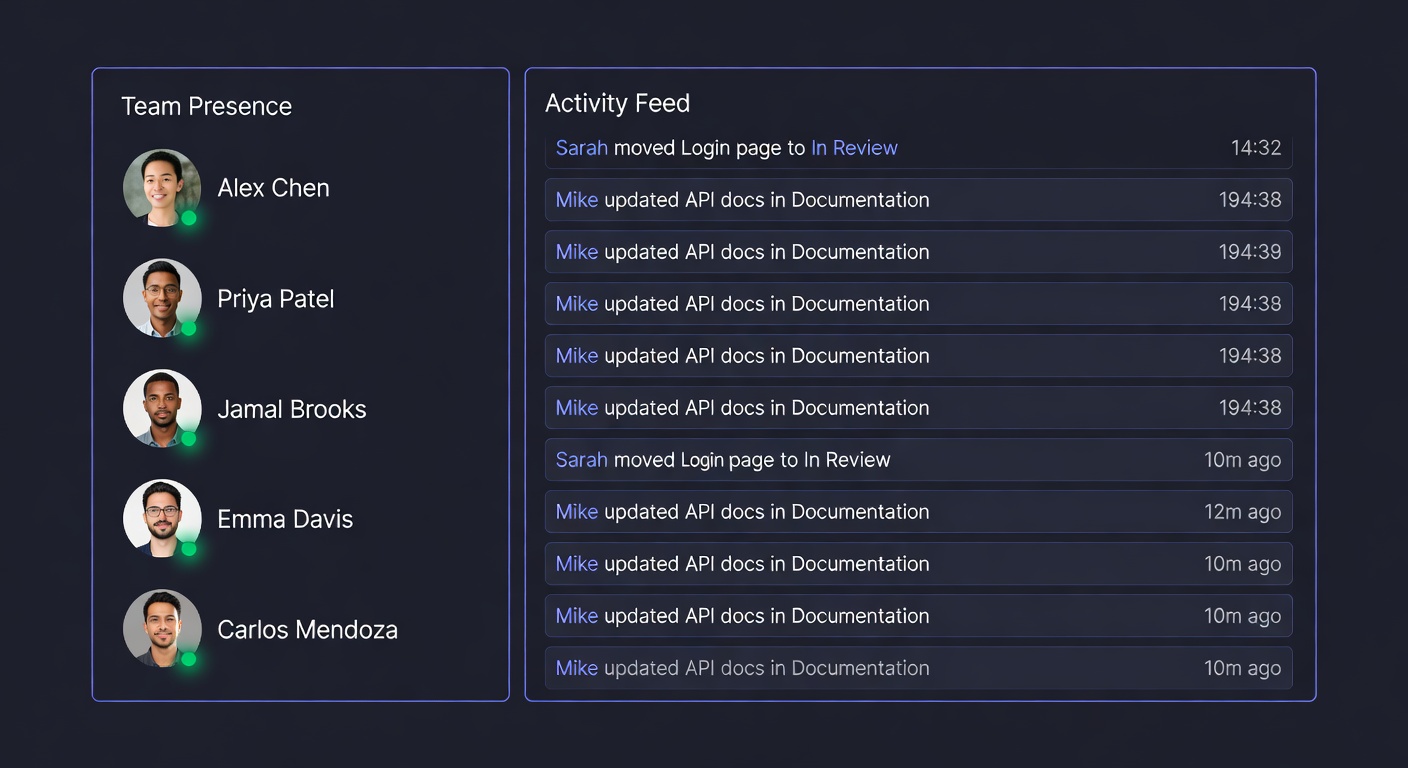
We're going to create a sidebar widget that shows:
- Which teammates are currently "in" the project workspace
- A live, append-only activity feed (someone moved a card, left a comment, changed a status)
- The ability for the current user to perform common actions that immediately appear in everyone else's feed
- Background simulation of other people's activity so the demo feels alive even when you're the only one looking at it
This pattern appears in almost every internal tool, client portal, or collaboration surface you will ever build.
Step 1: Register the Route
In config/routes.sl:
router_live("project_activity", "dashboard#project_activity");
The first argument is the component name (used in the WebSocket path /live/socket/<component> and as the template filename). It is not a URL path.
Step 2: The Template (app/views/live/project_activity.html.slv)
<div class="live-activity-widget border border-white/10 bg-slate-950/60 rounded-2xl overflow-hidden flex flex-col h-[520px] shadow-2xl shadow-black/40">
  <!-- Header -->
  <div class="px-4 py-3 border-b border-white/10 bg-white/[0.02] flex items-center justify-between">
    <div class="flex items-center gap-2">
      <div class="w-2 h-2 rounded-full bg-emerald-400 animate-pulse"></div>
      <span class="text-sm font-semibold text-white tracking-tight">Team Activity</span>
    </div>
    <span class="text-[10px] font-mono px-2 py-0.5 rounded bg-white/5 text-gray-400"><%= presence.length %> online</span>
  </div>

  <!-- Presence row -->
  <div class="px-4 py-3 border-b border-white/10 bg-black/20">
    <div class="flex -space-x-2">
      <% for person in presence %>
        <div class="w-7 h-7 rounded-full ring-2 ring-slate-950 overflow-hidden border border-white/10" title="<%= person["name"] %>">
          <div class="w-full h-full flex items-center justify-center text-[10px] font-semibold text-white"
               style="background: <%= person["color"] %>">
            <%= person["initials"] %>
          </div>
        </div>
      <% end %>
    </div>
  </div>

  <!-- Activity feed -->
  <div class="flex-1 overflow-auto p-3 space-y-px text-sm font-light custom-scrollbar" id="activity-feed">
    <% if activities.length == 0 %>
      <div class="text-gray-500 text-center py-8 text-xs">Waiting for activity…</div>
    <% else %>
      <% for act in activities %>
        <div class="flex items-start gap-3 px-3 py-2 rounded-lg hover:bg-white/[0.015] transition-colors">
          <div class="mt-1 w-1.5 h-1.5 rounded-full flex-shrink-0 mt-2" style="background: <%= act["color"] %>"></div>
          <div class="min-w-0 flex-1 text-gray-300">
            <span class="font-medium text-gray-200"><%= act["actor"] %></span>
            <span class="text-gray-400"> <%= act["action"] %></span>
            <% if act["target"] %>
              <span class="text-indigo-300"> <%= act["target"] %></span>
            <% end %>
          </div>
          <div class="flex-shrink-0 text-[10px] font-mono text-gray-500 pt-0.5">
            <%= act["time"] %>
          </div>
        </div>
      <% end %>
    <% end %>
  </div>

  <!-- Action bar -->
  <div class="border-t border-white/10 bg-black/30 p-3">
    <div class="text-[10px] uppercase tracking-widest text-gray-500 mb-2 px-1">Quick actions</div>
    <div class="grid grid-cols-2 gap-2">
      <button soli-click="perform_action"
              soli-value-action="moved"
              soli-value-target="Login page"
              class="text-xs px-3 py-2 rounded-lg border border-white/10 hover:bg-white/5 text-gray-200 transition active:scale-[0.985]">
        Move card to Review
      </button>
      <button soli-click="perform_action"
              soli-value-action="commented on"
              soli-value-target="API design doc"
              class="text-xs px-3 py-2 rounded-lg border border-white/10 hover:bg-white/5 text-gray-200 transition active:scale-[0.985]">
        Leave a comment
      </button>
      <button soli-click="perform_action"
              soli-value-action="changed status of"
              soli-value-target="Checkout flow"
              class="text-xs px-3 py-2 rounded-lg border border-white/10 hover:bg-white/5 text-gray-200 transition active:scale-[0.985]">
        Mark complete
      </button>
      <button soli-click="perform_action"
              soli-value-action="archived"
              soli-value-target="old marketing site"
              class="text-xs px-3 py-2 rounded-lg border border-white/10 hover:bg-white/5 text-gray-200 transition active:scale-[0.985]">
        Archive item
      </button>
    </div>
  </div>
</div>
A few things worth noting:
- We use normal ERB control flow (
<% for ... %>,<% if %>). - Each state key is available as a plain ERB variable (
presence,activities) — no special syntax. - All interactivity is declared with
soli-click+soli-value-*attributes. Noonclick, no inline JavaScript. - The feed scrolls naturally because it's a real overflow container.
Step 3: The Handler
The handler lives in a normal controller (or you can extract it to a dedicated Live component file — both work).
# app/controllers/dashboard_controller.sl

def project_activity(event_data: Any) -> Any {
    event = event_data["event"]
    state = event_data["state"] ?? {}

    # First connection — seed realistic initial state
    if event == "connect"
        return {
            "state": {
                "presence": [
                    {"name": "You", "initials": "ME", "color": "#6366f1"},
                    {"name": "Sarah Chen", "initials": "SC", "color": "#10b981"},
                    {"name": "Marcus Rivera", "initials": "MR", "color": "#f59e0b"},
                    {"name": "Priya Patel", "initials": "PP", "color": "#ec4899"}
                ],
                "activities": [
                    {
                        "actor": "Sarah Chen",
                        "action": "moved",
                        "target": "Login page",
                        "color": "#10b981",
                        "time": "just now"
                    },
                    {
                        "actor": "Marcus Rivera",
                        "action": "commented on",
                        "target": "API design doc",
                        "color": "#f59e0b",
                        "time": "2m ago"
                    }
                ],
                "last_tick": datetime_now()
            },
            "tick_interval": 4500   # Push updates every 4.5s
        }
    end

    # User clicked one of the quick action buttons
    if event == "perform_action"
        action = event_data["params"]["action"] ?? "did something with"
        target = event_data["params"]["target"] ?? "an item"

        let activities = state["activities"] ?? []
        # Keep only the last 12 entries so the feed doesn't grow forever
        if len(activities) > 12
            activities = activities.slice(-12)
        end

        activities.push({
            "actor": "You",
            "action": action,
            "target": target,
            "color": "#6366f1",
            "time": "just now"
        })

        return { "state": merge(state, {"activities": activities}) }
    end

    # Background tick — occasionally inject "other people" doing things
    # This makes the demo delightful when you're testing alone
    if event == "tick"
        let activities = state["activities"] ?? []
        let presence = state["presence"] ?? []

        # 35% chance we simulate remote activity on each tick
        if random() < 0.35 and len(activities) < 18
            let remote_actors = ["Sarah Chen", "Marcus Rivera", "Priya Patel"]
            let remote_actions = [
                {"action": "moved", "targets": ["Pricing table", "Onboarding flow", "Settings page"]},
                {"action": "commented on", "targets": ["Q3 roadmap", "Support ticket #4821", "Database migration plan"]},
                {"action": "changed status of", "targets": ["Billing integration", "Marketing site redesign"]}
            ]

            let actor = remote_actors.sample()
            let act = remote_actions.sample()
            let target = act["targets"].sample()

            # Find a nice color for that person
            let color = "#10b981"
            for p in presence
                if p["name"] == actor
                    color = p["color"]
                end
            end

            activities.push({
                "actor": actor,
                "action": act["action"],
                "target": target,
                "color": color,
                "time": "just now"
            })

            # Trim again
            if len(activities) > 12
                activities = activities.slice(-12)
            end

            return { "state": merge(state, {"activities": activities}) }
        end

        # No change — just return current state (tick keeps running)
        return { "state": state }
    end

    # Unknown event — return state unchanged
    { "state": state }
}
The handler is deliberately ordinary Soli. No special macros, no generated code you have to reason about.
How the Tick System Works
When your handler returns a hash containing "tick_interval": <milliseconds>, Soli starts (or updates) a per-connection timer on the server. On every tick it calls your handler again with event: "tick".
You can return a different interval, 0 to stop the timer, or omit the key entirely to leave the current schedule untouched.
This is perfect for:
- Live dashboards
- Background job monitors
- "X people typing" indicators
- Any UI that should feel alive without constant user input
Comparison: LiveView vs HTMx
You already have HTMx in the stack. When should you reach for each?
| Situation | Choose HTMx | Choose LiveView |
|---|---|---|
| One-off form that updates a small region | Excellent — zero persistent connection | Overkill |
| Complex multi-step workflow with lots of conditional UI | Possible but gets messy | Natural fit |
| Need data to change even when the user is idle (dashboards, monitoring) | Requires polling or external trigger | Built-in tick_interval |
| You want zero JavaScript in the entire app | Ideal | Still excellent (the ~7 KB client is invisible) |
| Many concurrent users on the same view | Fine | Slightly heavier (one WebSocket per viewer) |
Most real applications end up using both. HTMx for the 80% of interactions that are simple "click → server renders a partial." LiveView for the 20% that truly benefit from long-lived server state and background pushes.
Production Notes
A few things worth knowing before you put this in front of customers:
- Authentication — The LiveView connection goes through your normal middleware stack. You can (and should) protect the route the same way you protect any other controller action.
- Patches are DOM-aware — The server ships the changed lines of the render; the client morphs the DOM in place with keyed reconciliation, so focus and widget state inside a live region survive patches. Use
soli-keyfor list-item identity and wrap client-owned widgets (Alpine islands, charts) insoli-ignore— outside it, the server owns the tree.<script>tags patched into a live region never execute. - The directive set is a subset of Phoenix's — click, submit, change, keydown/keyup, focus/blur,
soli-value-*,soli-target. No debounce/throttle, window bindings, JS commands, uploads, streams, or nested components yet. - Reconnection — The client automatically reconnects with exponential backoff. On reconnect it sends a fresh
connectevent so you can re-seed state — but the component restarts from initial state; in-flight state is not restored. - Rate limiting — Because every action is an explicit event, adding per-user or per-connection rate limits inside the handler is trivial.
- Horizontal scaling — The current implementation is per-process. For multi-instance deployments you will want a small pub/sub layer (SolidB's pub/sub or the
esevent broker both work beautifully here). - Testing — You can test the handler function in isolation exactly like any other function. The template rendering is deterministic.
When This Matters
LiveView shines the moment your interface has any of these properties:
- Multiple people can affect the same data at the same time
- The UI should reflect server-side changes the user didn't initiate
- You have background jobs, webhooks, or external systems that mutate state
- You want rich interactivity but you refuse to maintain a second application in JavaScript
If none of those are true for a particular screen, use HTMx or a plain form post. The beauty of Soli is that you are never forced into one model.
Try It
Drop the three pieces (route + template + handler) into a fresh Soli project, start the server with --dev, and open two browser tabs. Perform actions in one and watch the other update in real time.
The image at the top of this post is a direct rendering of the exact widget you just built. Replace the simulated remote activity with real events coming from background jobs, webhooks, or other LiveView connections. The pattern scales from "demo that feels alive" to real product surfaces — with the production notes above in mind.
The web doesn't have to be a thick client. Sometimes the simplest thing that could possibly work is also the most delightful.