Implementing Google OAuth in SoliLang
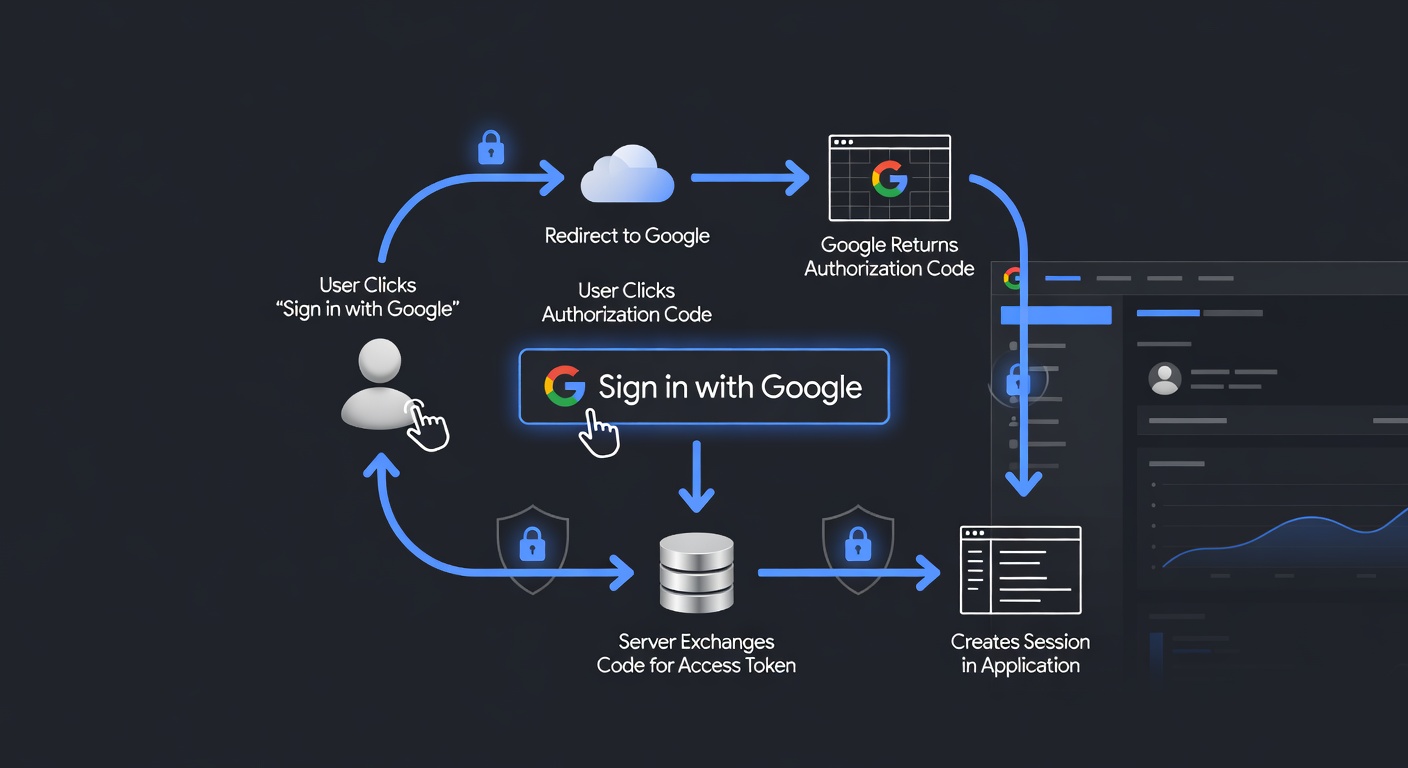
This guide walks you through implementing Google OAuth authentication in your SoliLang application.
Prerequisites
- A SoliLang project with session support
- A Google Cloud Platform project with OAuth credentials
Step 1: Set Up Google OAuth Credentials
- Go to the Google Cloud Console
- Navigate to APIs & Services > Credentials
- Click Create Credentials > OAuth client ID
- Configure the OAuth consent screen
- Create credentials with:
- Application type: Web application
- Authorized redirect URIs:
http://localhost:3000/auth/google/callback
Step 2: Store Environment Variables
GOOGLE_CLIENT_ID=your-client-id.apps.googleusercontent.com
GOOGLE_CLIENT_SECRET=your-client-secret
GOOGLE_REDIRECT_URI=http://localhost:3000/auth/google/callback
Step 3: Create the OAuth Routes
# app/controllers/auth_controller.sl

def google_login
  client_id = getenv("GOOGLE_CLIENT_ID")
  redirect_uri = getenv("GOOGLE_REDIRECT_URI")
  scope = "openid email profile"

  auth_url = "https://accounts.google.com/o/oauth2/v2/auth?" +
    "client_id=" + client_id +
    "&redirect_uri=" + redirect_uri +
    "&response_type=code" +
    "&scope=" + scope +
    "&access_type=offline"

  {
    "status": 302,
    "headers": {
      "Location": auth_url
    }
  }
end

def google_callback
  code = req["query_params"]["code"]

  if code == null
    return {"status": 400, "body": "Missing authorization code"}
  end

  # Exchange code for tokens
  token_response = google_exchange_code(code)

  if token_response["error"] != null
    return {"status": 401, "body": "Failed to exchange code: " + token_response["error_description"]}
  end

  access_token = token_response["access_token"]

  # Get user info from Google
  user_info = google_get_user_info(access_token)

  # Find or create user in database
  user = find_or_create_google_user(user_info)

  # Create session
  req["session"]["user_id"] = user["id"]

  {
    "status": 302,
    "headers": {
      "Location": "/dashboard"
    }
  }
end

def google_exchange_code(code)
  client_id = getenv("GOOGLE_CLIENT_ID")
  client_secret = getenv("GOOGLE_CLIENT_SECRET")
  redirect_uri = getenv("GOOGLE_REDIRECT_URI")

  params = {
    "code": code,
    "client_id": client_id,
    "client_secret": client_secret,
    "redirect_uri": redirect_uri,
    "grant_type": "authorization_code"
  }

  response = HTTP.post(
    "https://oauth2.googleapis.com/token",
    json_stringify(params),
    {
      "headers": { "Content-Type": "application/json" }
    }
  )

  json_parse(response["body"])
end

def google_get_user_info(access_token)
  response = HTTP.get(
    "https://www.googleapis.com/oauth2/v2/userinfo",
    {
      "headers": { "Authorization": "Bearer " + access_token }
    }
  )

  json_parse(response["body"])
end
Step 4: Create the User Model
# app/models/user.sl

class User < Model
  id: Int
  google_id: String
  email: String
  name: String
  avatar_url: String
  created_at: DateTime

  def find_or_create_google_user(google_data)
    let existing = User.find_by_google_id(google_data["id"])

    return existing if existing != nil

  User.create({
    "google_id": google_data["id"],
    "email": google_data["email"],
    "name": google_data["name"],
    "avatar_url": google_data["picture"]
  })
end
end
Step 5: Configure Routes
# config/routes.sl

get "/auth/google", "auth#google_login"
get "/auth/google/callback", "auth#google_callback"
Step 6: Add a Login Button
<!-- app/views/sessions/new.sl.html -->
<a href="/auth/google" class="btn btn-google">
  <img src="/images/google-icon.svg" alt="Google" />
  Sign in with Google
</a>
Security Considerations
- Verify the state parameter - Prevent CSRF attacks by generating and validating a state parameter
- Validate ID tokens - If using OpenID Connect, validate the ID token on your server
- Handle token errors - Gracefully handle expired or revoked tokens
- Secure sessions - Use secure, httpOnly cookies for sessions
Example with State Parameter
def generate_state()
  # 32 bytes of CSPRNG output, base64url-encoded — URL-safe, so it needs no
  # extra escaping when it goes into the query string below.
  Crypto.random_token(32)
end

def google_login
  state = generate_state()
  req["session"]["oauth_state"] = state

  auth_url = "https://accounts.google.com/o/oauth2/v2/auth?" +
    "client_id=" + getenv("GOOGLE_CLIENT_ID") +
    "&redirect_uri=" + getenv("GOOGLE_REDIRECT_URI") +
    "&response_type=code" +
    "&scope=openid email profile" +
    "&state=" + state

  {"status": 302, "headers": {"Location": auth_url}}
end

def google_callback
  received_state = req["query_params"]["state"]
  stored_state = req["session"]["oauth_state"]

  if received_state != stored_state
    return {"status": 400, "body": "Invalid state parameter"}
  end

  # Continue with authentication...
end
Conclusion
Google OAuth integration provides a secure way to authenticate users. This guide covered the essential steps, but you can extend it with:
- Refresh token handling for long-lived sessions
- Profile synchronization
- Multi-provider OAuth (GitHub, Facebook, etc.)
- Email verification requirements