A Native Window in 80 Lines of Soli
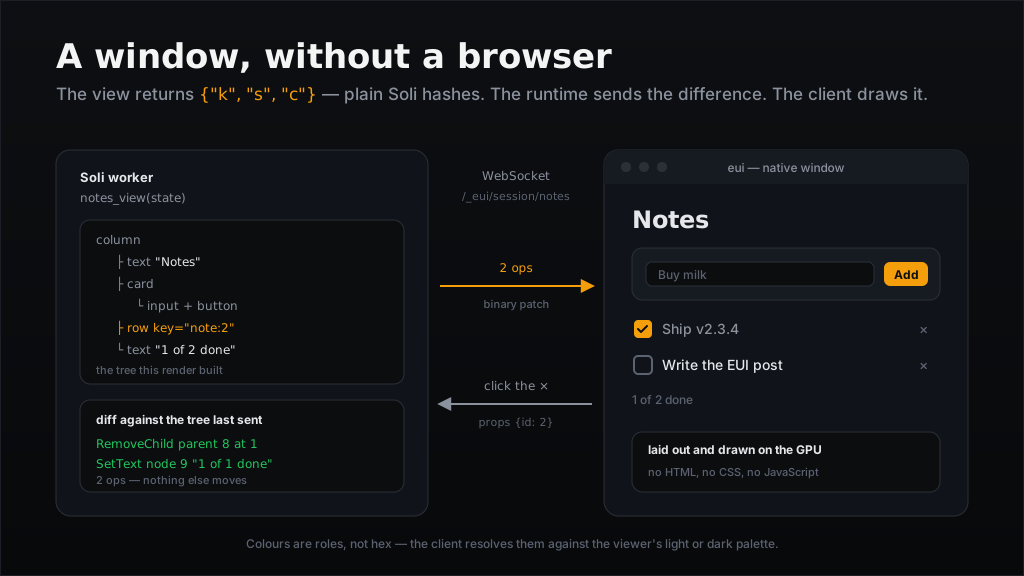
You already know how to write a Soli component: a handler that takes an event and gives back state, a view that turns state into markup. EUI keeps the first half exactly as it is and replaces the second. The view returns a tree of plain Soli hashes instead of a template, and what arrives on the other end is not a browser — it is a native window drawing on the GPU.
No HTML. No CSS. No JavaScript, no bundler, no node_modules. The server holds
the tree it last sent, diffs the new one against it, and puts the difference on a
WebSocket as binary patches. A counter costs a few megabytes of RAM and no CPU at
idle, because there is no document engine to keep running.
This post builds a notes app — type a note, tick it done, delete it — from
soli new to a window on your desktop. Every line of it was run before it was
written down; the screenshot further down is this app, rendered by the real
client.
The Shape
app/controllers/notes_controller.sl    # the handler and the view — all we write
app/controllers/eui_builders.sl        # ┐
app/controllers/eui_builders_forms.sl  # │ 343 widgets, in plain Soli
app/controllers/eui_builders_charts.sl # │
app/controllers/eui_builders_feed.sl   # ┘
config/routes.sl                       # one router_eui line
One file of ours. The other four are the catalogue, and they arrive with the app.
Step 1: Scaffold
soli new notes --eui
cd notes
--eui adds a working component (a counter) and the four catalogue files above.
Those 343 builders — column, row, card, checkbox, icon_button — are not
native and not a library. They are ordinary Soli functions that return hashes.
Open eui_builders.sl and read one:
def node(kind, style, children)
  {
    "k": kind,
    "s": style,
    "c": children
  }
end

def column(style, children)
  style["display"] = "column"
  node("box", style, children)
end
That is the whole abstraction. k is the kind, s the style, c the children.
Seventeen kinds exist — box, text, image, input, scroll, list,
canvas, video, scene and the rest — and everything else is composition.
Leave the catalogue alone at first. It is vendored from upstream and written the way upstream writes it: style tables one row to a line, which is not what
soli fmtwould produce. The formatter will offer to rewrite three thousand lines you did not write, and a reformatted copy is a three-thousand line diff against every fix that lands upstream.One consequence to know before it surprises you:
soli lint .on a freshly scaffolded app reports 138 issues in 4 files, every one of them in the vendored catalogue. Lint the file you wrote —soli lint app/controllers/notes_controller.sl— not the directory.
Step 2: The handler
An EUI handler has the signature you already use. It takes event_data —
event, params, and the state this instance last returned — and gives back
the next state. It holds no connection and knows nothing about sockets.
# app/controllers/notes_controller.sl

def notes(event_data)
  event  = event_data["event"]
  params = event_data["params"] ?? {}
  state  = event_data["state"]

  items   = state["items"] ?? []
  draft   = state["draft"].to_s
  next_id = state["next_id"] ?? 1

  return next_state(items, params["payload"].to_s, next_id) if event == "draft"
  return added(items, draft, next_id) if event == "add"
  return next_state(toggled(items, props_id(params)), draft, next_id) if event == "toggle"
  return next_state(removed(items, props_id(params)), draft, next_id) if event == "remove"

  # `connect` and `viewport` arrive here too. Anything unnamed keeps the
  # state as it was, which is what this last line does.
  next_state(items, draft, next_id)
end
That last line matters. The runtime posts synthetic events your view never asked
for: connect when the socket opens, viewport when the window is resized or
the viewer switches to dark mode. A handler that falls through to null throws
its state away the moment someone drags a window edge.
The rest is ordinary Soli, and it is worth keeping the state transitions out of the dispatch so each one reads on its own:
def next_state(items, draft, next_id)
  {"items": items, "draft": draft, "next_id": next_id}
end

def props_id(params)
  params["props"]["id"]
end

def added(items, draft, next_id)
  return next_state(items, "", next_id) if draft.blank?
  note = {"id": next_id, "title": draft, "done": false}
  next_state(items + [note], "", next_id + 1)
end

def toggled(items, id)
  items.map(fn(n) n["id"] == id ? n.merge({"done": !n["done"]}) : n)
end

def removed(items, id)
  items.filter(fn(n) n["id"] != id)
end
Step 3: The view
The view is a pure function of state. It calls builders, it returns a hash, and it never touches the wire:
def notes_view(state)
  items = state["items"] ?? []
  draft = state["draft"].to_s
  done  = items.filter(fn(n) n["done"]).length()

  column(
    {"pad": 6, "gap": 4, "bg": "surface.base", "height": "100%"},
    [
      h1("Notes"),
      card({"gap": 3}, [row(
        {"gap": 2, "align": "center"},
        [
          input(draft, "draft", {
            "style": {"grow": 1},
            "props": {"label": "New note"},
            "on": {"submit": "add"}
          }),
          button("Add", "add")
        ]
      )]),
      column({"gap": 2}, items.map(fn(n) { note_row(n) })),
      muted(str(done) + " of " + str(items.length()) + " done")
    ]
  )
end
Three things in there are worth stopping on.
"bg": "surface.base" is a role, not a colour. There are 33 of them —
surface.base, surface.raised, surface.sunken, text.default, text.muted,
accent.base and so on — and the client resolves each against the viewer's
light or dark palette. The server never sends #1a1d23, which is why this app
is correct in both modes without a line of code about modes. Get a role name
wrong and the session ends with EUI: unknown colour role 'surface.bass'; the
same is true of style keys. Typos are loud here, on purpose.
"add" is an event name, not a function. button(label, event) puts the
second argument in the node's on.click; the client sends it back when someone
clicks, and it arrives as event_data["event"] for the handler to match. There
is no def add anywhere, and nothing resolves the string to one. The same is
true of "draft", "toggle" and "remove" — four strings, matched in the
dispatch above. (added, toggled and removed are just helpers I named; the
resemblance is mine, not a convention.)
The input carries a submit handler as well as a change one. Press Enter
and the client sends change — banking what you typed — and then submit,
which the server posts to the handler right after it, so add sees the draft
the keystroke just saved. Without the submit line the event is validated
against the node, found to have no handler, and silently dropped: the field
would work with the button and do nothing on Enter. Clicking Add takes the other
path to the same place, because moving focus off an editable node commits it
first.
Rows carry the item's id in props:
def note_row(n)
  keyed(
    "note:" + n["id"].to_s,
    row(
      {
        "gap": 2,
        "align": "center",
        "animation": ["enter", "exit"],
        "motion": "leading",
        "transition": "fast"
      },
      [
        checkbox(n["title"], n["done"], "toggle", {"id": n["id"]}),
        icon_button("×", "remove", {"id": n["id"]}, {
          "key": "rm:" + n["id"].to_s,
          "icon": "close",
          "name": "Remove " + n["title"]
        })
      ]
    )
  )
end
Both controls send the same event name for every row — "toggle", "remove" —
and the fourth argument is props, which comes back to the handler as
params["props"]["id"]. That is the whole row-identity story: no closures over
the row, no generated event names, no parsing an id out of a string.
Note also what the icon_button is told: "name": "Remove " + n["title"]. A
screen reader announces "Remove Buy milk", not "×".
Step 4: Run it
One line registers the component:
# config/routes.sl
router_eui("notes", "notes#notes", "notes#notes_view")
Start the server the way you always do:
soli serve . --dev
Then open the component in a window. The client is a separate binary called
eui, from the EUI project — a stock soli install gives you the server half,
not a GPU renderer:
EUI_ALLOW_INSECURE_LOOPBACK=1 eui ws://127.0.0.1:5011/_eui/session/notes
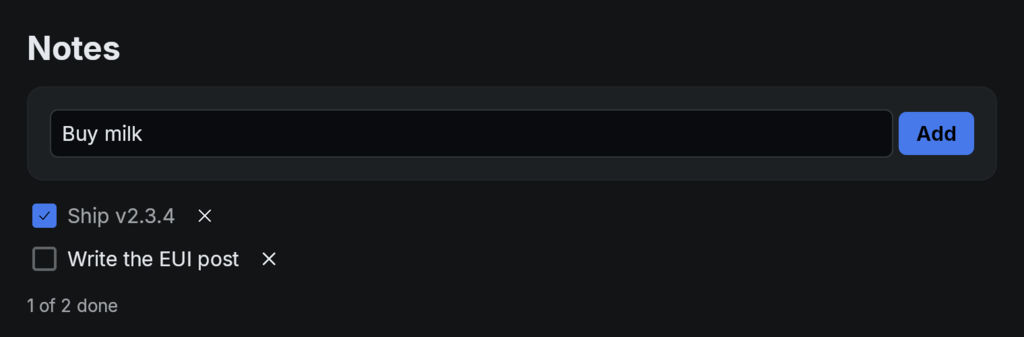
Type a note and press Enter: the field clears and the row slides in from the leading edge. Tick it and the label goes muted. Click the × and it slides out.
Two things will stop you here.
EUI_ALLOW_INSECURE_LOOPBACK=1is required for plainws://; anywhere but loopback the client demandswssand pins the manifest's publisher key. Andsoli eui <url>, which opens a window from thesolibinary itself, needs a build with--features eui-desktop— that is not in the default feature set. Use the standaloneeuibinary.
Here is the round trip, end to end:
sequenceDiagram
  participant Window as eui client
  participant Soli as Soli worker
  Window->>Soli: Hello (protocol version)
  Soli-->>Window: Welcome (min(theirs, ours))
  Soli-->>Window: full tree, as binary ops
  Window->>Soli: click the × on node 7, props {id: 2}
  Soli->>Soli: notes(event) -> state; notes_view(state) -> tree
  Soli->>Soli: diff against the tree it last sent
  Soli-->>Window: RemoveChild, SetText — 2 ops
Nothing is re-sent. Deleting a note is two ops: drop the row, rewrite the counter. Ticking one is five, because the tick icon is grafted in and two styles change with it. The first row you add costs about two dozen, and the second costs six — the difference is the atom, style and colour tables, which a session interns once and then refers to by number.
Step 5: Motion
Look again at the row's style:
"animation": ["enter", "exit"],
"motion": "leading",
"transition": "fast"
Three keys, three different jobs, and they are easy to confuse:
animationis a bit set of when to animate:none,spin,enter,exit. One is written on its own; two are written as a list.motionis a single value naming the direction:fade,leading,trailing,top,bottom,scale,paired.transitionis the duration:none,fast,base,slow.
A new note slides in from the leading edge and a deleted one slides out the same way, in about a tenth of a second, for three lines of style and no animation code at all.
The protocol refuses a direction with no entrance or exit — a record whose
motion is not fade and which sets neither enter nor exit is rejected
outright. It is a meaningless combination, so it is not a permitted one.
Step 6: One interaction with no round trip
Every event so far is a round trip: click, socket, handler, view, diff, patch. On a LAN that is invisible. For a hover state it is still silly.
A handler can instead carry a small program the client runs itself. The
scaffolded counter next door is the clearest place to see it — its number is
keyed("value", ...), and a local handler reaches a node by that key:
# app/controllers/eui_controller.sl
plus = button("+", "increment")
plus["on"]["click"] = {"local": "state.count += 1; value.text = str(state.count)", "then": "increment"}
local is a tiny statement language — assign to local state, set a node's text
or style, call back(), emit(...) — compiled to bytecode and run in the
client. then names the server event to send afterwards, so the number moves on
the same frame as the click and the server still hears about it. The catalogue
wraps exactly this as local_button(label, program, after).
The catalogue already does this for you in more places than you would guess. The
input in this app arrived with hover and focus styles wired as local handlers —
that is why the field lights up under the pointer without a single server event.
Going further
The notes app is done. Here is the rest of what is in the box.
Everything up to this point was run on the way to writing it — scaffolded, served, and opened in the client that produced the screenshot above. The snippets below are read from the current release's source rather than exercised end to end, because a shader and a capability prompt need more than a loopback socket. Treat them as accurate, not as rehearsed.
Pictures that were never files. An image src normally names a path under
public/ or app/assets/. An attachment in SoliDB or S3 has no path and should
not be given one, so eui_asset takes the bytes directly:
blob = read_upload(user, "avatar", user["avatar_id"])
img  = image(eui_asset(blob["data"]), 64, 64)
read_upload answers {filename, content_type, size, data} with data in
base64, which is exactly what eui_asset accepts. It answers
{"asset": "<64 hex>"}, and an image, audio or video src takes that in
place of a path. Call it on every render. The store is a 256 MiB LRU and
eviction is silent: a hash you remembered from an earlier render can name bytes
that are gone, and all you get is a hole where the picture was.
Files coming the other way. A file_pick opens the platform dialog; the
bytes arrive later as a file_upload event carrying name, content_type,
size and a path under the session's spool directory. That spool is deleted
when the socket closes — a view that wants to keep a file must copy it somewhere
first.
Capabilities. Ten of them: camera, microphone, clipboard.read,
clipboard.write, notifications, location, fs.pick, fs.save, nfc,
scene. An app asks in its routes:
# config/routes.sl
eui_capabilities("fs.pick", "clipboard.write")
Asking grants nothing. The person on the other end allows each one —
eui <url> --allow fs.pick — and a file dialog silently does nothing if you
wired the handler but never asked, or asked but were never allowed.
3D, if you want it. A scene node names a shader and a mesh, both travelling
the same verified asset path as an image, and at most eight numbers of your own:
{"k": "scene", "p": {"shader": {"asset": shader_hash}, "uniforms": [0.5, 2.0], "playing": true}}
The other twenty-four floats in the uniform block belong to the client, which is
why a server can never send a camera and therefore never send a broken one.
Asking for the scene capability raises the app's protocol_min to 2, so a
client too old to decode the node is turned away at the handshake with a reason,
instead of failing halfway through a batch it cannot read.
What the last render cost. In --dev, eui_stats() returns the view and
encode time in milliseconds, the ops and bytes that went on the wire, the node
count, and the four tables a session interns once. Outside --dev it returns
{}, so you can compose a dev bar into your view unconditionally and ship it:
dev_bar(eui_stats())
What is not measured draws nothing.
What to read next
The reference lives under /docs/eui/overview —
styling for the roles and every style key,
events for the full event list,
assets for the content-addressed store, and four pages of
widgets. The catalogue in your own
app/controllers/ is ahead of those pages, so when the two disagree, the file on
your disk is the one telling the truth.
Eighty lines, no build step, and a window that draws itself.